Don't miss your chance to take the Fabric Data Engineer (DP-600) exam for FREE! Find out how by attending the DP-600 session on April 23rd (pacific time), live or on-demand.
Learn moreNext up in the FabCon + SQLCon recap series: The roadmap for Microsoft SQL and Maximizing Developer experiences in Fabric. All sessions are available on-demand after the live show. Register now
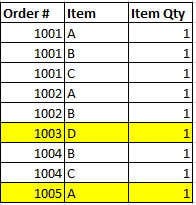
I'm looking to create a measure that counts the number of single line orders in a table. For example, this table would yeild a result of 2 (or list the two order numbers out) since there were only two unique order #'s that only had a single item on the order.
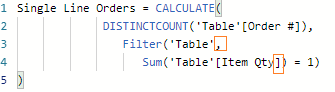
I had written this but it clearly isn't working...
Single Line Orders = CALCULATE(
DISTINCTCOUNT(Order #),
Filter('Table'),
Sum('Table'[Item Qty) = 1)
)
Hi awitt,
For your DAX function, there are two expression errors like picture below, while it can't return the correct result after correct the DAX.
To work the issue, you can follow steps below.
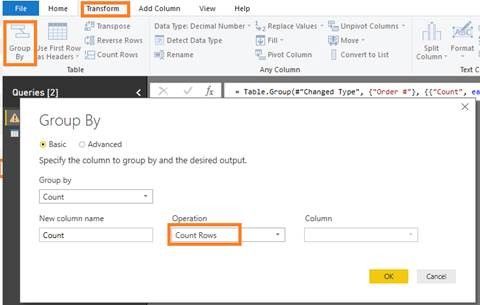
Firstly, you can create intermediate table Count_Table to count distinct Order.
Then, create measure named Single Line Orders to count the unique order.
Single Line Orders = CALCULATE(COUNT('Table'[Order #]),Count_Table[Count]=1)
Finally, return the result showing picture below.
Here is my test pbix file link: https://qiuyunus-my.sharepoint.com/:u:/g/personal/pbipro_qiuyunus_onmicrosoft_com/EUhaNajioVZGnIwAN2...
Best Regards,
Amy
If this post helps, then please consider Accept it as the solution to help the other members find it more quickly.
try following Measure
Measure =
COUNTROWS (
FILTER (
ALL ( TableName[Order#] ),
CALCULATE ( COUNT ( TableName[Order#] ) ) = 1
)
)
If you have recently started exploring Fabric, we'd love to hear how it's going. Your feedback can help with product improvements.
A new Power BI DataViz World Championship is coming this June! Don't miss out on submitting your entry.
Share feedback directly with Fabric product managers, participate in targeted research studies and influence the Fabric roadmap.
| User | Count |
|---|---|
| 48 | |
| 45 | |
| 41 | |
| 20 | |
| 17 |
| User | Count |
|---|---|
| 69 | |
| 63 | |
| 32 | |
| 31 | |
| 25 |