cancel
Showing results for 
Search instead for 
Did you mean: 

The Power BI Data Visualization World Championships is back! Get ahead of the game and start preparing now! Learn more

Reply
Anonymous
Not applicable

Filter Table By Score

Hi I am trying to filter a table by a score (measure)

Say select a student B and his score is 60 I would like the table to bring back all of the students that have the same score;


Any help will be great.


Thanks


1 ACCEPTED SOLUTION
Anonymous
Not applicable

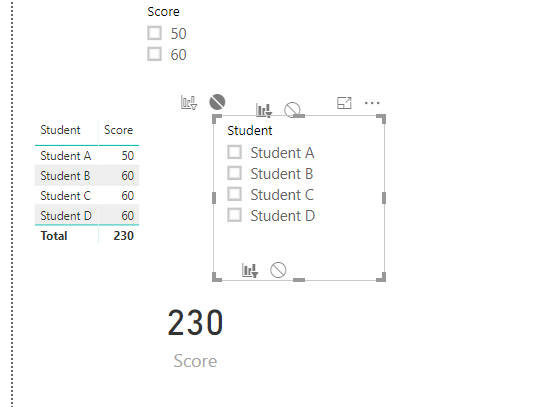
@Anonymous  This could be a possible workaround:


Score.PNG

Create the above visuals and edit interaction of Student Fi;ter and Table. 


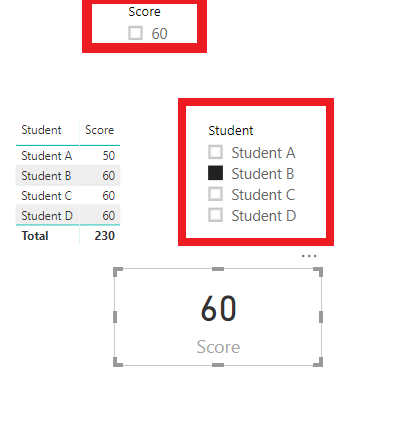
- Now when you select a student, the mark is going to be highlighted in the card, but the table values would not change as you have editted interaction. ( At the same time your score filter would change)

Step 1.PNG

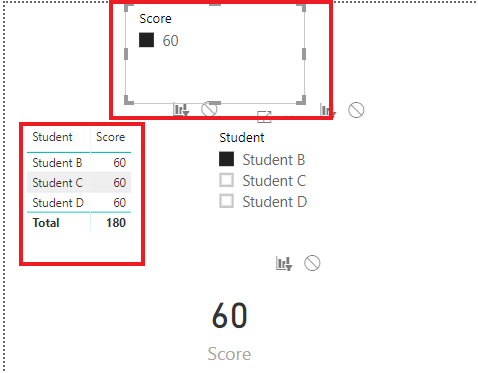
- Now select 60 in the slicer and then the table would give you a list of students in that score.


Step 2.png


* *Just a workaround, and they would all make better sense if the visuals are arranged accordingly with proper headers (Say select a student of your choice and then a score)

View solution in original post

4 REPLIES 4
Anonymous
Not applicable

Hey @Anonymous 


could you show how score is calculated?


Anonymous
Not applicable

Student Score

Student A50
Student B60
Student C60
Student D60


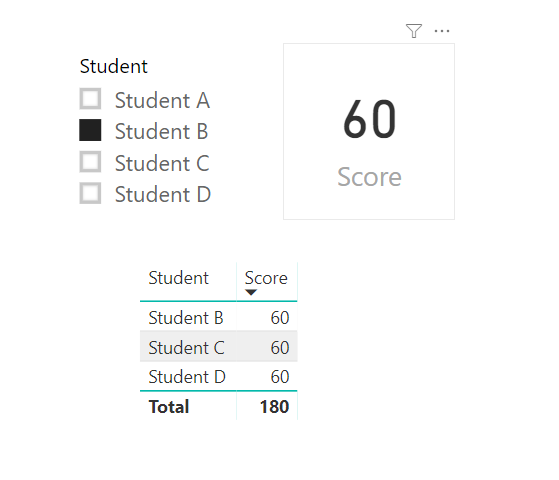
And the end result would be like below;


image.png

Anonymous
Not applicable

@Anonymous  This could be a possible workaround:


Score.PNG

Create the above visuals and edit interaction of Student Fi;ter and Table. 


- Now when you select a student, the mark is going to be highlighted in the card, but the table values would not change as you have editted interaction. ( At the same time your score filter would change)

Step 1.PNG

- Now select 60 in the slicer and then the table would give you a list of students in that score.


Step 2.png


* *Just a workaround, and they would all make better sense if the visuals are arranged accordingly with proper headers (Say select a student of your choice and then a score)

Anonymous
Not applicable

Hi @Anonymous 


Yep this is kinda the first route that i went down, but really they want it in one click ( you know what users are like).


But i am unsure if there is a solution as you are unable to have a measure directly in the visual.


Thanks

Helpful resources

Announcements
Power BI DataViz World Championships

Power BI Dataviz World Championships

The Power BI Data Visualization World Championships is back! Get ahead of the game and start preparing now!

December 2025 Power BI Update Carousel

Power BI Monthly Update - December 2025

Check out the December 2025 Power BI Holiday Recap!

FabCon Atlanta 2026 carousel

FabCon Atlanta 2026

Join us at FabCon Atlanta, March 16-20, for the ultimate Fabric, Power BI, AI and SQL community-led event. Save $200 with code FABCOMM.