Join us at FabCon Atlanta from March 16 - 20, 2026, for the ultimate Fabric, Power BI, AI and SQL community-led event. Save $200 with code FABCOMM.
Register now!Vote for your favorite vizzies from the Power BI Dataviz World Championship submissions. Vote now!
I have an Excel sales table. It has customer gender as a separate column. Revenue is recorded in another separate column. I created two separate measures to calculate how many male and female customers there are. I now want to use these measures and see how much revenue was generated by a particular gender. It somehow doesn't work as Revenue always comes up as a summarized value of the whole column even though I map it with a particular gender measure.
Solved! Go to Solution.
@AJ007,
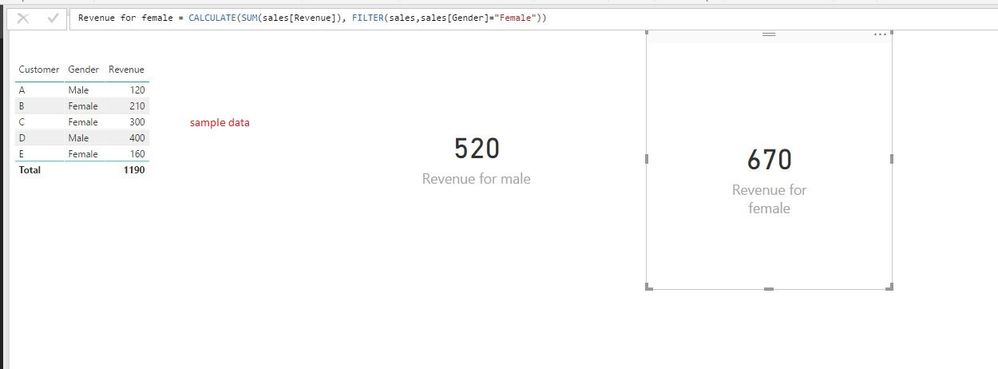
I create the following measures based on the sample data.
Revenue for male = CALCULATE(SUM(sales[Revenue]), FILTER(sales,sales[Gender]="Male"))
Revenue for female = CALCULATE(SUM(sales[Revenue]), FILTER(sales,sales[Gender]="Female"))
If the above DAX don't help, please share dummy data of your table for us to analyze.
Regards,
Lydia
@AJ007,
I create the following measures based on the sample data.
Revenue for male = CALCULATE(SUM(sales[Revenue]), FILTER(sales,sales[Gender]="Male"))
Revenue for female = CALCULATE(SUM(sales[Revenue]), FILTER(sales,sales[Gender]="Female"))
If the above DAX don't help, please share dummy data of your table for us to analyze.
Regards,
Lydia
Thanks Lydia !
Vote for your favorite vizzies from the Power BI World Championship submissions!
If you love stickers, then you will definitely want to check out our Community Sticker Challenge!
Check out the January 2026 Power BI update to learn about new features.
| User | Count |
|---|---|
| 64 | |
| 53 | |
| 42 | |
| 20 | |
| 17 |
| User | Count |
|---|---|
| 121 | |
| 103 | |
| 47 | |
| 30 | |
| 24 |