cancel
Showing results for 
Search instead for 
Did you mean: 

Try your skills in the Power BI Dataviz World Championship! Round one ends June 26. Join now

Reply
Anonymous
Not applicable

Filter Start Time

Hello,


Need some help with my new project. I'm still learning on how to code, and i got stucked on the following.

Below is my table.


Time StampHour# of Cases
11/11/19 7:04 AM71
11/11/19 6:44 AM61
11/11/19 6:51 AM61
11/11/19 8:01 AM81
11/11/19 7:07 AM71
11/11/19 8:56 AM81
11/11/19 9:14 AM91
11/11/19 8:04 AM81
11/11/19 8:14 AM81
11/11/19 9:47 PM211
11/11/19 11:22 PM231
11/11/19 11:58 PM231
11/12/19 12:43 AM01
11/12/19 2:03 AM21
11/12/19 2:42 AM21
11/12/19 2:43 AM21
11/12/19 2:49 AM21
11/12/19 3:41 AM31
11/12/19 3:43 AM31
11/12/19 4:39 AM41
11/12/19 4:26 AM41
11/12/19 5:38 AM51
11/12/19 5:40 AM51
11/12/19 4:56 AM41


Basically im making a graph that show how many cases each hour.

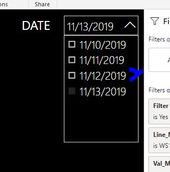
But i want to put a Filter that drop down a Date. (I want the user to just pick the date they want to see)


But the twist is. Example if the drop down i choose is 11/12/19, i want it to show the hours from 11/11/19 Hour 21 up to hour 20 of 11/12.


Basically hour start time is from 10PM up to 9:59PM(next day). hope it makes sense. Thank you!


312312312.JPG


1 ACCEPTED SOLUTION
Anonymous
Not applicable

Hi @pamboys09 ,


Please check following steps as below:

1. Create calculated table as slicer:

Table 2 = CALENDARAUTO()

2. Create measure:

Measure =

VAR td =

    FORMAT ( SELECTEDVALUE ( 'Table 2'[Date] ), "YYYYMMDD" ) & 20

VAR pd =

    FORMAT ( PREVIOUSDAY ( 'Table 2'[Date] ), "YYYYMMDD" ) & 21

RETURN

    CALCULATE (

        SUM ( 'Table'[# of Cases] ),

        FILTER (

            'Table',

            FORMAT ( 'Table'[Time Stamp], "YYYYMMDDHH" ) >= pd

                && FORMAT ( 'Table'[Time Stamp], "YYYYMMDDHH" ) <= td

        )

    )

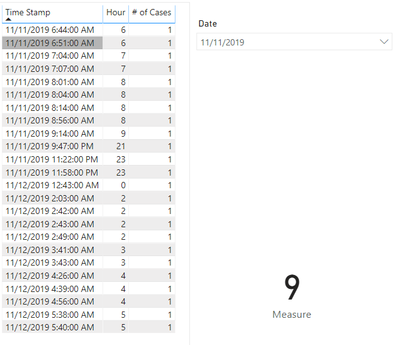
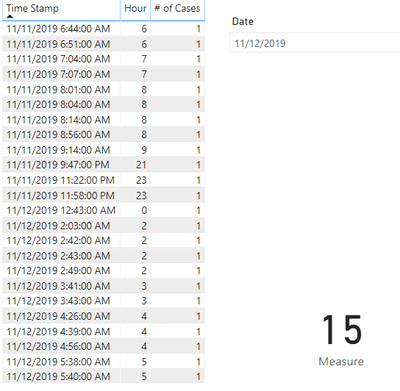
3. Result would be shown as below:

1.PNG

2.PNG

BTW, Pbix as attached, hopefully works for you.


Best Regards,

Jay


Community Support Team _ Jay Wang

If this post helps, then please consider Accept it as the solution to help the other members find it more quickly.

View solution in original post

2 REPLIES 2
Anonymous
Not applicable

Hi @pamboys09 ,


Please check following steps as below:

1. Create calculated table as slicer:

Table 2 = CALENDARAUTO()

2. Create measure:

Measure =

VAR td =

    FORMAT ( SELECTEDVALUE ( 'Table 2'[Date] ), "YYYYMMDD" ) & 20

VAR pd =

    FORMAT ( PREVIOUSDAY ( 'Table 2'[Date] ), "YYYYMMDD" ) & 21

RETURN

    CALCULATE (

        SUM ( 'Table'[# of Cases] ),

        FILTER (

            'Table',

            FORMAT ( 'Table'[Time Stamp], "YYYYMMDDHH" ) >= pd

                && FORMAT ( 'Table'[Time Stamp], "YYYYMMDDHH" ) <= td

        )

    )

3. Result would be shown as below:

1.PNG

2.PNG

BTW, Pbix as attached, hopefully works for you.


Best Regards,

Jay


Community Support Team _ Jay Wang

If this post helps, then please consider Accept it as the solution to help the other members find it more quickly.

Anonymous
Not applicable

Woah, thank you very much this is the one I'm looking for. thanks again!

Helpful resources

Announcements
Fabric Data Days is here Carousel

Fabric Data Days 2026

Don't miss out on Data Days, June 15 through August 7. Learn Fabric, Power BI, SQL, AI and more.

May Power BI Update Carousel

Power BI Monthly Update - May 2026

Check out the May 2026 Power BI update to learn about new features.

Power BI DataViz World Championships carousel

Power BI DataViz World Championships - June 2026

A new Power BI DataViz World Championship is coming this June! Don't miss out on submitting your entry.