This time we’re going bigger than ever. Fabric, Power BI, SQL, AI and more. We're covering it all. You won't want to miss it.
Learn moreDid you hear? There's a new SQL AI Developer certification (DP-800). Start preparing now and be one of the first to get certified. Register now
I suspect the answer is 'its not possible' to this question, but I am hoping there is a trick I'm missing
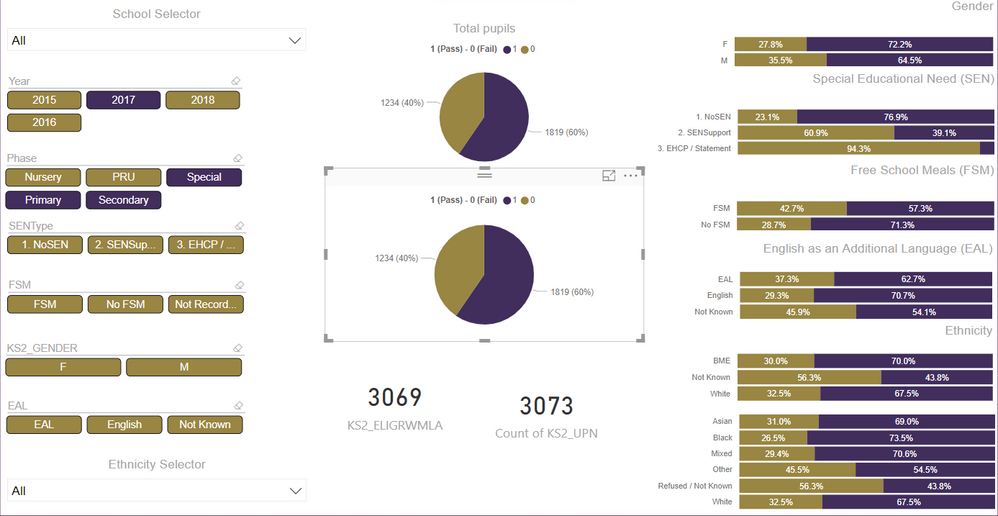
I have a data set where each row represents an individual - the first group of columns are characteristics about that individual, there is then a group of columns with different measures in.
I have set a report up which shows the measures split by the characteristics of the inidividual.
In the example shown for instance the charts use KS2_ELIGRWM as the value and KS2_RWMEXP as the legend / detail - the various characteristic columns are used for the axis.
The only way I can see to create the same set of charts for the other 2 measures shown (KS2_ELIGREADLA and KS2_ELIGMATLA) would be to duplicate the pages and change the measures manually - however, ideally I would like to be able to put a selector in so that they can be selected on the same page - is there a way of doing this?
Solved! Go to Solution.
You may select Unpivot Columns in the Query Editor first.
Fantastic - worked a treat - thank you!
Check out the April 2026 Power BI update to learn about new features.
Sign up to receive a private message when registration opens and key events begin.
If you have recently started exploring Fabric, we'd love to hear how it's going. Your feedback can help with product improvements.
| User | Count |
|---|---|
| 34 | |
| 31 | |
| 25 | |
| 20 | |
| 16 |
| User | Count |
|---|---|
| 61 | |
| 49 | |
| 28 | |
| 23 | |
| 23 |