cancel
Showing results for 
Search instead for 
Did you mean: 

The Power BI Data Visualization World Championships is back! It's time to submit your entry. Live now!

Reply
cham
Post Patron
Post Patron

Filter Names

Hi,

I want to filter specific names in my filter. How I can do that?


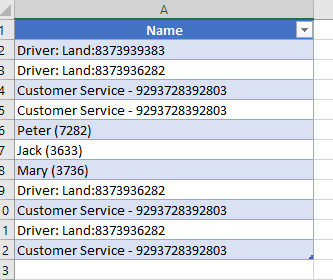
I am having following data set. In my slicer I want to show only names that mentioned in that column (Ex:Peter, Jack, Mary) Only those data I want to show in my slicer. I dont want to show other data. How I can do that?

caller id.PNG

1 ACCEPTED SOLUTION
MariaP
Solution Supplier
Solution Supplier

Hi @cham ,


It's best to supply sample of your data so community can better help. It depends on how consistant the content of the rows you want to exclude  is.

You can try the same as idea as mentioned but this time use the excluding option for the fields you do not want if you know they will always be the same. It is not an exact match so Driver or Customer is enough to exclude :

#"Filtered Rows" = Table.SelectRows(#"Changed Type", each not Text.Contains([Column1], "Driver:Land") and not Text.Contains([Column1], "Customer Service"))

 DriverLandFilter.PNG


Another option may be to create a new table with only the names as a reference table.


Maria

View solution in original post

4 REPLIES 4
MariaP
Solution Supplier
Solution Supplier

HI @cham ,


If your names are alway the same format Peter(3726) etc... 

Use Edit Queries and copy the Name column and create a new table called NameFilter and keep only names by using the query editor function "Filter Rows" and then add contains "("


#"Filtered Rows" = Table.SelectRows(#"Changed Type", each Text.Contains([Column1], "("))


You can then use that table as your filter and create a relationship to your original Name table.


It all depends on your data structure though and what you are trying to achieve overall.


Maria

Hi Maria,


No it contains other numbers with "(". Like below,


Drivers - Land: (8043489384)


Is theer any other way to capture that details?


Thanks,

cham

MariaP
Solution Supplier
Solution Supplier

Hi @cham ,


It's best to supply sample of your data so community can better help. It depends on how consistant the content of the rows you want to exclude  is.

You can try the same as idea as mentioned but this time use the excluding option for the fields you do not want if you know they will always be the same. It is not an exact match so Driver or Customer is enough to exclude :

#"Filtered Rows" = Table.SelectRows(#"Changed Type", each not Text.Contains([Column1], "Driver:Land") and not Text.Contains([Column1], "Customer Service"))

 DriverLandFilter.PNG


Another option may be to create a new table with only the names as a reference table.


Maria

This would work. Thank you so much.

Helpful resources

Announcements
December 2025 Power BI Update Carousel

Power BI Monthly Update - December 2025

Check out the December 2025 Power BI Holiday Recap!

FabCon Atlanta 2026 carousel

FabCon Atlanta 2026

Join us at FabCon Atlanta, March 16-20, for the ultimate Fabric, Power BI, AI and SQL community-led event. Save $200 with code FABCOMM.