Join us at FabCon Atlanta from March 16 - 20, 2026, for the ultimate Fabric, Power BI, AI and SQL community-led event. Save $200 with code FABCOMM.
Register now!The Power BI Data Visualization World Championships is back! Get ahead of the game and start preparing now! Learn more
So I have a table of survey responses and I am trying to create a calulated column for the whole table based on the survey response to a specific question by the related Employee. Example of the table below:
Employee ID Question ID Question Response
1 1 Yes
2 1 No
1 4 a.albert
2 4 h.hughes
1 7 Strongly Agree
2 7 Disagree
I want the new calculated column to show the question response to Question ID =4 (Who was your recruiter?) for the Related Employee ID. So the it would look like this
Employee ID Question ID Question Response Recruiter
1 1 Yes a.albert
2 1 No h.hughes
1 4 a.albert a.albert
2 4 h.hughes h.hughes
1 7 Strongly Agree a.albert
2 7 Disagree h.hughes
I assume I would need to use the Filter Function to Filter(Survey Responses, EALIER(empoyee ID) = employee ID && Question ID = Value(4)). However, everything I have tried to this point has not worked.
Solved! Go to Solution.
Hi @benjaminlperry ,
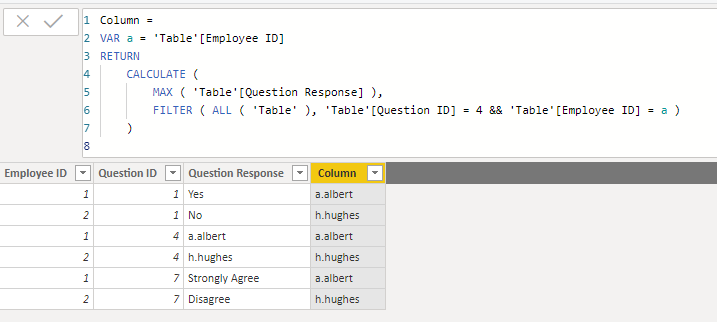
We can create a calculated column as below.
Column =
VAR a = 'Table'[Employee ID]
RETURN
CALCULATE (
MAX ( 'Table'[Question Response] ),
FILTER ( ALL ( 'Table' ), 'Table'[Question ID] = 4 && 'Table'[Employee ID] = a )
)
Hi @benjaminlperry ,
We can create a calculated column as below.
Column =
VAR a = 'Table'[Employee ID]
RETURN
CALCULATE (
MAX ( 'Table'[Question Response] ),
FILTER ( ALL ( 'Table' ), 'Table'[Question ID] = 4 && 'Table'[Employee ID] = a )
)
So this is more of a data modeling approach, but I would suggest adding this info to the Employees table instead of this survey table if you have to add it as a calculated column.
The better option would likely to be to create this as a measure. You can read more about calculated columns vs measures for beginners here. If you can assume that every Employee would only have one response to this question, you can use this measure:
Recruited_By = CALCULATE(SELECTEDVALUE(SurveyAnswers[Question Response]), FILTER(ALL(SurveyAnswers), [EmployeeID]=SELECTEDVALUE([Employee ID]) && [Question ID] = 4)
And then in any context where you only have one EmployeeID available, this measure will give you the appropriate recruiter.
If you absolutely have to have this as a calculated column, remove the first SELECTEDVALUE, and replace the second SELECTEDVALUE with EARLIER.
The Power BI Data Visualization World Championships is back! Get ahead of the game and start preparing now!
| User | Count |
|---|---|
| 39 | |
| 37 | |
| 33 | |
| 32 | |
| 29 |
| User | Count |
|---|---|
| 132 | |
| 86 | |
| 85 | |
| 68 | |
| 64 |