This is best Fabric, Power BI, SQL and AI community event. How do we know? The last event sold out! Save €200 with code FABCMTY200.
Register nowA new Data Days event is coming soon! This time we’re going bigger than ever. Fabric, Power BI, SQL, AI and more. Don't miss out.
So I have a table of survey responses and I am trying to create a calulated column for the whole table based on the survey response to a specific question by the related Employee. Example of the table below:
Employee ID Question ID Question Response
1 1 Yes
2 1 No
1 4 a.albert
2 4 h.hughes
1 7 Strongly Agree
2 7 Disagree
I want the new calculated column to show the question response to Question ID =4 (Who was your recruiter?) for the Related Employee ID. So the it would look like this
Employee ID Question ID Question Response Recruiter
1 1 Yes a.albert
2 1 No h.hughes
1 4 a.albert a.albert
2 4 h.hughes h.hughes
1 7 Strongly Agree a.albert
2 7 Disagree h.hughes
I assume I would need to use the Filter Function to Filter(Survey Responses, EALIER(empoyee ID) = employee ID && Question ID = Value(4)). However, everything I have tried to this point has not worked.
Solved! Go to Solution.
Hi @benjaminlperry ,
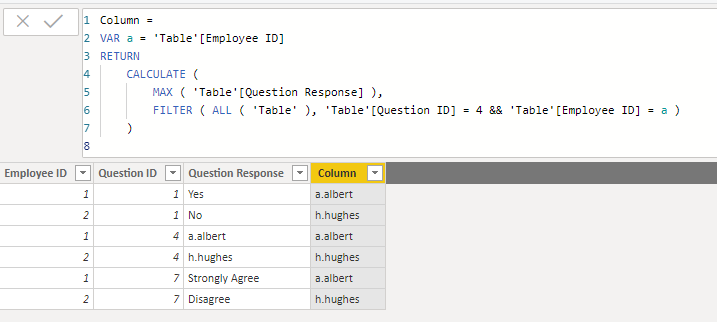
We can create a calculated column as below.
Column =
VAR a = 'Table'[Employee ID]
RETURN
CALCULATE (
MAX ( 'Table'[Question Response] ),
FILTER ( ALL ( 'Table' ), 'Table'[Question ID] = 4 && 'Table'[Employee ID] = a )
)
Hi @benjaminlperry ,
We can create a calculated column as below.
Column =
VAR a = 'Table'[Employee ID]
RETURN
CALCULATE (
MAX ( 'Table'[Question Response] ),
FILTER ( ALL ( 'Table' ), 'Table'[Question ID] = 4 && 'Table'[Employee ID] = a )
)
So this is more of a data modeling approach, but I would suggest adding this info to the Employees table instead of this survey table if you have to add it as a calculated column.
The better option would likely to be to create this as a measure. You can read more about calculated columns vs measures for beginners here. If you can assume that every Employee would only have one response to this question, you can use this measure:
Recruited_By = CALCULATE(SELECTEDVALUE(SurveyAnswers[Question Response]), FILTER(ALL(SurveyAnswers), [EmployeeID]=SELECTEDVALUE([Employee ID]) && [Question ID] = 4)
And then in any context where you only have one EmployeeID available, this measure will give you the appropriate recruiter.
If you absolutely have to have this as a calculated column, remove the first SELECTEDVALUE, and replace the second SELECTEDVALUE with EARLIER.
Check out the May 2026 Power BI update to learn about new features.
Sign up to receive a private message when registration opens and key events begin.
If you have recently started exploring Fabric, we'd love to hear how it's going. Your feedback can help with product improvements.
| User | Count |
|---|---|
| 28 | |
| 25 | |
| 25 | |
| 22 | |
| 13 |
| User | Count |
|---|---|
| 60 | |
| 50 | |
| 26 | |
| 20 | |
| 19 |