Join us at FabCon Atlanta from March 16 - 20, 2026, for the ultimate Fabric, Power BI, AI and SQL community-led event. Save $200 with code FABCOMM.
Register now!The Power BI Data Visualization World Championships is back! It's time to submit your entry. Live now!
Hi all,
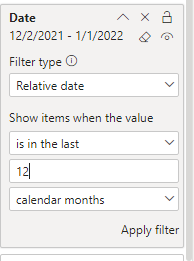
I would like to convert filter option from filter pane to buttons in my dashboard. Basically, one button relatively filters for "Last month" and one button filters for "Last 12 months". I would like to have the options to filter for all pages or this page.
Any advice will be really appreicated.
Thank you in advance
Solved! Go to Solution.
Hi @Eesa
You can use Bookmarks buttons to achieve that
https://www.youtube.com/watch?v=IdXK470YwAQ
Regards
Amine Jerbi
If I answered your question, please mark this thread as accepted
and you can follow me on
My Website, LinkedIn and Facebook
Hi, @Eesa
There is an option using bookmarks where you can have bookmark button for Last Month & Last 12 Months. Another option is using DAX. You need to create measure/s for Last Month & Last 12 Months and filter table that you can use as a slicer then synced in all pages
Did I answer your question? Please Like and Mark my post as a solution if it solves your issue. Thanks.
Appreciate your Kudos !!!
https://www.youtube.com/channel/UCndD_QZVNB_JWYLEmP6KrpA
Proud to be a Super User!
Hi, @Eesa
There is an option using bookmarks where you can have bookmark button for Last Month & Last 12 Months. Another option is using DAX. You need to create measure/s for Last Month & Last 12 Months and filter table that you can use as a slicer then synced in all pages
Did I answer your question? Please Like and Mark my post as a solution if it solves your issue. Thanks.
Appreciate your Kudos !!!
https://www.youtube.com/channel/UCndD_QZVNB_JWYLEmP6KrpA
Proud to be a Super User!
Hi @Eesa
You can use Bookmarks buttons to achieve that
https://www.youtube.com/watch?v=IdXK470YwAQ
Regards
Amine Jerbi
If I answered your question, please mark this thread as accepted
and you can follow me on
My Website, LinkedIn and Facebook
| User | Count |
|---|---|
| 49 | |
| 37 | |
| 33 | |
| 22 | |
| 18 |
| User | Count |
|---|---|
| 133 | |
| 99 | |
| 57 | |
| 38 | |
| 38 |