Join us in Barcelona for FabCon and SQLCon, September 28 - October 1, 2026.
This is best Fabric, Power BI, SQL and AI community event. How do we know? The last event sold out! Save €200 with code FABCMTY200.
Register now- Power BI forums
- Get Help with Power BI
- Desktop
- Service
- Report Server
- Power Query
- Mobile Apps
- Developer
- DAX Commands and Tips
- Custom Visuals Development Discussion
- Health and Life Sciences
- Power BI Spanish forums
- Translated Spanish Desktop
- Training and Consulting
- Instructor Led Training
- Dashboard in a Day for Women, by Women
- Galleries
- Data Stories Gallery
- Themes Gallery
- Contests Gallery
- QuickViz Gallery
- Quick Measures Gallery
- Visual Calculations Gallery
- Fabric Apps Gallery
- Notebook Gallery
- Translytical Task Flow Gallery
- TMDL Gallery
- R Script Showcase
- Webinars and Video Gallery
- Ideas
- Custom Visuals Ideas (read-only)
- Issues
- Issues
- Events
- Upcoming Events
The Fabric community is upgrading! Read all of the details including the timeline and what you can expect. Learn more
- Power BI forums
- Forums
- Get Help with Power BI
- Desktop
- Re: Filter A Query Based on Parameters
- Subscribe to RSS Feed
- Mark Topic as New
- Mark Topic as Read
- Float this Topic for Current User
- Bookmark
- Subscribe
- Printer Friendly Page

- Mark as New
- Bookmark
- Subscribe
- Mute
- Subscribe to RSS Feed
- Permalink
- Report Inappropriate Content
Filter A Query Based on Parameters
Hi All,
I have read all the other posts in here on using parameters in queries and they make sense. However, in the latest version of Power BI Desktop, these do not seem to be working. I have created by query link so:
let
Source = Sql.Database("Server", "Database",
[Query="
SELECT * FROM ChangeManagementAudit
WHERE CONVERT(datetime,EventDate) >= '" & StartDate & "'
"]),
#"Removed Columns" = Table.RemoveColumns(Source,{"FileName", "EventTime", "AccessType", "DomainName", "Process"}),
#"Changed Type" = Table.TransformColumnTypes(#"Removed Columns",{{"EventDate", type date}}),
#"Grouped Rows" = Table.Group(#"Changed Type", {"Solution", "EventDate", "UserAccount", "Project"}, {{"Count", each Table.RowCount(_), type number}})
in
#"Grouped Rows"
The resulting error code I always get is:
Expression.Error: We cannot apply operator & to types Text and DateTime.
Details:
Operator=&
Left=
SELECT * FROM ChangeManagementAudit
WHERE CONVERT(datetime,EventDate) >= '
Right=1/1/2016 12:00:00 AM
Is there a newer method of implementing the query parameters that I'm not aware of? All of the form based options are in the desktop either for example there is no icon next to the filter value to change it to a parameterized value.
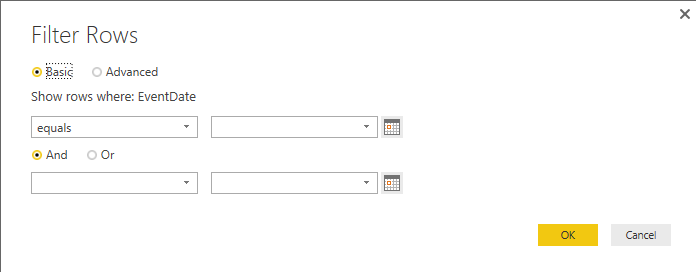
Can someone help me?
Solved! Go to Solution.


- Mark as New
- Bookmark
- Subscribe
- Mute
- Subscribe to RSS Feed
- Permalink
- Report Inappropriate Content
The report is as the error says "Expression.Error: We cannot apply operator & to types Text and DateTime."
Change the StartDate to text rather than date/time. Then it works in my test. Regarding date type conversion, in many databases, a formated string "20160804" or 2016-08-04" can be implicitly converted to date correctly. No worry about the conversion.
- Mark as New
- Bookmark
- Subscribe
- Mute
- Subscribe to RSS Feed
- Permalink
- Report Inappropriate Content
The report is as the error says "Expression.Error: We cannot apply operator & to types Text and DateTime."
Change the StartDate to text rather than date/time. Then it works in my test. Regarding date type conversion, in many databases, a formated string "20160804" or 2016-08-04" can be implicitly converted to date correctly. No worry about the conversion.

- Mark as New
- Bookmark
- Subscribe
- Mute
- Subscribe to RSS Feed
- Permalink
- Report Inappropriate Content
Thank you, I made these changes
I the database stored query leave variable as date and i power BI query editor put variables as text after that working properly
let
SQLSource = (Param1 as text, Param2 as text) =>
let
param1 = Date.ToText(Param1, "MM")&"/"&Date.ToText(Param1, "dd")&"/"&Date.ToText(Param1, "yyyy"),
param2 = Date.ToText(Param2, "MM")&"/"&Date.ToText(Param2, "dd")&"/"&Date.ToText(Param2, "yyyy"),
Source = Sql.Database("10.58.211.97,49461", "PPL_KPI", [Query="EXEC [PPL_KPI].[dbo].[Completed_kpi] @init_date = '"& Param1 &"', @final_date = '" & Param2 & "'"])
in
Source
in
SQLSource

- Mark as New
- Bookmark
- Subscribe
- Mute
- Subscribe to RSS Feed
- Permalink
- Report Inappropriate Content
I'm trying to pass date as parameters and have changed it to text. However, when i pass the value like 4/4/2017 , I'm getting incorrect syntax near '/' . Could you kindly help?
- Mark as New
- Bookmark
- Subscribe
- Mute
- Subscribe to RSS Feed
- Permalink
- Report Inappropriate Content
@Bibek wrote:
Hi @Eric_Zhang
I'm trying to pass date as parameters and have changed it to text. However, when i pass the value like 4/4/2017 , I'm getting incorrect syntax near '/' . Could you kindly help?
Since this thread is old and closed, for your question, could you please raise a new thread?
- Mark as New
- Bookmark
- Subscribe
- Mute
- Subscribe to RSS Feed
- Permalink
- Report Inappropriate Content
@Eric_Zhang No issues. I have found the solution. However, I have another query for which I'll raise a new thread.
- Mark as New
- Bookmark
- Subscribe
- Mute
- Subscribe to RSS Feed
- Permalink
- Report Inappropriate Content
I will try that. I guess the part that threw me off was that the LEFT side was my entire SELECT query up to the & and not just the EventDate.

Helpful resources

FabCon & SQLCon – Barcelona 2026
Join us in Barcelona for FabCon and SQLCon, the Fabric, Power BI, SQL, and AI community event. Save €200 with code FABCMTY200.

Power BI DataViz World Championships - June 2026
A new Power BI DataViz World Championship is coming this June! Don't miss out on submitting your entry.

| User | Count |
|---|---|
| 23 | |
| 22 | |
| 14 | |
| 14 | |
| 13 |


| User | Count |
|---|---|
| 47 | |
| 39 | |
| 24 | |
| 22 | |
| 20 |


