cancel
Showing results for 
Search instead for 
Did you mean: 

The Power BI Data Visualization World Championships is back! Get ahead of the game and start preparing now! Learn more

Reply
shreyaspuranik
Frequent Visitor

Filling missing dates to track personal finance

Hi, I am trying to use power bi to track my personal finances and learn more about power bi by doing these small personal projects. When I download by bank statements, I get data in this format: 

TransactionCategoryPost DateExpense
A11/1/2021$10
B21/4/2021$30
C21/4/2021$10
D31/10/2021$15


to get a trendline for my expected expenses in the future, I need to have equally spaced transaction dates and I believe i need data in this format: 

TransactionCategoryPost DateExpense
A11/1/2021$10
  1/2/2021$0
  1/3/2021$0
B21/4/2021$30
C21/4/2021$10
  1/5/2021$0
  1/6/2021$0
D31/7/2021$15


How do I do this in power query ? Thanks in advance for your help! 

1 ACCEPTED SOLUTION
v-luwang-msft
Community Support
Community Support

Hi @shreyaspuranik ,

Test the below steps,

Step1,create a calander date table:

Calendar = CALENDAR("2021,1,1","2021,1,10")

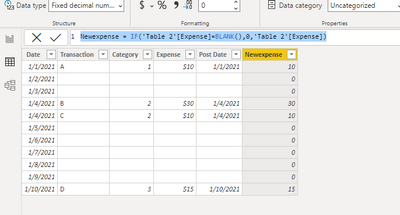
Then use the following dax to create another table:

Table 2 = NATURALLEFTOUTERJOIN('Calendar','Table')

vluwangmsft_0-1632292945093.png

Newexpense = IF('Table 2'[Expense]=BLANK(),0,'Table 2'[Expense])

vluwangmsft_1-1632293086920.png

If you need to, you can extract some of the fields from this last table and create a report with only the fields you need to use.


Did I answer your question? Mark my post as a solution!


Best Regards

Lucien

View solution in original post

4 REPLIES 4
v-luwang-msft
Community Support
Community Support

Hi @shreyaspuranik ,

Test the below steps,

Step1,create a calander date table:

Calendar = CALENDAR("2021,1,1","2021,1,10")

Then use the following dax to create another table:

Table 2 = NATURALLEFTOUTERJOIN('Calendar','Table')

vluwangmsft_0-1632292945093.png

Newexpense = IF('Table 2'[Expense]=BLANK(),0,'Table 2'[Expense])

vluwangmsft_1-1632293086920.png

If you need to, you can extract some of the fields from this last table and create a report with only the fields you need to use.


Did I answer your question? Mark my post as a solution!


Best Regards

Lucien

goncalogeraldes
Super User
Super User

Hello there @shreyaspuranik ! For a trend analysis you a need a date field with continuous values and to achieve this you can create a date table and connect it to your current table via the Date column. Here is a link on how to easily create a Date table.


Hope this answer solves your problem! If you need any additional help please @ me in your reply.
If my reply provided you with a solution, pleased mark it as a solution ✔️ or give it a kudoe 👍
Thanks!

You can also check out my LinkedIn!

Best regards,
Gonçalo Geraldes

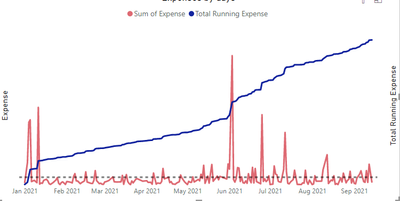
@goncalogeraldes Thanks for your answer! I am trying to visualize my expenses in a line chart with date hierarchy and thus get some analytics like forecast and average expense (per unit in date hierarchy). Even with using a continious date field like you mentioned above, the average ( per unit day) is still calculated as total expense/ countdistinct(post date) instead of total expense/total days till today.  The red line is sum of expenses on each day. My question essentially stemmed from  a wrong average value and thus needing to create $0 transactions for every day when there is no transaction. I hope I am making sense!

shreyaspuranik_0-1631899107198.png


Hello there @shreyaspuranik ! What about:


measure = 
var _days = DATEDIFF(MIN( Calendar[Date] ), MAX( Calendar[Date]), DAY )

return
DIVIDE( total expense, _days)


Hope this answer solves your problem! If you need any additional help please @ me in your reply.
If my reply provided you with a solution, pleased mark it as a solution ✔️ or give it a kudoe 👍
Thanks!

You can also check out my LinkedIn!

Best regards,
Gonçalo Geraldes

Helpful resources

Announcements
Power BI DataViz World Championships

Power BI Dataviz World Championships

The Power BI Data Visualization World Championships is back! Get ahead of the game and start preparing now!

November Power BI Update Carousel

Power BI Monthly Update - November 2025

Check out the November 2025 Power BI update to learn about new features.

FabCon Atlanta 2026 carousel

FabCon Atlanta 2026

Join us at FabCon Atlanta, March 16-20, for the ultimate Fabric, Power BI, AI and SQL community-led event. Save $200 with code FABCOMM.