cancel
Showing results for 
Search instead for 
Did you mean: 

The Power BI Data Visualization World Championships is back! Get ahead of the game and start preparing now! Learn more

Reply
ineedham
Helper I
Helper I

Filled State Map's Diverging Color Scales with Slicer

I’m trying to create a filled map/choropleth with a category slicer controlling three distinct maps with diverging color scales.

I’ve created a filled map based on state salary data with three salary categories: annual, hourly, and per visit. 

The data looks like this:
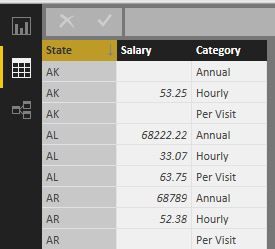


 dataBI.JPG


When I add the slicer on Category, all the correct values show up, but there’s no variation in the filled states. Every state is the same solid color, regardless of the value.


Even when I try to change “Diverging” in the Data Color section at the bottom of the Format tab, the Data Color section at the top with a lone color overrides it:
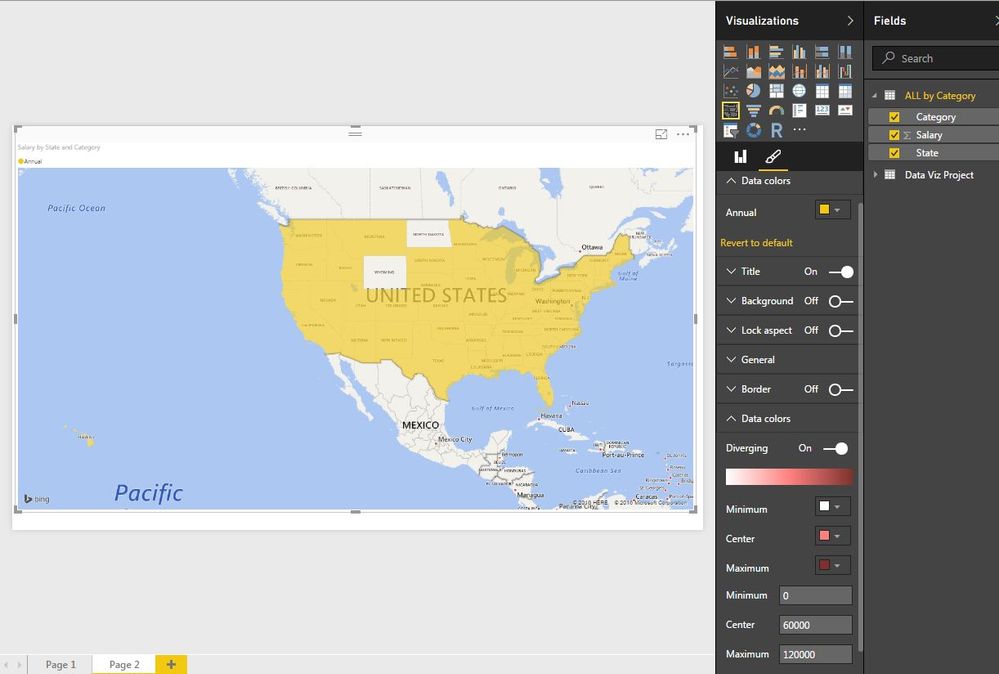
 

dataBI3.JPG


The values in the the annual category are obviously much higher than those in the hourly and per visit categories: values in the ten/hundred thousands vs values in the tens.  I’m not sure if this is what’s causing problems. 


Also, I tried uploading the data with one row per state, and each of the 3 salary categories in different columns, but I’m not sure how I would create the lone category slicer with three separate fields:
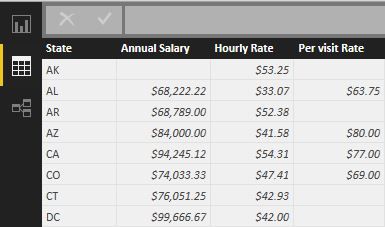
 

dataBI2.JPG


Any ideas?

6 REPLIES 6
Eric_Zhang
Microsoft Employee
Microsoft Employee

@ineedham


Try to remove category from legend of the filled map, then the color diverging should work in the first case in your post.
Based on my test and observation, the legend field in a filled map doesn't make sense.


Thank you, Eric,


I removed Category from the Legend.  


My issue is still that I don't know how to create a different diverging color scale for each of the 3 categories in the slicer (I'm not even sure it's possible).  Setting the diverging color scale applies to all categories, which is a problem for my data because the annual salary data values are much larger than the hourly and per visit values.


@ineedham wrote:

Thank you, Eric,


I removed Category from the Legend.  


My issue is still that I don't know how to create a different diverging color scale for each of the 3 categories in the slicer (I'm not even sure it's possible).  Setting the diverging color scale applies to all categories, which is a problem for my data because the annual salary data values are much larger than the hourly and per visit values.


@ineedham

Based on my test, to get a different diverging color scale, you may have to use 3 individual filled maps, with the color saturation filled by measures as below. A slicer is not necessary in this case.

HourlySal = CALCULATE(MAX(Table[Salary]),Table[Category]="Hourly")

PerVSal = CALCULATE(MAX(Table[Salary]),Table[Category]="Per Visit")

AnnualSal = CALCULATE(MAX(Table[Salary]),Table[Category]="Annual")


Adding those measures was a great idea, but my ultimate goal was to toggle between maps on one page, without having to create 3 separate tabs/maps.  I found a solution: the default Slicer Visual created the problems I mentioned above, but the Custom Chiclet Slicer I downloaded from the PowerBI Visuals pages works perfectly.


Thanks for your help, Eric.

@ineedham


Thanks for your sharing. 🙂

Just one question to confirm, did you create a different diverging color scale for different categories in one filled map?

No, I didn't.  The scales were automatically adjusted to the min and max of each category's values, and the color scale was the same for all 3.

Helpful resources

Announcements
Power BI DataViz World Championships

Power BI Dataviz World Championships

The Power BI Data Visualization World Championships is back! Get ahead of the game and start preparing now!

December 2025 Power BI Update Carousel

Power BI Monthly Update - December 2025

Check out the December 2025 Power BI Holiday Recap!

FabCon Atlanta 2026 carousel

FabCon Atlanta 2026

Join us at FabCon Atlanta, March 16-20, for the ultimate Fabric, Power BI, AI and SQL community-led event. Save $200 with code FABCOMM.