A new Data Days event is coming soon!
This time we’re going bigger than ever. Fabric, Power BI, SQL, AI and more. We're covering it all. You won't want to miss it.
Learn more- Power BI forums
- Get Help with Power BI
- Desktop
- Service
- Report Server
- Power Query
- Mobile Apps
- Developer
- DAX Commands and Tips
- Custom Visuals Development Discussion
- Health and Life Sciences
- Power BI Spanish forums
- Translated Spanish Desktop
- Training and Consulting
- Instructor Led Training
- Dashboard in a Day for Women, by Women
- Galleries
- Data Stories Gallery
- Themes Gallery
- Contests Gallery
- QuickViz Gallery
- Quick Measures Gallery
- Visual Calculations Gallery
- Notebook Gallery
- Translytical Task Flow Gallery
- TMDL Gallery
- R Script Showcase
- Webinars and Video Gallery
- Ideas
- Custom Visuals Ideas (read-only)
- Issues
- Issues
- Events
- Upcoming Events
Level up your Power BI skills this month - build one visual each week and tell better stories with data! Get started
- Power BI forums
- Forums
- Get Help with Power BI
- Desktop
- Fill down non null values
- Subscribe to RSS Feed
- Mark Topic as New
- Mark Topic as Read
- Float this Topic for Current User
- Bookmark
- Subscribe
- Printer Friendly Page


- Mark as New
- Bookmark
- Subscribe
- Mute
- Subscribe to RSS Feed
- Permalink
- Report Inappropriate Content
Fill down non null values
Hello all,
I have the following column:
| Name1 |
| 5 |
| 6 |
| 4 |
| Name2 |
| 5 |
| 9 |
l would like to fill down the cells with numbers by the name1 and name2. How can I do this. I have tried to change the cells with numbers by blank values and fill them down but this does not work.
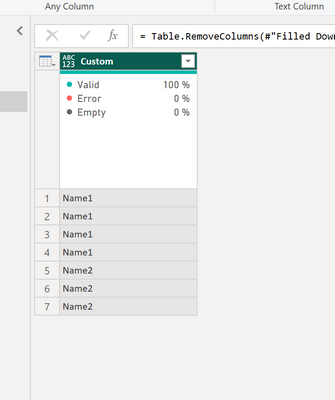
expected result:
| Name1 |
| Name1 |
| Name1 |
| Name1 |
| Name2 |
| Name2 |
| Name2 |
Thanks for the help,
Chris
Solved! Go to Solution.


- Mark as New
- Bookmark
- Subscribe
- Mute
- Subscribe to RSS Feed
- Permalink
- Report Inappropriate Content
Hi @Chrisjr
Please do the followng in Power Query:
base table
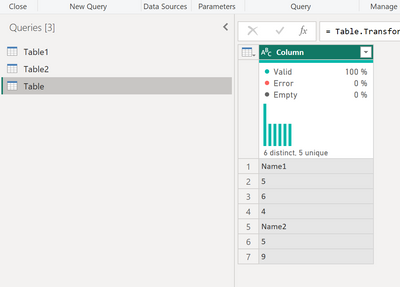
add a custom column
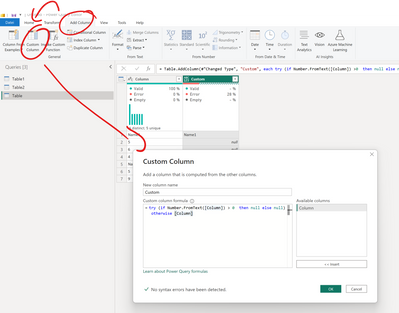
try (if Number.FromText([Column]) > 0 then null else null) otherwise [Column]*you can also take something like <> 0 if you also have values below 0
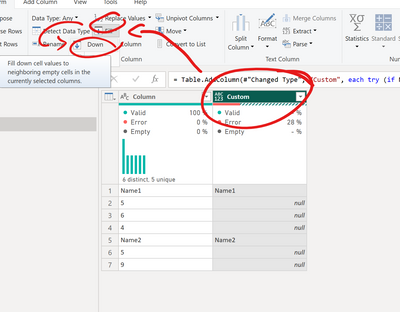
Execute the fill
Delete the old column

Best regards
Michael
-----------------------------------------------------
If this post helps, then please consider Accept it as the solution to help the other members find it more quickly. Appreciate your thumbs up!
@ me in replies or I'll lose your thread.
-----------------------------------------------------
Visit my blog datenhungrig which I recently started with content about business intelligence and Power BI in German and English or follow me on LinkedIn!


- Mark as New
- Bookmark
- Subscribe
- Mute
- Subscribe to RSS Feed
- Permalink
- Report Inappropriate Content
@Chrisjr , just adding to @Mikelytics solution. If you want to replace the values and do the fill down in a same column without duplicating and deleting the columns, Please try the below code in your replace value step.
= Table.ReplaceValue(Source,each [Name],
each if Number.FromText([Name]) > 0 then null else [Name],
     Replacer.ReplaceValue,{"Name"})
Thanks,
- Mark as New
- Bookmark
- Subscribe
- Mute
- Subscribe to RSS Feed
- Permalink
- Report Inappropriate Content
Hi @Chrisjr
Please do the followng in Power Query:
base table
add a custom column
try (if Number.FromText([Column]) > 0 then null else null) otherwise [Column]*you can also take something like <> 0 if you also have values below 0
Execute the fill
Delete the old column
Best regards
Michael
-----------------------------------------------------
If this post helps, then please consider Accept it as the solution to help the other members find it more quickly. Appreciate your thumbs up!
@ me in replies or I'll lose your thread.
-----------------------------------------------------
Visit my blog datenhungrig which I recently started with content about business intelligence and Power BI in German and English or follow me on LinkedIn!
- Mark as New
- Bookmark
- Subscribe
- Mute
- Subscribe to RSS Feed
- Permalink
- Report Inappropriate Content
- Mark as New
- Bookmark
- Subscribe
- Mute
- Subscribe to RSS Feed
- Permalink
- Report Inappropriate Content
HI @Arul Thanks for your reply.
I thought about this solution but how do you replace by null values?
- Mark as New
- Bookmark
- Subscribe
- Mute
- Subscribe to RSS Feed
- Permalink
- Report Inappropriate Content
@Chrisjr , just adding to @Mikelytics solution. If you want to replace the values and do the fill down in a same column without duplicating and deleting the columns, Please try the below code in your replace value step.
= Table.ReplaceValue(Source,each [Name],
each if Number.FromText([Name]) > 0 then null else [Name],
     Replacer.ReplaceValue,{"Name"})
Thanks,
- Mark as New
- Bookmark
- Subscribe
- Mute
- Subscribe to RSS Feed
- Permalink
- Report Inappropriate Content
HI @Arul
Awesome addon which makes the solution more lean! Will definietely put this in my toolbox 🙂 Thank you!
Best regards
Michael
Visit my blog datenhungrig which I recently started with content about business intelligence and Power BI in German and English or follow me on LinkedIn!
- Mark as New
- Bookmark
- Subscribe
- Mute
- Subscribe to RSS Feed
- Permalink
- Report Inappropriate Content

Helpful resources

Power BI Monthly Update - April 2026
Check out the April 2026 Power BI update to learn about new features.

Data Days 2026 coming soon!
Sign up to receive a private message when registration opens and key events begin.

New to Fabric Survey
If you have recently started exploring Fabric, we'd love to hear how it's going. Your feedback can help with product improvements.

Power BI DataViz World Championships - June 2026
A new Power BI DataViz World Championship is coming this June! Don't miss out on submitting your entry.

| User | Count |
|---|---|
| 36 | |
| 33 | |
| 31 | |
| 24 | |
| 18 |


| User | Count |
|---|---|
| 66 | |
| 50 | |
| 33 | |
| 24 | |
| 24 |


