cancel
Showing results for 
Search instead for 
Did you mean: 

The Power BI Data Visualization World Championships is back! Get ahead of the game and start preparing now! Learn more

Reply
Anonymous
Not applicable

Fill down collumn information based on condition

Greeting, everyone,

For couple of days can't figure out how I should approach this and got stuck in a corner.

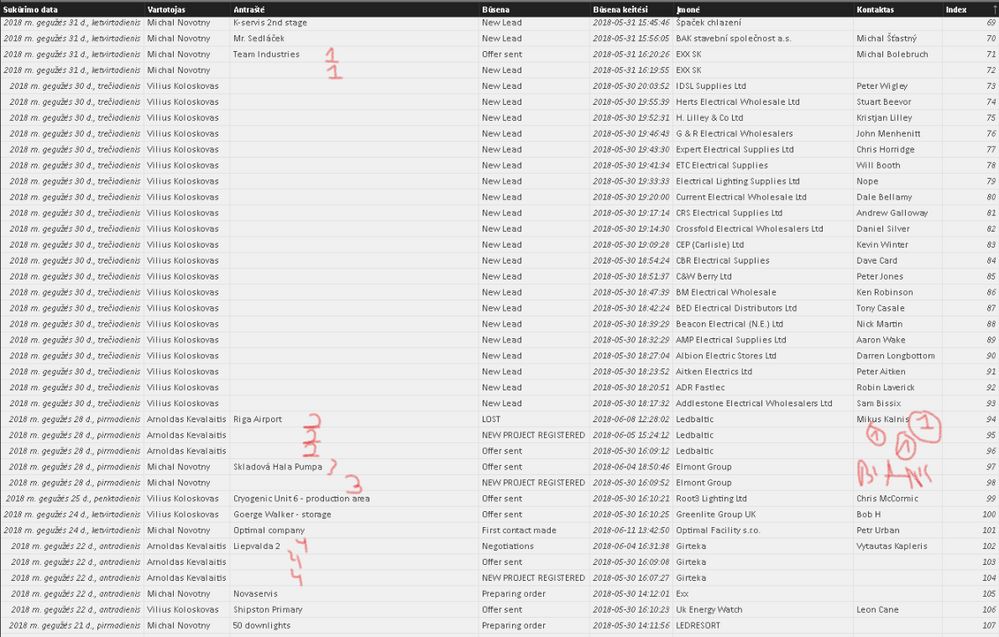
I would like to conditionally fill down the (2) collumns infromation based on criteria so that the values that have to be blank are left blank without filling them down from above.

Sketch.png

The criteria would be "Antraste" - which is based on "Vartotojas" = User and "Imone" = Company and "Kontaktas"= Manager (to make it easier changed names in " ".

So what I am struggling with is to fill down the information of "Antraste" based upon Company which it is related to User. If I am trying to do the "fill down" function within the "Edit Queries" it fills dow unconditionally and fills in the blanks where there should be blanks. Same is with the Manager - where there should be blank it fills in one from above.

Thank you for any insights towards the issue that I am facing.

1 ACCEPTED SOLUTION
v-juanli-msft
Community Support
Community Support

Hi @Anonymous

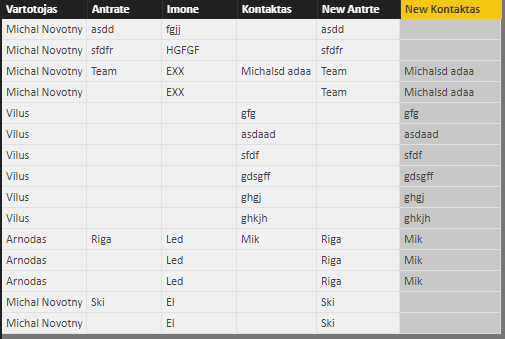
Thanks to rohitMe’s suggestion, I make a test and it seems to achieve your requirement.

11.png

New Antrte = 
IF (
    Sheet1[Antrate] = BLANK (),
    CALCULATE (
        LASTNONBLANK ( Sheet1[Antrate], Sheet1[Antrate] ),
        FILTER ( ALLEXCEPT ( Sheet1, Sheet1[Vartotojas] ), Sheet1[Imone] = EARLIER ( Sheet1[Imone] ) )
    ),
   Sheet1[Antrate]
)
New Kontaktas = 
IF (
    Sheet1[Kontaktas] = BLANK (),
    CALCULATE (
        LASTNONBLANK ( Sheet1[Kontaktas], Sheet1[Kontaktas] ),
        FILTER ( ALLEXCEPT ( Sheet1, Sheet1[Vartotojas] ), Sheet1[Imone] = EARLIER ( Sheet1[Imone] ) )
    ),
   Sheet1[Kontaktas]
)

Best regards

Maggie

View solution in original post

3 REPLIES 3
v-juanli-msft
Community Support
Community Support

Hi @Anonymous

Thanks to rohitMe’s suggestion, I make a test and it seems to achieve your requirement.

11.png

New Antrte = 
IF (
    Sheet1[Antrate] = BLANK (),
    CALCULATE (
        LASTNONBLANK ( Sheet1[Antrate], Sheet1[Antrate] ),
        FILTER ( ALLEXCEPT ( Sheet1, Sheet1[Vartotojas] ), Sheet1[Imone] = EARLIER ( Sheet1[Imone] ) )
    ),
   Sheet1[Antrate]
)
New Kontaktas = 
IF (
    Sheet1[Kontaktas] = BLANK (),
    CALCULATE (
        LASTNONBLANK ( Sheet1[Kontaktas], Sheet1[Kontaktas] ),
        FILTER ( ALLEXCEPT ( Sheet1, Sheet1[Vartotojas] ), Sheet1[Imone] = EARLIER ( Sheet1[Imone] ) )
    ),
   Sheet1[Kontaktas]
)

Best regards

Maggie

Anonymous
Not applicable

Thats amazing!

I almost got it working as well - with some bugs but was sufficient.

This however does it perfectly.

Thank you for your time @v-juanli-msft and Everyone!


rohitMe
Advocate I
Advocate I

Hi @Anonymous


I would suggest you that instead of using the fill down option you create a new custom column defining the criteria according to which you need to fill the cell value.


Look at the following problem and solution so you get an idea as to how you can proceed. The solution is I guess not what you are looking for but it should help you to understand what you need to do to acheive your result.

 https://community.powerbi.com/t5/Desktop/Filling-Data-Gaps-Conditionally/td-p/148745


Regards

Rohit

Helpful resources

Announcements
Power BI DataViz World Championships

Power BI Dataviz World Championships

The Power BI Data Visualization World Championships is back! Get ahead of the game and start preparing now!

December 2025 Power BI Update Carousel

Power BI Monthly Update - December 2025

Check out the December 2025 Power BI Holiday Recap!

FabCon Atlanta 2026 carousel

FabCon Atlanta 2026

Join us at FabCon Atlanta, March 16-20, for the ultimate Fabric, Power BI, AI and SQL community-led event. Save $200 with code FABCOMM.