Get certified for free when you join Fabric Data Days 2026 and dive into Fabric, Power BI, SQL, AI, and other essential data skills.
Join nowJuly 28 - August 9 | Final Round of the Power BI Dataviz World Championships. This is your chance. Learn more
Hi,
I have a dataset with null values for Project name below it's first appearance. For example:
| Project | Value1 | Value2 |
| A | 4 | 23 |
| 424 | 35 | |
| 5 | 23 | |
| 546 | 7 | |
| 456 | 3 | |
| 6 | 7 | |
| B | 456 | 34 |
| 2 | 346 | |
| 4 | 3 | |
| 34 | 637 | |
| 257 | 24 | |
| 5472 | 6 | |
| 54 | 34 | |
| 5 | 53 | |
| 6 | 435 | |
| 2 | 325 | |
| 56 | 32 | |
| C | 54 | 6 |
| 7 | 7 | |
| 2457 | 5 |
I want to fill out everything below the Project name until a new name is encountered:
| Project | Value1 | Value2 |
| A | 4 | 23 |
| A | 424 | 35 |
| A | 5 | 23 |
| A | 546 | 7 |
| A | 456 | 3 |
| A | 6 | 7 |
| B | 456 | 34 |
| B | 2 | 346 |
| B | 4 | 3 |
| B | 34 | 637 |
| B | 257 | 24 |
| B | 5472 | 6 |
| B | 54 | 34 |
| B | 5 | 53 |
| B | 6 | 435 |
| B | 2 | 325 |
| B | 56 | 32 |
| C | 54 | 6 |
| C | 7 | 7 |
| C | 2457 | 5 |
Any ideas on how I can approach this?
Solved! Go to Solution.
Hi @Anonymous
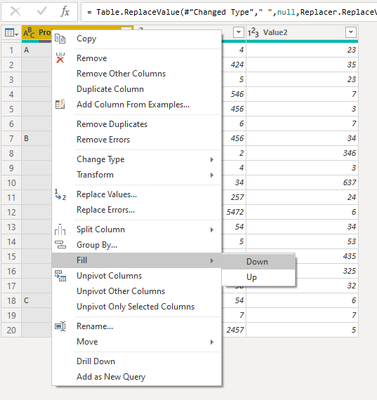
In the Power Query editor, you need to right click on the Project column and choose Fill Down.
_______________
If I helped, please accept the solution and give kudos! 😀
Hi @Anonymous
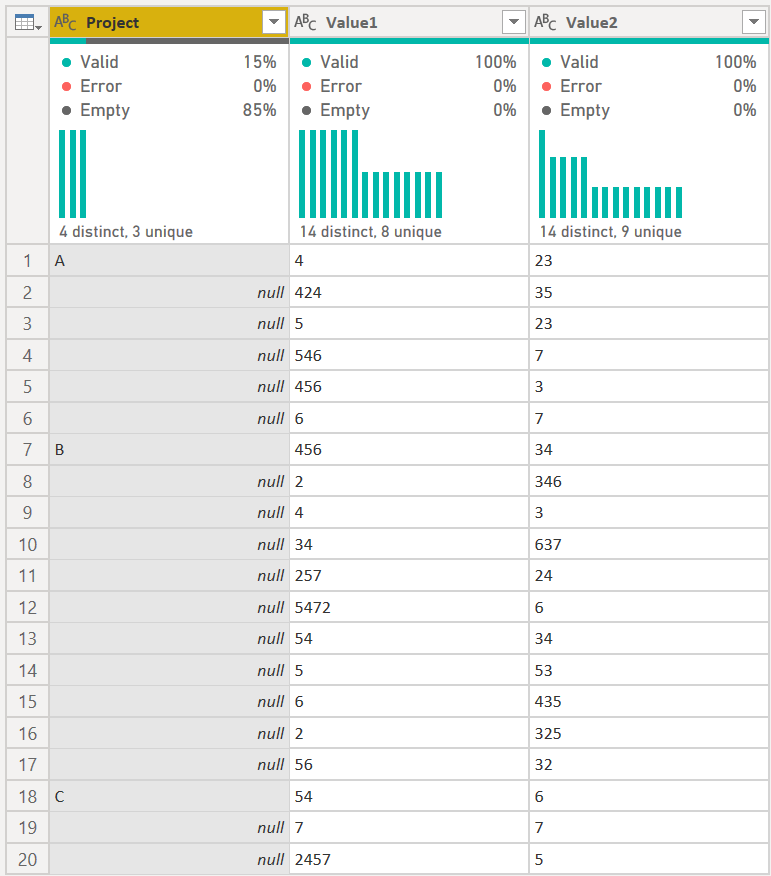
It depends. Your data needs to look like the below first:
You'll notice that the data in column [Project] is null. If it is, then do as @lkalawski recommends. Just right-click on the Project Column, Fill, and Down.
If it is not null though, you need to replace the stuff there with null. So right-click on the [Project] column and select Replace Values. You have two things to try easily:
if that doesn't work, you'll need to figure out what is truly in that first column. The Fill Down/Up is a great feature, but it only works with nulls.
DAX is for Analysis. Power Query is for Data Modeling
Proud to be a Super User!
MCSA: BI ReportingHi @Anonymous
It depends. Your data needs to look like the below first:
You'll notice that the data in column [Project] is null. If it is, then do as @lkalawski recommends. Just right-click on the Project Column, Fill, and Down.
If it is not null though, you need to replace the stuff there with null. So right-click on the [Project] column and select Replace Values. You have two things to try easily:
if that doesn't work, you'll need to figure out what is truly in that first column. The Fill Down/Up is a great feature, but it only works with nulls.
DAX is for Analysis. Power Query is for Data Modeling
Proud to be a Super User!
MCSA: BI ReportingHi @Anonymous
In the Power Query editor, you need to right click on the Project column and choose Fill Down.
_______________
If I helped, please accept the solution and give kudos! 😀
Join us in Barcelona for FabCon and SQLCon, the Fabric, Power BI, SQL, and AI community event. Save €200 with code FABCMTY200.
If you love stickers, then you will definitely want to check out our community sticker challenge, Barcelona edition!
Check out the July 2026 Power BI update to learn about new features.
| User | Count |
|---|---|
| 30 | |
| 28 | |
| 25 | |
| 24 | |
| 16 |
| User | Count |
|---|---|
| 45 | |
| 32 | |
| 17 | |
| 16 | |
| 16 |