Join us at FabCon Atlanta from March 16 - 20, 2026, for the ultimate Fabric, Power BI, AI and SQL community-led event. Save $200 with code FABCOMM.
Register now!The Power BI Data Visualization World Championships is back! Get ahead of the game and start preparing now! Learn more
I have load 4 tables from google analytics with idetntial fields.
i need to union this tables and work with union data, but field's sorting in one table is differ from other: http://joxi.ru/vAWDOn6S1kNabr
Why and how fix this trouble?
Solved! Go to Solution.
Hi @serjio,
You can try to use below methods to merge tables.
1. Power query:Table.SelectColumns ,Table.Combine
Sample:
MergeTable=
Table.Combine(
Table.SelectColumns(Table1,{"Column1","Column2","Column3"}),
Table.SelectColumns(Table2,{"Column1","Column2","Column3"}),
Table.SelectColumns(Table3,{"Column1","Column2","Column3"}),
Table.SelectColumns(Table4,{"Column1","Column2","Column3"}))
2. Dax formula. Selectcolumns, union functions.
Sample formula:
Table 2 = UNION(
SELECTCOLUMNS('Table',"Column1",[Column1],"Column2",[Column2],"Column3",[Column3]),
SELECTCOLUMNS('Table2',"Column1",[Column1],"Column2",[Column2],"Column3",[Column3]),
SELECTCOLUMNS('Table3',"Column1",[Column1],"Column2",[Column2],"Column3",[Column3]),
SELECTCOLUMNS('Table3',"Column1",[Column1],"Column2",[Column2],"Column3",[Column3])
)
Reference links:
Dax:
Power query:
Regards,
Xiaoxin Sheng
Cool,
We have to in Power Query. but we can do in DAX also. but in DAX it will createing Performance Issue.
So best way is go with Power Query.
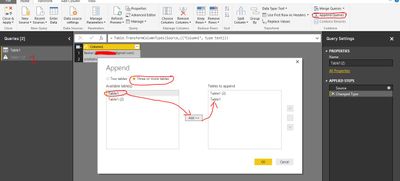
SO we have option to Append your four table and create new table. follow the below steps
Let me know if any help
Hi @serjio,
You can try to use below methods to merge tables.
1. Power query:Table.SelectColumns ,Table.Combine
Sample:
MergeTable=
Table.Combine(
Table.SelectColumns(Table1,{"Column1","Column2","Column3"}),
Table.SelectColumns(Table2,{"Column1","Column2","Column3"}),
Table.SelectColumns(Table3,{"Column1","Column2","Column3"}),
Table.SelectColumns(Table4,{"Column1","Column2","Column3"}))
2. Dax formula. Selectcolumns, union functions.
Sample formula:
Table 2 = UNION(
SELECTCOLUMNS('Table',"Column1",[Column1],"Column2",[Column2],"Column3",[Column3]),
SELECTCOLUMNS('Table2',"Column1",[Column1],"Column2",[Column2],"Column3",[Column3]),
SELECTCOLUMNS('Table3',"Column1",[Column1],"Column2",[Column2],"Column3",[Column3]),
SELECTCOLUMNS('Table3',"Column1",[Column1],"Column2",[Column2],"Column3",[Column3])
)
Reference links:
Dax:
Power query:
Regards,
Xiaoxin Sheng
The Power BI Data Visualization World Championships is back! Get ahead of the game and start preparing now!
| User | Count |
|---|---|
| 39 | |
| 37 | |
| 33 | |
| 32 | |
| 29 |
| User | Count |
|---|---|
| 133 | |
| 88 | |
| 85 | |
| 68 | |
| 64 |