cancel
Showing results for 
Search instead for 
Did you mean: 

The Power BI Data Visualization World Championships is back! Get ahead of the game and start preparing now! Learn more

Reply
sivarajan21
Post Prodigy
Post Prodigy

Field parameters not dynamically changing visuals

Hi,


I was trying to create a field parameter to dynamically change my visuals.

Please find attached sample dataset in below link:

Missing Calendar fixed_sol.pbix


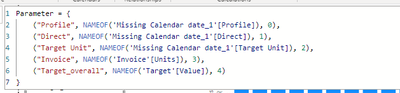
Below is my parameter created in report page:

sivarajan21_1-1685467127855.png


But my visuals are not filtered(changing) by parameter I have created.

Can you please guide me on this?


Please let me know if you need further info.

Thanks in advance

@Ahmedx  @lbendlin @Greg_Deckler @Ashish_Mathur @amitchandak @grantsamborn 

1 ACCEPTED SOLUTION
amitchandak
Super User
Super User

@sivarajan21 , I added the date to the Target table and joined with the date, Joined the invoice table with a date.


Check the added page in file after signature

Share with Power BI Enthusiasts: Full Power BI Video (20 Hours) YouTube
Microsoft Fabric Series 60+ Videos YouTube
Microsoft Fabric Hindi End to End YouTube

View solution in original post

3 REPLIES 3
amitchandak
Super User
Super User

@sivarajan21 , I added the date to the Target table and joined with the date, Joined the invoice table with a date.


Check the added page in file after signature

Share with Power BI Enthusiasts: Full Power BI Video (20 Hours) YouTube
Microsoft Fabric Series 60+ Videos YouTube
Microsoft Fabric Hindi End to End YouTube

Hi @amitchandak ,


As i have not received any response, I will accept this as a solution and close this query.

Thanks

Hi @amitchandak ,


Thanks for your quick response sir!
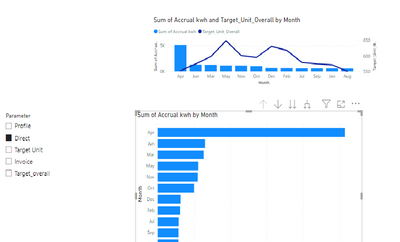
This is an amazing solution! This perfectly filters the table. But one thing that confuses me was this parameter is not filtering out the stacked bar chart as shown below:

sivarajan21_0-1685473476331.png

Please can you help me with this ?

Any lead would be greatly appreciated!


Please find the attached sample file

Missing Calendar fixed_sol (1).pbix


Please let me know if you need further info.


Thanks in advance

Helpful resources

Announcements
Power BI DataViz World Championships

Power BI Dataviz World Championships

The Power BI Data Visualization World Championships is back! Get ahead of the game and start preparing now!

December 2025 Power BI Update Carousel

Power BI Monthly Update - December 2025

Check out the December 2025 Power BI Holiday Recap!

FabCon Atlanta 2026 carousel

FabCon Atlanta 2026

Join us at FabCon Atlanta, March 16-20, for the ultimate Fabric, Power BI, AI and SQL community-led event. Save $200 with code FABCOMM.