cancel
Showing results for 
Search instead for 
Did you mean: 

July 28 - August 9 | Final Round of the Power BI Dataviz World Championships. This is your chance. Learn more

Reply
Ang0
Frequent Visitor

Field List in data source duplicated

Hi,


We are using Power BI with MS SAS (Live connection).


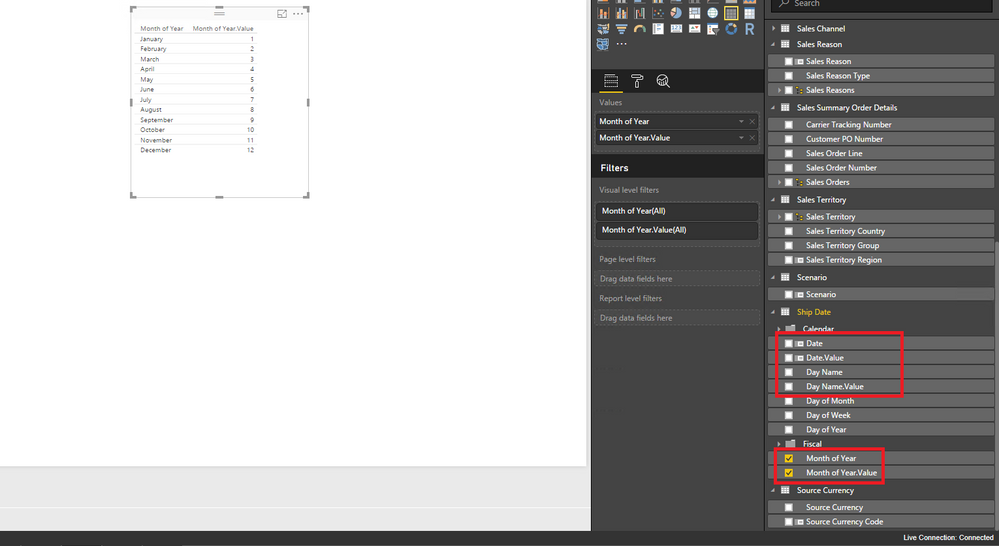
The list of fields shown on the right hand side is duplicated and I have twice as many fields as I expect. For every field I see <field name> and <field name.Value>


I have tried to link from Excel to the same data source and don't have the same issue.


Thanks for your help

1 ACCEPTED SOLUTION
Anonymous
Not applicable

Hi @Ang0,

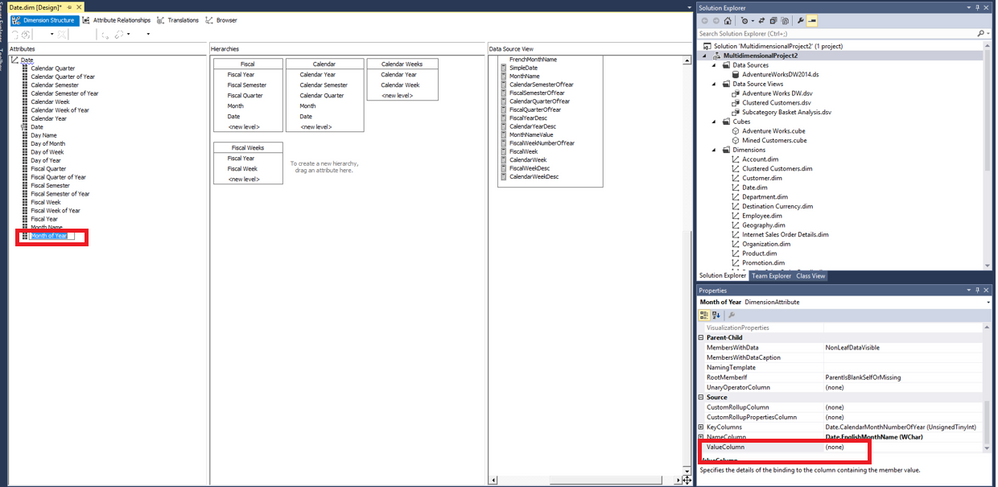
You would need to change ValueColumn for your dimension attribute to none in SSDT, there is an example for your reference. 1.PNG

For more details about ValueColumn , please review this blog: https://www.mssqltips.com/sqlservertip/3271/sql-server-analysis-server-ssas-keycolumn-vs-namecolumn-....

Thanks,
Lydia Zhang

View solution in original post

3 REPLIES 3
Anonymous
Not applicable

Hi @Ang0,

Do you connect to SSAS Multidimensional model via Live Connection from Power BI Desktop? If that is the case, I can reproduce your issue as follows. And this behavior is by design in Power BI Desktop, as indicated in this article, Dimension attributes (Keys), Name are imported as columns in Power BI Desktop.
1.PNG


Thanks,
Lydia Zhang

Hi Lydia, 


Thank you for the quick Reply.  Yes,  I connect to SSAS Multidimensional model via Live Connection from Power BI Desktop.


I notice that you only have the duplication for a couple of fields. ie. you don't  have Sales Territory.value, Sales Territory Country.value, sales order line. value etc.


It sounds as if the the problem relates to how our dimensions have been defined in  SSAS. (I'm new to SSAS too)


If I understand correctly I need to check the Key and Name dimension attributes in SSAS?  Please could you give me an idea of how I'd do that in SQL Server Management Studio? Sorry - I know that sounds dumb. 


Many Thanks

Angela


Anonymous
Not applicable

Hi @Ang0,

You would need to change ValueColumn for your dimension attribute to none in SSDT, there is an example for your reference. 1.PNG

For more details about ValueColumn , please review this blog: https://www.mssqltips.com/sqlservertip/3271/sql-server-analysis-server-ssas-keycolumn-vs-namecolumn-....

Thanks,
Lydia Zhang

Helpful resources

Announcements
FabCon and SQLCon Barcelona 2026

FabCon & SQLCon – Barcelona 2026

Join us in Barcelona for FabCon and SQLCon, the Fabric, Power BI, SQL, and AI community event. Save €200 with code FABCMTY200.

Fabric Community Sticker Design Challenge Barcelona Carousel

Fabric Community Sticker Challenge - Barcelona 2026

If you love stickers, then you will definitely want to check out our community sticker challenge, Barcelona edition!

July Power BI Update Carousel

Power BI Monthly Update - July 2026

Check out the July 2026 Power BI update to learn about new features.

Power BI DataViz World Championships carousel

Power BI DataViz World Championships - June 2026

A new Power BI DataViz World Championship is coming this June! Don't miss out on submitting your entry.

Top Solution Authors
Top Kudoed Authors