Join us at FabCon Atlanta from March 16 - 20, 2026, for the ultimate Fabric, Power BI, AI and SQL community-led event. Save $200 with code FABCOMM.
Register now!The Power BI Data Visualization World Championships is back! Get ahead of the game and start preparing now! Learn more
Hi,
I have a simple table with Date, Product Name and Value. I need a measure that will provide a Total 'value' for the dates <= a date chosen by the user, of which the following works fine:
Measure = CALCULATE(Sum('0 - Measureables'[Value]),(FILTER(ALL('0 - Measureables'),'0 - Measureables'[Date]<=(MAX('0 - Measureables'[Date])))))
HOWEVER, this completely ignores the 'Product Name' slicer (i assume because its referencng ALL. How can i adapt this so that the product name slicer is still filtered. Therefore giving a total for All previous dates for the chosen product name too.
Many Thanks
Stu
Solved! Go to Solution.
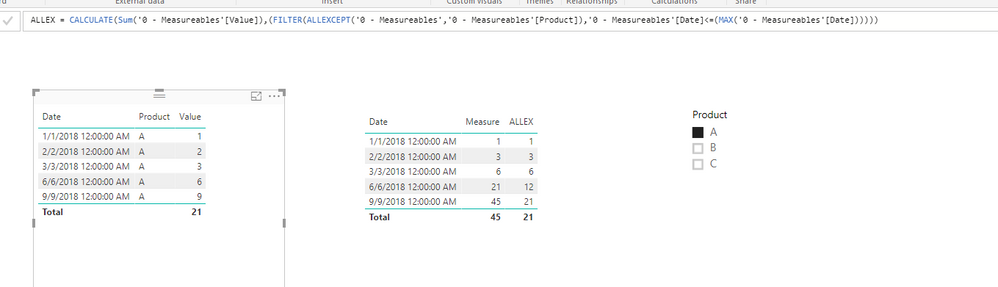
Base on my test, we can use the function ALLEXCEPT instead of ALL here to make the product name keeping filtered.
So we can create a measure using the formula as below:
ALLEX := CALCULATE(Sum('0 - Measureables'[Value]),(FILTER(ALLEXCEPT('0 - Measureables','0 - Measureables'[Product]),'0 - Measureables'[Date]<=(MAX('0 - Measureables'[Date])))))
After that we can get the result that we need.
For more information, please refer to the pbix as attached.
Regards,
Lydia
Base on my test, we can use the function ALLEXCEPT instead of ALL here to make the product name keeping filtered.
So we can create a measure using the formula as below:
ALLEX := CALCULATE(Sum('0 - Measureables'[Value]),(FILTER(ALLEXCEPT('0 - Measureables','0 - Measureables'[Product]),'0 - Measureables'[Date]<=(MAX('0 - Measureables'[Date])))))
After that we can get the result that we need.
For more information, please refer to the pbix as attached.
Regards,
Lydia
Brilliant Thank you.
If you simply want to display the total value for a specific set of dates, cant you use a date slicer together with a "measure = sum(measureables[value])?
Hi, thank you for the response. Unfortunately though i need to display sum of the values (total) for each measure but only until the date that the user selected, not all the dates in the table as some may be after this point. In the seperate column i have a measure showing exactly what you have suggested, but that only gives the total for the chosen day.
Hope this makes sense,
Thanks
Check out the November 2025 Power BI update to learn about new features.
Advance your Data & AI career with 50 days of live learning, contests, hands-on challenges, study groups & certifications and more!
| User | Count |
|---|---|
| 58 | |
| 45 | |
| 42 | |
| 21 | |
| 18 |