cancel
Showing results for 
Search instead for 
Did you mean: 

The Power BI Data Visualization World Championships is back! Get ahead of the game and start preparing now! Learn more

Reply
pejczi
Frequent Visitor

FIFO - Stock Calculation

Dear all, I would like to ask you how to calculate stock if the previous row is negative value.

For example :

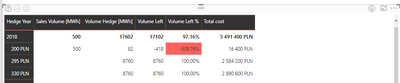
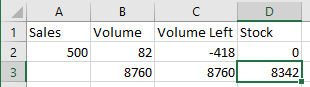
First photo (on the left) shows my example values. I would like to create a new measure [Stock] which is calculating stock for a year -  if the volume left is < 0 in previous row , then the rest is being calculated in the next row, as the example on the 2nd photo shows.


More strict example :


I bought 60 pairs of shoes for 2019. I sold 70 of them, so total volume would be 60-70=-10. I know that I have to reorder next 10 pairs of shoes , I buy additional 30 pairs. My stock in 2nd order is 30-10=20. This is the same as example below.

In those pictures, I am buying some products measured in MWh. I bought 82 MWh on 1. January and sold 500 MWh to clients to clients. I decided to order on 5. January much more, so I bought 8760 MWh. I know that I owed 418 MWh to my customers, so my stock left is 8342.


How to calculate this stock ? Volume left is a measure which is calculated like this :


Volume Left = SUM(Hedge[Volume Hedge [MWh]]])-SUM(Sales[Sales Volume [MWh]]])


where Sales Volume is basically my sales from another table.

pbi.PNGpbi2.PNG

1 ACCEPTED SOLUTION
pejczi
Frequent Visitor

Okay, I found a solution, maybe it'll help someone :


VolumeStock = 
CALCULATE (
    [Volume Left]; 
    FILTER (
        ALL ( Hedge ); 
        'Hedge'[Hedge Year] = MAX ( 'Hedge'[Hedge Year] )
            && Hedge[Hedge Price [zł]]] <= MAX ( Hedge[Hedge Price [zł]]] )
    )
)

and then another measure : Volume Stock = IF([VolumeStock]<0;0;[VolumeStock])

View solution in original post

3 REPLIES 3
Aron_Moore
Solution Specialist
Solution Specialist

Thank you for your answer.


Apparently, it sums wrong rows - it sums from the volume left from first row of each group, instead of every single from one group until its positive (basing on the article you sent).


VolumeStock = 
IF (
    MIN ( Hedge[Hedge Year] ) <= CALCULATE ( MAX ( Hedge[Hedge Year] ); ALL ( Hedge ) );
CALCULATE([Volume Left];FILTER(ALL(Hedge[Hedge Year]);(Hedge[Hedge Year])<=MAX(Hedge[Hedge Year]))))


pbi

pejczi
Frequent Visitor

Okay, I found a solution, maybe it'll help someone :


VolumeStock = 
CALCULATE (
    [Volume Left]; 
    FILTER (
        ALL ( Hedge ); 
        'Hedge'[Hedge Year] = MAX ( 'Hedge'[Hedge Year] )
            && Hedge[Hedge Price [zł]]] <= MAX ( Hedge[Hedge Price [zł]]] )
    )
)

and then another measure : Volume Stock = IF([VolumeStock]<0;0;[VolumeStock])

Helpful resources

Announcements
Power BI DataViz World Championships

Power BI Dataviz World Championships

The Power BI Data Visualization World Championships is back! Get ahead of the game and start preparing now!

December 2025 Power BI Update Carousel

Power BI Monthly Update - December 2025

Check out the December 2025 Power BI Holiday Recap!

FabCon Atlanta 2026 carousel

FabCon Atlanta 2026

Join us at FabCon Atlanta, March 16-20, for the ultimate Fabric, Power BI, AI and SQL community-led event. Save $200 with code FABCOMM.