Don't miss your chance to take the Fabric Data Engineer (DP-700) exam on us!
Learn moreNext up in the FabCon + SQLCon recap series: The roadmap for Microsoft SQL and Maximizing Developer experiences in Fabric. All sessions are available on-demand after the live show. Register now
Hi all,
I have a data coming from our HR tool like this:
| Name | Start date of absence | End date of absence |
| John Doe | 01/10/2018 | 02/10/2018 |
| Jane Doe | 02/10/2018 | 05/10/2018 |
I would like to generate a new table using the information above like the following:
| Name | Absence date |
| John Doe | 01/10/2018 |
| John Doe | 02/10/2018 |
| Jane Doe | 02/10/2018 |
| Jane Doe | 03/10/2018 |
| Jane Doe | 04/10/2018 |
| Jane Doe | 05/10/2018 |
Do you have any thoughts on how to convert this data?
Thanks!
Ugur
Solved! Go to Solution.
@Anonymous
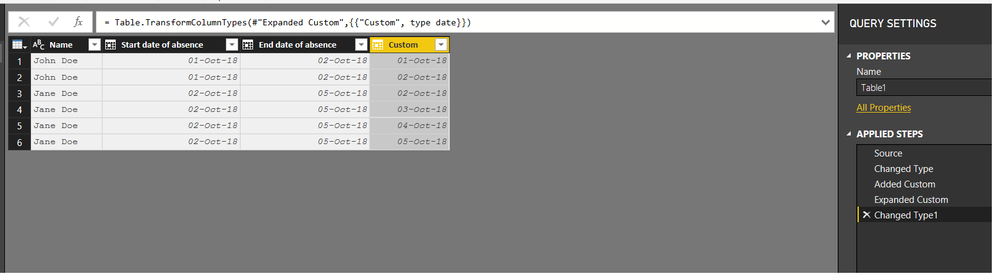
In the Query Editor..... Add a custom column as follows and convert it to date format
It will give you a list of dates from start to end.
{Number.From([Start date of absence])..Number.From([End date of absence])}
Then expand the list to new rows
See file attached as well
@Anonymous hello, you can use the Unpivot table, it will turn 2 columns into 1 column, take a look in this quickly video, and learn how to turn the number of your columns your need in 1.
Please, don' forget to mark this post as solution if you got it! other people can have the same situation in the future!
@Anonymous
In the Query Editor..... Add a custom column as follows and convert it to date format
It will give you a list of dates from start to end.
{Number.From([Start date of absence])..Number.From([End date of absence])}
Then expand the list to new rows
See file attached as well
Hi Zubair_Muhammad
First of all, thanks for reply on this issue, I was looking for exactly same answer and this help me a lot, thinking in this same case, do you know if there´s a way to calculate the dates in range but considering only Monday to Friday? I´m working also in calculate absences but only that ones that apply to working week.
Thanks in advanced.
how to do this on custom tables?
Ist there also a formular for doing it the other way around.
So to get a Coloumn for each day to start and end date?
If you have recently started exploring Fabric, we'd love to hear how it's going. Your feedback can help with product improvements.
A new Power BI DataViz World Championship is coming this June! Don't miss out on submitting your entry.
Share feedback directly with Fabric product managers, participate in targeted research studies and influence the Fabric roadmap.
| User | Count |
|---|---|
| 54 | |
| 46 | |
| 44 | |
| 20 | |
| 19 |
| User | Count |
|---|---|
| 73 | |
| 71 | |
| 34 | |
| 33 | |
| 31 |