FabCon is coming to Atlanta
Join us at FabCon Atlanta from March 16 - 20, 2026, for the ultimate Fabric, Power BI, AI and SQL community-led event. Save $200 with code FABCOMM.
Register now!- Power BI forums
- Get Help with Power BI
- Desktop
- Service
- Report Server
- Power Query
- Mobile Apps
- Developer
- DAX Commands and Tips
- Custom Visuals Development Discussion
- Health and Life Sciences
- Power BI Spanish forums
- Translated Spanish Desktop
- Training and Consulting
- Instructor Led Training
- Dashboard in a Day for Women, by Women
- Galleries
- Data Stories Gallery
- Themes Gallery
- Contests Gallery
- QuickViz Gallery
- Quick Measures Gallery
- Visual Calculations Gallery
- Notebook Gallery
- Translytical Task Flow Gallery
- TMDL Gallery
- R Script Showcase
- Webinars and Video Gallery
- Ideas
- Custom Visuals Ideas (read-only)
- Issues
- Issues
- Events
- Upcoming Events
The Power BI Data Visualization World Championships is back! Get ahead of the game and start preparing now! Learn more
- Power BI forums
- Forums
- Get Help with Power BI
- Desktop
- Re: Extracting a filtered number
- Subscribe to RSS Feed
- Mark Topic as New
- Mark Topic as Read
- Float this Topic for Current User
- Bookmark
- Subscribe
- Printer Friendly Page

- Mark as New
- Bookmark
- Subscribe
- Mute
- Subscribe to RSS Feed
- Permalink
- Report Inappropriate Content
Extracting a filtered number
Hello everyone,
I have one doubt about using a filtered data.
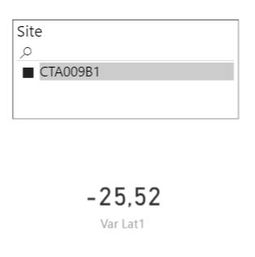
For example, I have a table with a lot of sites names and latitudes and longitudes related to those sites.
I selected one data (CTA009B1) that has one latitude (in this case -25,52) and one longitude linked with it.
I would like to use this filtered latitude as an input to calculate another table. How could I do that?
I thank you in advance.
Solved! Go to Solution.
- Mark as New
- Bookmark
- Subscribe
- Mute
- Subscribe to RSS Feed
- Permalink
- Report Inappropriate Content
Columns are calculated on Data import, not at run-time. So you won't be able to create or update a column on the fly with user filters. Measures are your only option.

- Mark as New
- Bookmark
- Subscribe
- Mute
- Subscribe to RSS Feed
- Permalink
- Report Inappropriate Content
What do you mean by Calculating another table? Understanding your intentions will guide us on how we can provide some advice.
- Mark as New
- Bookmark
- Subscribe
- Mute
- Subscribe to RSS Feed
- Permalink
- Report Inappropriate Content
@Anonymous This latitude will be used as a variable in another table/column.
For example:
Column 1
120 - Var Latitude
100 - Var Latitude
50 - Var Latitude
1.000 - Var Latitude
- Mark as New
- Bookmark
- Subscribe
- Mute
- Subscribe to RSS Feed
- Permalink
- Report Inappropriate Content
Is this table simply going to be held in memory as part of another Dax statement, are you hoping to use this as a parameter for another report or are you hoping to build a table that will appear on your table/field listing on the right?
If you want to use it within another DAX statement, thats pretty easy. Set up a measure that takes the MIN of your Latitude column. Once filtered it will only have 1 row, those get you the value you want. Then you can start your DAX statement with
Your Measure =
VAR InputLat = [LatInputMeasure]
RETURN
If you are wanting to pass the value across to another report, have a visual that relies on a measure the produces a HTTP string you can click on. This string builds the parameter so when they click on the value it takes you to the destination report with the filters included.
https://powerbi.microsoft.com/en-us/documentation/powerbi-service-url-filters/
- Mark as New
- Bookmark
- Subscribe
- Mute
- Subscribe to RSS Feed
- Permalink
- Report Inappropriate Content
@Anonymous You gave me a heads up. Part of the problem I can solve with your solution, but actually I want to use this MIN Latitude as a variable to calculate a new column
New Column
Latitude 1 - MIN Latitude
Latitude 2 - MIN Latitude
Latitude 3 - MIN Latitude
- Mark as New
- Bookmark
- Subscribe
- Mute
- Subscribe to RSS Feed
- Permalink
- Report Inappropriate Content
Columns are calculated on Data import, not at run-time. So you won't be able to create or update a column on the fly with user filters. Measures are your only option.
- Mark as New
- Bookmark
- Subscribe
- Mute
- Subscribe to RSS Feed
- Permalink
- Report Inappropriate Content
I was afraid about it =/
- Mark as New
- Bookmark
- Subscribe
- Mute
- Subscribe to RSS Feed
- Permalink
- Report Inappropriate Content
Lastly, a measure can't be used to create a saved data table. It can help you filter a matrix or something display.
Helpful resources

Power BI Dataviz World Championships
The Power BI Data Visualization World Championships is back! Get ahead of the game and start preparing now!

Power BI Monthly Update - December 2025
Check out the December 2025 Power BI Holiday Recap!

FabCon Atlanta 2026
Join us at FabCon Atlanta, March 16-20, for the ultimate Fabric, Power BI, AI and SQL community-led event. Save $200 with code FABCOMM.

| User | Count |
|---|---|
| 39 | |
| 37 | |
| 33 | |
| 32 | |
| 29 |


| User | Count |
|---|---|
| 132 | |
| 88 | |
| 82 | |
| 68 | |
| 64 |


