
Join us at FabCon Atlanta from March 16 - 20, 2026, for the ultimate Fabric, Power BI, AI and SQL community-led event. Save $200 with code FABCOMM.
Register now!Vote for your favorite vizzies from the Power BI Dataviz World Championship submissions. Vote now!
In Power BI, I'm trying to create a new column (with DAX) that extracts text to the left of a dash ("-"), based on an existing column.
| ColumnA | CalculatedColumn |
| AAA - 789D | AAA |
| AAA - DWOS | AAA |
| BBB - 8F WX | BBB |
| BBB - 5RS | BBB |
| CC - YXDZ | CC |
Please note, the data is connected using DirectQuery so I've been running into some roadblocks using DAX.
Any help would be appreciated!
Try this:
calculcatedColumn = LEFT([ColumnA], SEARCH("-", [ColumnA]) - 1)The idea is that the dax will grab everything to the left (excluding the space) of the first "-" character in each row.
Thanks, vicky_
Unforunately, that formula results in this error message for me:
Function 'SEARCH' is not allowed as part of calculated column DAX expressions on DirectQuery models.
Thanks, vicky_!
Using all 4 arguments with the SEARCH function works great when linked to a DirectQuery model!
ex., SEARCH(" -",[ColumnA],1,0)
Unfortunately, I can't get the LEFT function to work with it (but I can get the LEFT function to work alone, if I use a single number as the <num_chars>, ex., = LEFT([ColumnA],3; unforunately that's not dynamic enough for my needs).
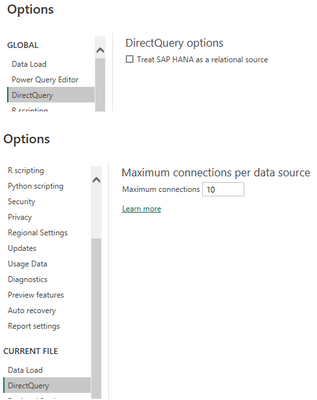
I imagine it is because I am not presented an option to "Allow unrestricted measures in DirectQuery mode" (even though I am using power bi desktop) as shown in the thread you linked:
I have tried the following with no luck (they all give an OLE DB or ODBC expression error):
CalculatedColumn = LEFT([COLUMNA], SEARCH("-", [COLUMNA],1,0) - 1)
CalculatedColumn = LEFT([COLUMNA],(SEARCH("-", [COLUMNA],1,0)-1))
CalculatedColumn = LEFT([COLUMNA],FIND("-",[COLUMNA],1,0))
Vote for your favorite vizzies from the Power BI World Championship submissions!
If you love stickers, then you will definitely want to check out our Community Sticker Challenge!
Check out the January 2026 Power BI update to learn about new features.
| User | Count |
|---|---|
| 63 | |
| 51 | |
| 41 | |
| 23 | |
| 18 |
| User | Count |
|---|---|
| 130 | |
| 111 | |
| 48 | |
| 30 | |
| 28 |