cancel
Showing results for 
Search instead for 
Did you mean: 

July 7 - July 17 | Round 2 of the Power BI Dataviz World Championships. Don't miss your chance! Learn more

Reply
KG1
Resolver I
Resolver I

Extracting Numbers from Text

Hi

I need to be able to extract the order reference number from a text column


The description contains the order reference number I need


I have had a look at similar threads and found this solution 


= Text.Select([String],{"0".."9"})


Because there are more numbers in the description field this doesnt give me the result I need


Any help would be greatly appreciated - thank you in advance


DescriptionResultRequired Result
Road Closure 1234569 Any Lane HF1 9JA - Date 06/01/211234569190601211234569
Unplanned Road Closure 1234569 Nowhere Lane HF7 4JA1234569741234569
Emergency Road Closure 1234569 Somewhere Lane HF16 5JA12345691651234569
1 ACCEPTED SOLUTION
Anonymous
Not applicable

Hi @KG1 ,


The whole M code is shown below:

let
    Source = Table.FromRows(Json.Document(Binary.Decompress(Binary.FromText("bcw7C4MwGIXhv3LI3KJJNMEx9EKR0qGlkziE+nkBTYqtiP++Ii4Fx/fAc7KM3b0tcGj9Z+gJXMgoVgmMm3C1jnA5cySpwR5H+yWEKgh5IDjLdxl7undrnaMCmx83P9Y09/qjEaVmcaeO+orca9p2D9/Rn+QK8UpLglAx6qEhSL1MWqGq5VwRmqEZWZ7/AA==", BinaryEncoding.Base64), Compression.Deflate)), let _t = ((type nullable text) meta [Serialized.Text = true]) in type table [Description = _t]),
    #"Changed Type" = Table.TransformColumnTypes(Source,{{"Description", type text}}),
    #"Duplicated Column" = Table.DuplicateColumn(#"Changed Type", "Description", "Description - Copy"),
    #"Split Column by Character Transition" = Table.SplitColumn(#"Duplicated Column", "Description - Copy", Splitter.SplitTextByCharacterTransition((c) => not List.Contains({"0".."9"}, c), {"0".."9"}), {"Description - Copy.1", "Description - Copy.2", "Description - Copy.3", "Description - Copy.4", "Description - Copy.5", "Description - Copy.6", "Description - Copy.7"}),
    #"Removed Other Columns" = Table.SelectColumns(#"Split Column by Character Transition",{"Description", "Description - Copy.1", "Description - Copy.2"}),
    #"Split Column by Character Transition1" = Table.SplitColumn(#"Removed Other Columns", "Description - Copy.2", Splitter.SplitTextByCharacterTransition({"0".."9"}, (c) => not List.Contains({"0".."9"}, c)), {"Description - Copy.2.1", "Description - Copy.2.2"}),
    #"Removed Other Columns1" = Table.SelectColumns(#"Split Column by Character Transition1",{"Description", "Description - Copy.2.1"})
in
    #"Removed Other Columns1"
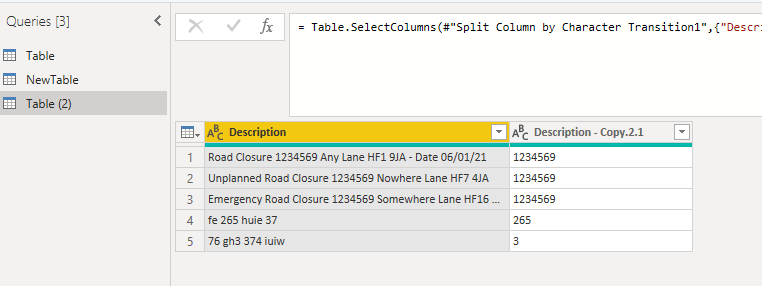
Extract number.PNG


Actually, if the first string is always end with Closure, you could simply use this M syntax:

= Table.AddColumn(#"Changed Type", "Text Between Delimiters", each Text.BetweenDelimiters([Description], "Closure ", " "), type text)
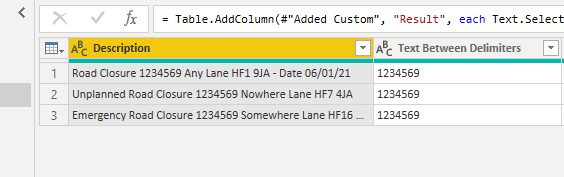
Delimiters.PNG

Or  the length of order reference number is fixed——always 7 ,then you could use LEFT() to extract the Result like this:
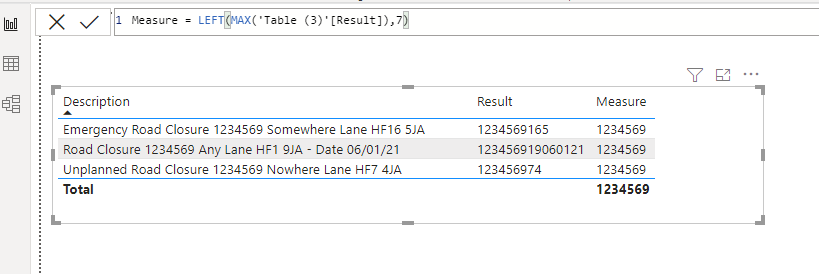
LEFT.PNG


Best Regards,
Eyelyn Qin
If this post helps, then please consider Accept it as the solution to help the other members find it more quickly.

View solution in original post

2 REPLIES 2
Anonymous
Not applicable

Hi @KG1 ,


The whole M code is shown below:

let
    Source = Table.FromRows(Json.Document(Binary.Decompress(Binary.FromText("bcw7C4MwGIXhv3LI3KJJNMEx9EKR0qGlkziE+nkBTYqtiP++Ii4Fx/fAc7KM3b0tcGj9Z+gJXMgoVgmMm3C1jnA5cySpwR5H+yWEKgh5IDjLdxl7undrnaMCmx83P9Y09/qjEaVmcaeO+orca9p2D9/Rn+QK8UpLglAx6qEhSL1MWqGq5VwRmqEZWZ7/AA==", BinaryEncoding.Base64), Compression.Deflate)), let _t = ((type nullable text) meta [Serialized.Text = true]) in type table [Description = _t]),
    #"Changed Type" = Table.TransformColumnTypes(Source,{{"Description", type text}}),
    #"Duplicated Column" = Table.DuplicateColumn(#"Changed Type", "Description", "Description - Copy"),
    #"Split Column by Character Transition" = Table.SplitColumn(#"Duplicated Column", "Description - Copy", Splitter.SplitTextByCharacterTransition((c) => not List.Contains({"0".."9"}, c), {"0".."9"}), {"Description - Copy.1", "Description - Copy.2", "Description - Copy.3", "Description - Copy.4", "Description - Copy.5", "Description - Copy.6", "Description - Copy.7"}),
    #"Removed Other Columns" = Table.SelectColumns(#"Split Column by Character Transition",{"Description", "Description - Copy.1", "Description - Copy.2"}),
    #"Split Column by Character Transition1" = Table.SplitColumn(#"Removed Other Columns", "Description - Copy.2", Splitter.SplitTextByCharacterTransition({"0".."9"}, (c) => not List.Contains({"0".."9"}, c)), {"Description - Copy.2.1", "Description - Copy.2.2"}),
    #"Removed Other Columns1" = Table.SelectColumns(#"Split Column by Character Transition1",{"Description", "Description - Copy.2.1"})
in
    #"Removed Other Columns1"

Extract number.PNG


Actually, if the first string is always end with Closure, you could simply use this M syntax:

= Table.AddColumn(#"Changed Type", "Text Between Delimiters", each Text.BetweenDelimiters([Description], "Closure ", " "), type text)

Delimiters.PNG

Or  the length of order reference number is fixed——always 7 ,then you could use LEFT() to extract the Result like this:

LEFT.PNG


Best Regards,
Eyelyn Qin
If this post helps, then please consider Accept it as the solution to help the other members find it more quickly.

TomMartens
Super User
Super User

Hey @KG1 ,


you can use this M snippet, this M snippet creates a new column called "Custom".
Paste this snippet in your query using the Advanced Editor (if you never used the Advanced Editor before, make a copy of your pbix).
Close the last line above the final in with a comma.

Paste the code snippet above the last in in your query. 

As the step is called #"Added Custom", don't forget to use this name after the final in.

// the result column that contains the 1st number from the column description
    #"Added Custom" = Table.AddColumn(#"Changed Type", "Custom", 
        // passes the current row to an inline function
        (row) => 
        let 
            // splits the column description into a list, the items are separated by a space
            DescToList = Text.Split( row[Description] , " " ),
            // counts the items o the list
            NoOfItems = List.Count( DescToList ) - 1,
            // extracts the first number of the list of numbers
            TheFirstNumber =
                // removes the nulls from the inner list
                List.RemoveNulls(
                    // the inner, an interation across the items  
                    List.Generate(
                        () => [x  = 0 , y = try Number.From( DescToList{ 0 } ) otherwise null ]
                        , each [x] < NoOfItems
                        , each [x = [x] + 1 , y = try Number.From( DescToList{ [x] + 1 } ) otherwise null ]
                        , each [y]
                    )
                ){0}
            in TheFirstNumber
    )
in
    #"Added Custom"

Here is a screenshot of the result based on the sample data you provided:

image.png

Hopefully, this is what you are looking for.


Regards,

Tom


Did I answer your question? Mark my post as a solution, this will help others!

Proud to be a Super User!
I accept Kudos 😉
Hamburg, Germany

Helpful resources

Announcements
FabCon and SQLCon Barcelona 2026

FabCon & SQLCon – Barcelona 2026

Join us in Barcelona for FabCon and SQLCon, the Fabric, Power BI, SQL, and AI community event. Save €200 with code FABCMTY200.

60 days of Data Days Carousel

Data Days 2026

Join Fabric Data Days 2026: 60 days of free live/on-demand sessions, challenges, study groups, and certification opportunities.

Power BI DataViz World Championships carousel

Power BI DataViz World Championships - June 2026

A new Power BI DataViz World Championship is coming this June! Don't miss out on submitting your entry.
