cancel
Showing results for 
Search instead for 
Did you mean: 

The Power BI Data Visualization World Championships is back! Get ahead of the game and start preparing now! Learn more

Reply
drwillia
Helper I
Helper I

Extracting Alphanumeric from Dynamic String Length and Format

Hi


I have various records in PowerBI in a single text field.  I need to extract only the alphanumeric values of length 8 characters from these strings, for example H5M10499, SA900324 and 3F601561 would be the strings id like to extract. Notice they are in different positions so i cannot tranform and extract using the right function and also the delimited varies, but the constant is the length and the fact that it is alphanumeric in nature. 


Gold Coast Council - 305E2 - H5M10499 - 100028392

HD Rental - D6 XL SU - SA900324

Ezyquip Hire 745 3F601561


Would appreciate any input on this problem,

Thanks

Daniel

6 REPLIES 6
YalanWu_test
Helper I
Helper I

Hi, @drwillia ;

You could create this funtion.

= Table.AddColumn(#"Changed Type", "Custom", each 
List.Select(Text.SplitAny([Column1], " "), each Text.Length(_)=8))

The final show:
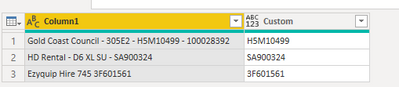
YalanWu_test_1-1660269391626.png

let
    Source = Table.FromRows(Json.Document(Binary.Decompress(Binary.FromText("i45Wcs/PSVFwzk8sLgGSpXnJmTkKugrGBqauRkDaw9TX0MDE0hLINDQwMDCyMLY0UorViVbycFEISs0rSQQpdjFTiPBRCA4FMoMdLQ0MjI1MwGpcqyoLSzMLFDwyi1IVzE1MFYzdzAwMTc0MlWJjAQ==", BinaryEncoding.Base64), Compression.Deflate)), let _t = ((type nullable text) meta [Serialized.Text = true]) in type table [Column1 = _t]),
    #"Changed Type" = Table.TransformColumnTypes(Source,{{"Column1", type text}}),
    #"Added Custom" = Table.AddColumn(#"Changed Type", "Custom", each 
List.Select(Text.SplitAny([Column1], " "), each Text.Length(_)=8)),
    #"Expanded Custom" = Table.ExpandListColumn(#"Added Custom", "Custom")
in
    #"Expanded Custom"

Best Regards,

HotChilli
Community Champion
Community Champion

It needs the column name in brackets after Text.Length so there looks to be extra [#" characters and more extra at the end

--


HotChilli
Community Champion
Community Champion

You must be pretty close.  Error messages?

= Table.SelectRows(#"Split Column by Delimiter", each Text.Length([#"[Fin Project].[Project].[Project].[MEMBER_CAPTION]"] = 8))


Expression.Error: We cannot convert the value false to type Text.
Details:
Value=FALSE
Type=[Type]


HotChilli
Community Champion
Community Champion

You can split the column by space character, using Advanced->To Rows.  That will give you a column of strings.  Then use the Filter dropdown from the column header to generate a formula (just pick one of the values, doesn't matter which, you just want to generate a Table.SelectRows statement which you can edit).

Then edit the statement to use Text.Length(column_Name) = 8 instead of the filter you generated

Hi @HotChilli 


Firstly thanks for responding, ive never seen it done like this before. In the advanced editor I cant get this statement to work:


#"Filtered Rows" = Table.SelectRows(#"Split Column by Delimiter", Text.Length("[Fin Project].[Project].[Project].[MEMBER_UNIQUE_NAME]")=8


Thanks

Daniel

Helpful resources

Announcements
Power BI DataViz World Championships

Power BI Dataviz World Championships

The Power BI Data Visualization World Championships is back! Get ahead of the game and start preparing now!

December 2025 Power BI Update Carousel

Power BI Monthly Update - December 2025

Check out the December 2025 Power BI Holiday Recap!

FabCon Atlanta 2026 carousel

FabCon Atlanta 2026

Join us at FabCon Atlanta, March 16-20, for the ultimate Fabric, Power BI, AI and SQL community-led event. Save $200 with code FABCOMM.