FabCon is coming to Atlanta
Join us at FabCon Atlanta from March 16 - 20, 2026, for the ultimate Fabric, Power BI, AI and SQL community-led event. Save $200 with code FABCOMM.
Register now!- Power BI forums
- Get Help with Power BI
- Desktop
- Service
- Report Server
- Power Query
- Mobile Apps
- Developer
- DAX Commands and Tips
- Custom Visuals Development Discussion
- Health and Life Sciences
- Power BI Spanish forums
- Translated Spanish Desktop
- Training and Consulting
- Instructor Led Training
- Dashboard in a Day for Women, by Women
- Galleries
- Data Stories Gallery
- Themes Gallery
- Contests Gallery
- QuickViz Gallery
- Quick Measures Gallery
- Visual Calculations Gallery
- Notebook Gallery
- Translytical Task Flow Gallery
- TMDL Gallery
- R Script Showcase
- Webinars and Video Gallery
- Ideas
- Custom Visuals Ideas (read-only)
- Issues
- Issues
- Events
- Upcoming Events
The Power BI Data Visualization World Championships is back! Get ahead of the game and start preparing now! Learn more
- Power BI forums
- Forums
- Get Help with Power BI
- Desktop
- Re: Extract the day on which a first transaction w...
- Subscribe to RSS Feed
- Mark Topic as New
- Mark Topic as Read
- Float this Topic for Current User
- Bookmark
- Subscribe
- Printer Friendly Page

- Mark as New
- Bookmark
- Subscribe
- Mute
- Subscribe to RSS Feed
- Permalink
- Report Inappropriate Content
Extract the day on which a first transaction was generated
Hi Experts,
I need to extract the day on which the first transaction was generated. As shown below.
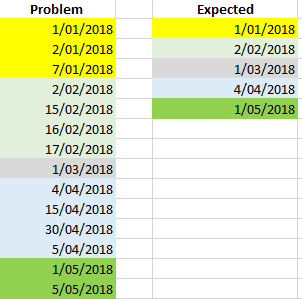
I have tried for hours but I have not been able to find a way to do it. Could you please help me?
Thanks, 
Solved! Go to Solution.


- Mark as New
- Bookmark
- Subscribe
- Mute
- Subscribe to RSS Feed
- Permalink
- Report Inappropriate Content
@Anonymous
Without date hierarchy, you can use following
Calculated Table =
SUMMARIZE (
    ADDCOLUMNS (
        TableName,
        "First_Date", CALCULATE (
            MIN ( TableName[ProblemColumn] ),
            FILTER (
                TableName,
                MONTH ( TableName[ProblemColumn] )
                    = MONTH ( EARLIER ( TableName[ProblemColumn] ) )
                    && YEAR ( TableName[ProblemColumn] )
                        = YEAR ( EARLIER ( TableName[ProblemColumn] ) )
            )
        )
    ),
    [First_Date]
)
Regards
Zubair
Please try my custom visuals
- Mark as New
- Bookmark
- Subscribe
- Mute
- Subscribe to RSS Feed
- Permalink
- Report Inappropriate Content
@Anonymous
Try following pattern
Calc Table =
SUMMARIZE (
    FILTER ( Table1, [User] = "J" ),
    [Date],
    [Company],
    [User],
    "CA", SUM ( Table1[CA] ),
    "LMS", SUM ( Table1[LMS]
.........
and so on for other numeric columns

)
Regards
Zubair
Please try my custom visuals
- Mark as New
- Bookmark
- Subscribe
- Mute
- Subscribe to RSS Feed
- Permalink
- Report Inappropriate Content
Hi @Anonymous
Try this calculated table
From the Modelling Tab>>New Table
Calculated Table =
SUMMARIZE (
    ADDCOLUMNS (
        TableName,
        "First_Date", CALCULATE (
            MIN ( TableName[ProblemColumn] ),
            ALLEXCEPT (
                TableName,
                TableName[ProblemColumn].[Month],
                TableName[ProblemColumn].[Year]
            )
        )
    ),
    [First_Date]
)
Regards
Zubair
Please try my custom visuals
- Mark as New
- Bookmark
- Subscribe
- Mute
- Subscribe to RSS Feed
- Permalink
- Report Inappropriate Content
Thank you for your quick response.
I got the following error: Column reference to 'Date' in table 'F59D' cannot be used with a variation 'Month' because it does not have any.
I believe it is happing because I haven't created a Date Hierarchy breakdown the date in day, month and year.
But I do not how to do it.
The field date is a formula that converts Julian dates in calendar dates. So I can't find a way to create a hierarchy. When I tried I get the following:

I supposed it should look like this:

Do you know how can I fix it?
Thank again
- Mark as New
- Bookmark
- Subscribe
- Mute
- Subscribe to RSS Feed
- Permalink
- Report Inappropriate Content
@Anonymous
Without date hierarchy, you can use following
Calculated Table =
SUMMARIZE (
    ADDCOLUMNS (
        TableName,
        "First_Date", CALCULATE (
            MIN ( TableName[ProblemColumn] ),
            FILTER (
                TableName,
                MONTH ( TableName[ProblemColumn] )
                    = MONTH ( EARLIER ( TableName[ProblemColumn] ) )
                    && YEAR ( TableName[ProblemColumn] )
                        = YEAR ( EARLIER ( TableName[ProblemColumn] ) )
            )
        )
    ),
    [First_Date]
)
Regards
Zubair
Please try my custom visuals
- Mark as New
- Bookmark
- Subscribe
- Mute
- Subscribe to RSS Feed
- Permalink
- Report Inappropriate Content
- Mark as New
- Bookmark
- Subscribe
- Mute
- Subscribe to RSS Feed
- Permalink
- Report Inappropriate Content
Hi @Zubair_Muhammad ,
I have tried to summarise and move some columns from the problem to the calculated one but for some reason, I am not able to do it. Do you think you could help me?
What I am trying to achieve is the following :
On the problem table, I want to summarize the values for each month if they belong to the same company and they were created for the same user.
Problem table

N.B. I know I can do it on the report using a measure but I really need those values in a column.
Calculated table (expected)

Thank you for all your help. It is much appreciated.
- Mark as New
- Bookmark
- Subscribe
- Mute
- Subscribe to RSS Feed
- Permalink
- Report Inappropriate Content
@Anonymous
Can you copy paste this data (Copiable format)?
Regards
Zubair
Please try my custom visuals
- Mark as New
- Bookmark
- Subscribe
- Mute
- Subscribe to RSS Feed
- Permalink
- Report Inappropriate Content
HI @Zubair_Muhammad ,Thank you for getting back to me!! Sure I can
Here the data
| Date | Company | CA | LMS | TMS | DS | DSTY | D1 | D2 | D3 | User |
| 1/08/2018 | abc | 826092 | 3138604 | 2249096 | 230947 | 1189993 | 16833 | 47725 | 1575323 | j |
| 1/08/2018 | abc | 2680061 | 2043540 | 2155070 | 2720135 | 2602010 | 207970 | 56554 | 45317 | j |
| 1/08/2018 | abc | 39324476 | 46765264 | 34547397 | 50080847 | 42034925 | 13515325 | 1318259 | -462709 | j |
| 1/08/2018 | abc | 826092 | 3138604 | 2249096 | 230947 | 1189993 | 16833 | 47725 | 1575323 | a |
| 1/08/2018 | def | 39324476 | 46765264 | 34547397 | 125478 | 1125687 | 13515325 | 1318259 | -462709 | j |
| 2/08/2018 | abc | 49324476 | 46765264 | 34547397 | 154786 | 1234895 | 23153252 | 318259 | -4629 | j |
| 1/08/2018 | def | 726092 | 2138604 | 4249096 | 130947 | 589993 | 16833 | 47725 | 1575323 | j |
| 1/08/2018 | def | 1680061 | 1043540 | 1155070 | 1720135 | 602010 | 207970 | 56554 | 45317 | j |
| 1/08/2018 | def | 49324476 | 36765264 | 24547397 | 40080847 | 21034925 | 13515325 | 1318259 | -462709 | j |
Second table
| Date | Company | CA | LSM | TMS | DS | DSTY | D1 | D2 | D3 | User |
| 1/08/2018 | abc | 42830629 | 51947408 | 38951563 | 53031929 | 45826928 | 13740128 | 1422538 | 1157931 | j |
| 1/08/2018 | def | 51730629 | 39947408 | 29951563 | 41931929 | 22226928 | 13740128 | 1422538 | 1157931 | j |
Thank you 🙂
- Mark as New
- Bookmark
- Subscribe
- Mute
- Subscribe to RSS Feed
- Permalink
- Report Inappropriate Content
Hi @Anonymous
Why is the following excluded from final output?
Why user "A" is not in final outpurt
Row # 5
| 1/08/2018 | def | 39324476 | 46765264 | 34547397 | 125478 | 1125687 | 13515325 | 1318259 | -462709 | j |
Regards
Zubair
Please try my custom visuals
- Mark as New
- Bookmark
- Subscribe
- Mute
- Subscribe to RSS Feed
- Permalink
- Report Inappropriate Content
Sorry, I missed the row 5. It should be include.
The expected table should be:
| 1/08/2018 | def | 91055105 | 86712672 | 64498960 | 42057407 | 23352615 | 27255453 | 2740797 | 695222 | j |
The only user that I am interested in is the j one. differents user need to be excluded
- Mark as New
- Bookmark
- Subscribe
- Mute
- Subscribe to RSS Feed
- Permalink
- Report Inappropriate Content
@Anonymous
Try following pattern
Calc Table =
SUMMARIZE (
    FILTER ( Table1, [User] = "J" ),
    [Date],
    [Company],
    [User],
    "CA", SUM ( Table1[CA] ),
    "LMS", SUM ( Table1[LMS]
.........
and so on for other numeric columns

)
Regards
Zubair
Please try my custom visuals
- Mark as New
- Bookmark
- Subscribe
- Mute
- Subscribe to RSS Feed
- Permalink
- Report Inappropriate Content
Thank you, I will try straight away 🙂
Helpful resources

Power BI Dataviz World Championships
The Power BI Data Visualization World Championships is back! Get ahead of the game and start preparing now!

Power BI Monthly Update - December 2025
Check out the December 2025 Power BI Holiday Recap!

FabCon Atlanta 2026
Join us at FabCon Atlanta, March 16-20, for the ultimate Fabric, Power BI, AI and SQL community-led event. Save $200 with code FABCOMM.

| User | Count |
|---|---|
| 41 | |
| 39 | |
| 37 | |
| 29 | |
| 24 |


| User | Count |
|---|---|
| 124 | |
| 107 | |
| 80 | |
| 69 | |
| 67 |


