Join us at FabCon Atlanta from March 16 - 20, 2026, for the ultimate Fabric, Power BI, AI and SQL community-led event. Save $200 with code FABCOMM.
Register now!View all the Fabric Data Days sessions on demand. View schedule
Hello,
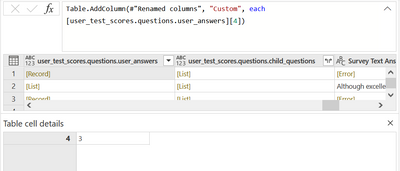
This is the Record cell that is driving me crazy:
The first column (4) is variable, it can be from 1 to 11. So I want to add a new column just showing the 2nd column (3).
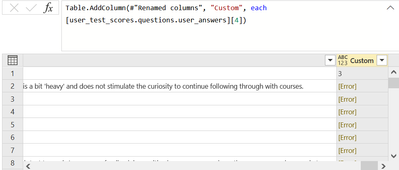
When I use this lookup formula I obviously get the number 3 because I insert in lookup field the number 4.
How can I solve this problem, extracting the correct answer whatever the number in the left column is?
Thanks a lot!
Solved! Go to Solution.
Thank you mate! It returns the "4" instead of the "3" (as I would prefer) but I can make some adjustments to extract the "3" number. Thanks!
Use Record.FieldNames(<record name>){0}
Thank you mate! It returns the "4" instead of the "3" (as I would prefer) but I can make some adjustments to extract the "3" number. Thanks!
Check out the November 2025 Power BI update to learn about new features.
Advance your Data & AI career with 50 days of live learning, contests, hands-on challenges, study groups & certifications and more!