cancel
Showing results for 
Search instead for 
Did you mean: 

The Power BI Data Visualization World Championships is back! It's time to submit your entry. Live now!

Reply
irshadanwar09
New Member

Extract Value

You have a CSV File that contains user complaints. The File contains a column named Logged. Logged contains the date and time each compliant

occurred. The data in Logged is in the following format: 2018-12-31 at 08:59.

You need to be able to analyze the complaints by the logged date and use a built-in date hierarchy.

What should you do?


A. Apply a transform to extract first 11 characters of the logged column.

B.  Create colum by example that start with 2018-12-31 and set the data type to new column to date .

1 ACCEPTED SOLUTION
v-yalanwu-msft
Community Support
Community Support

Hi, @irshadanwar09 ;

Is your problem solved?  If so, kindly mark the proper reply as a solution to help others having the similar issue and close the case. If not, let me know and I'll try to help you further.


Best Regards,
Community Support Team _ Yalan Wu
If this post helps, then please consider Accept it as the solution to help the other members find it more quickly.

View solution in original post

4 REPLIES 4
ShreyaPowerBI
Frequent Visitor

A is correct since the requirement is to create a data hierarchy 

v-yalanwu-msft
Community Support
Community Support

Hi, @irshadanwar09 ;

Is your problem solved?  If so, kindly mark the proper reply as a solution to help others having the similar issue and close the case. If not, let me know and I'll try to help you further.


Best Regards,
Community Support Team _ Yalan Wu
If this post helps, then please consider Accept it as the solution to help the other members find it more quickly.

v-yalanwu-msft
Community Support
Community Support

Hi, @irshadanwar09 ;

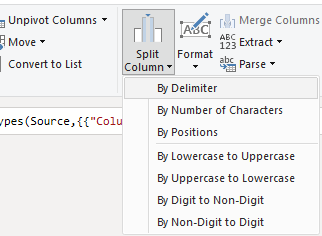
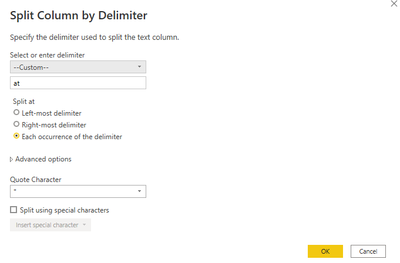
If I understand correctly,I will split the column.

vyalanwumsft_0-1664257142739.png

vyalanwumsft_1-1664257167164.png

The final show:

vyalanwumsft_2-1664257183874.png


Best Regards,
Community Support Team _ Yalan Wu
If this post helps, then please consider Accept it as the solution to help the other members find it more quickly.

amitchandak
Super User
Super User

@irshadanwar09 , In Power Query a new column


Date = DateTime.Date([Date Logged])


in Dax


Date = Datevalue([Date Logged])


And use that column. Prefer to use date table joined to this date with all required columns 


To get the best of the time intelligence function. Make sure you have a date calendar and it has been marked as the date in model view. Also, join it with the date column of your fact/s. Refer :radacad sqlbi My Video Series Appreciate your Kudos.

Share with Power BI Enthusiasts: Full Power BI Video (20 Hours) YouTube
Microsoft Fabric Series 60+ Videos YouTube
Microsoft Fabric Hindi End to End YouTube

Helpful resources

Announcements
Power BI DataViz World Championships

Power BI Dataviz World Championships

The Power BI Data Visualization World Championships is back! It's time to submit your entry.

January Power BI Update Carousel

Power BI Monthly Update - January 2026

Check out the January 2026 Power BI update to learn about new features.

FabCon Atlanta 2026 carousel

FabCon Atlanta 2026

Join us at FabCon Atlanta, March 16-20, for the ultimate Fabric, Power BI, AI and SQL community-led event. Save $200 with code FABCOMM.