Hi @volpinara
1.determinate the position of all the "-" : using List.PositionOfAny([ListColumn], Occurrence.All) ?
As tested, using List.PositionOfAny may cause errors.

2. to determinate the position of all the "-" , you could use Text.PositionOfAny
Add column->Custom column
Custom=Text.PositionOf([Name],"-")

Custom.1=Text.PositionOf([Name],"-",Occurrence.All)
[Custom] Returns the position of the first occurrence of the text value substring found in text,
[Custom.1] Returns the position of all occurrence.
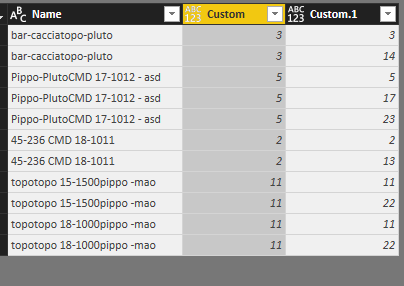
3. you could directly extract the "18-1000" substring
Assume your data has rows which have more than one string "18-1000" in each row, then you can extract each "18-1000".

Add column->Custom column
Custom=Text.PositionOf([Name],"18-1000",Occurrence.All)
Custom.1=if [Custom]=null then null else Text.Middle([Name], [Custom], 7)
Code in Advanced editor
let
    Source = Table.FromRows(Json.Document(Binary.Decompress(Binary.FromText("i45WSkos0k1OTE7OTCzJL8jXLcgpLclXitWJVgrILADyA0B8Z18XBUNzXUMDQyMFXYXE4hSwAhNTXSNjMwWwpAVI0hAsDDIGhBUMTXUNTQ0MCkDmKOjmJuajSYP0kCANE1GKjQUA", BinaryEncoding.Base64), Compression.Deflate)), let _t = ((type text) meta [Serialized.Text = true]) in type table [Name = _t]),
    #"Changed Type" = Table.TransformColumnTypes(Source,{{"Name", type text}}),
    #"Added Custom" = Table.AddColumn(#"Changed Type", "Custom", each Text.PositionOf([Name],"18-1000",Occurrence.All)),
    #"Expanded Custom" = Table.ExpandListColumn(#"Added Custom", "Custom"),
    #"Changed Type1" = Table.TransformColumnTypes(#"Expanded Custom",{{"Custom", Int64.Type}}),
    #"Added Custom1" = Table.AddColumn(#"Changed Type1", "Custom.1", each if [Custom]=null then null else Text.Middle([Name], [Custom], 7))
in
    #"Added Custom1"
Note: before add [Custom.1], please change the [Custom] to number data type.
Best Regards
Maggie


