This time we’re going bigger than ever. Fabric, Power BI, SQL, AI and more. We're covering it all. You won't want to miss it.
Learn moreLevel up your Power BI skills this month - build one visual each week and tell better stories with data! Get started
Dear.
I would appreciate your support for the following consultation.
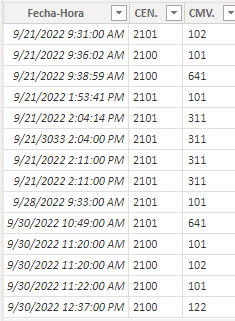
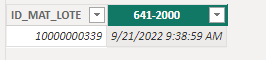
I have a table with movements on different dates and the column is ID_MAT_LOTE repeated, and what I am doing is creating a new Table and column with the DISTINCT formula. Additionally, I am placing the dates as columns with certain filter criteria. The problem arises that the formula of column 641-2000 is resulting in the date 21/09/2022 09:31:00, when it should be 21/09/2022 09:38:59 (attached image).
I use the CALCULATE formula because I can't use RELATED.
Please, I will appreciate your support to solve my doubt.
This is the formula of the image:
Solved! Go to Solution.
Hi @Syndicate_Admin ,
According to your description, here are my steps you can follow as a solution.
(1) This is my test data.
(2) We can create a calculated column.
641-2000 = CALCULATE(MIN('Table'[Fecha-Hora]),'Table'[CMV.]="641",CONTAINSSTRING('Table'[CEN.],"00"))
(3) Then the result is as follows.
Best Regards,
Neeko Tang
If this post helps, then please consider Accept it as the solution to help the other members find it more quickly.
Hi @Syndicate_Admin ,
According to your description, here are my steps you can follow as a solution.
(1) This is my test data.
(2) We can create a calculated column.
641-2000 = CALCULATE(MIN('Table'[Fecha-Hora]),'Table'[CMV.]="641",CONTAINSSTRING('Table'[CEN.],"00"))
(3) Then the result is as follows.
Best Regards,
Neeko Tang
If this post helps, then please consider Accept it as the solution to help the other members find it more quickly.
@Syndicate_Admin Sorry, having trouble following, can you post sample data as text and expected output?
Not really enough information to go on, please first check if your issue is a common issue listed here: https://community.powerbi.com/t5/Community-Blog/Before-You-Post-Read-This/ba-p/1116882
Also, please see this post regarding How to Get Your Question Answered Quickly: https://community.powerbi.com/t5/Community-Blog/How-to-Get-Your-Question-Answered-Quickly/ba-p/38490
The most important parts are:
1. Sample data as text, use the table tool in the editing bar
2. Expected output from sample data
3. Explanation in words of how to get from 1. to 2.
Check out the April 2026 Power BI update to learn about new features.
Sign up to receive a private message when registration opens and key events begin.
If you have recently started exploring Fabric, we'd love to hear how it's going. Your feedback can help with product improvements.
| User | Count |
|---|---|
| 35 | |
| 32 | |
| 25 | |
| 22 | |
| 18 |
| User | Count |
|---|---|
| 68 | |
| 36 | |
| 32 | |
| 25 | |
| 23 |