cancel
Showing results for 
Search instead for 
Did you mean: 

Try your skills in the Power BI Dataviz World Championship! Round one ends June 26. Join now

Reply
varunaggarwal30
Frequent Visitor

External Mapping for data mashup

Hi,


I am looking for a functionality in Power BI where I can externally map the multiple attributes to staging table attributes. There are multiple data sources with different structure and attribute names that needs to be added in one table. One way to do that is SSIS and connect the staging table to PowerBI directly. Is there any other way to map attributes in PowerBI directly ?


1 ACCEPTED SOLUTION
Anonymous
Not applicable

@varunaggarwal30,

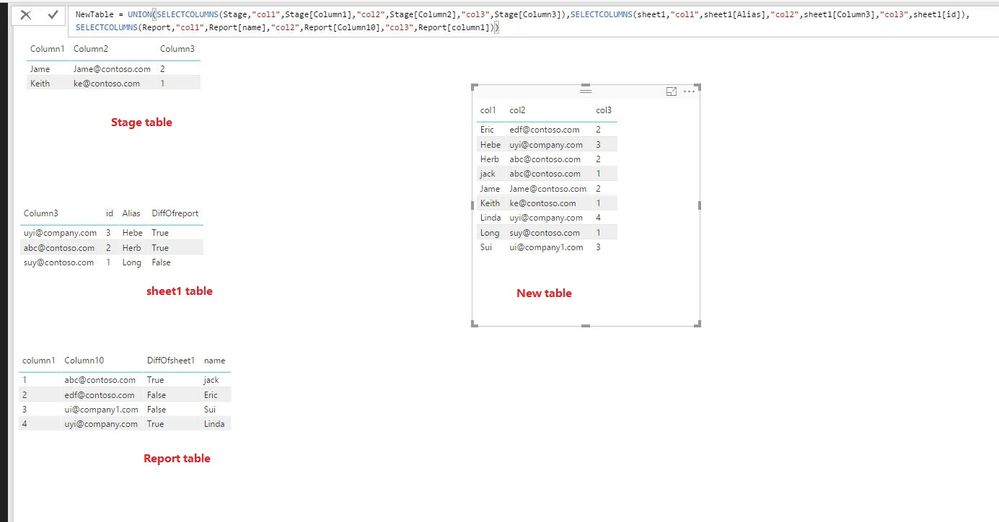
You can use DAX to create a new table, there is an example for your reference.

NewTable = UNION(SELECTCOLUMNS(Stage,"col1",Stage[Column1],"col2",Stage[Column2],"col3",Stage[Column3]),SELECTCOLUMNS(sheet1,"col1",sheet1[Alias],"col2",sheet1[Column3],"col3",sheet1[id]),SELECTCOLUMNS(Report,"col1",Report[name],"col2",Report[Column10],"col3",Report[column1]))


1.JPG

Regards,
Lydia

View solution in original post

5 REPLIES 5
Anonymous
Not applicable

@varunaggarwal30,

You can use DAX to create a new table, there is an example for your reference.

NewTable = UNION(SELECTCOLUMNS(Stage,"col1",Stage[Column1],"col2",Stage[Column2],"col3",Stage[Column3]),SELECTCOLUMNS(sheet1,"col1",sheet1[Alias],"col2",sheet1[Column3],"col3",sheet1[id]),SELECTCOLUMNS(Report,"col1",Report[name],"col2",Report[Column10],"col3",Report[column1]))


1.JPG

Regards,
Lydia

@Anonymous,


Is there any way we can have different column numbers and can add new columns from different sources. I tried add column option but it says union should have sam column

For Workaround I gave same columns in the all tables and kept them empty for non source table. Is there any cleaner way to do this?

Anonymous
Not applicable

@varunaggarwal30,

When using Union function, column number should be same from different tables.

Regards,
Lydia

@Anonymous Thanks!!!. I guess it should work.. 

Helpful resources

Announcements
Fabric Data Days is here Carousel

Fabric Data Days 2026

Don't miss out on Data Days, June 15 through August 7. Learn Fabric, Power BI, SQL, AI and more.

May Power BI Update Carousel

Power BI Monthly Update - May 2026

Check out the May 2026 Power BI update to learn about new features.

Power BI DataViz World Championships carousel

Power BI DataViz World Championships - June 2026

A new Power BI DataViz World Championship is coming this June! Don't miss out on submitting your entry.