cancel
Showing results for 
Search instead for 
Did you mean: 

The Power BI Data Visualization World Championships is back! Get ahead of the game and start preparing now! Learn more

Reply
Bordeaux
New Member

Extend data availability

Hello Microsoft community,


I hope I am in the right place.

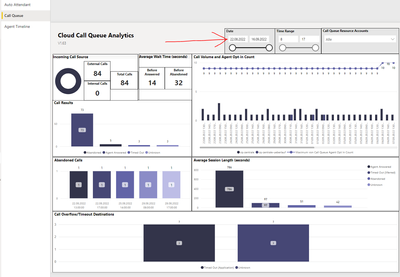
I would like to extend the cloud data availability to one year, right now its only a month. Is this possible?
It is about the following: https://www.microsoft.com/en-us/download/details.aspx?id=102291
"CQD Teams Auto Attendant & Call Queue Historical Report V1.63.pbit"

Bordeaux_0-1664886047034.png

I have zero experience in developing, please explain it simply.


Kind regards,


Bordeaux


1 ACCEPTED SOLUTION
Anonymous
Not applicable

Hi @Bordeaux ,

Known issue:

  • Only 28 days of history are available in the dashboard as call queue/auto attendant data is considered personal data and is subject to data privacy retention policies.

  • In some scenarios, the agent answered call count on the Cloud Call Queue Agent Timeline report may be different than the number of calls shown in the Teams client call history. The Teams client call history is correct. Support is investigating but there is no estimated time to repair available at this time.

  • 1 Incoming call source in the auto attendant and call queue graphs show the final call leg source rather than the initial call leg source. For example, if an auto attendant receives an external call and transfers the call to another auto attendant or call queue, the Incoming call source will be reported as Internal.

More details: Auto Attendant & Call Queue Historical Report - Microsoft Teams | Microsoft Learn


Best Regards

Community Support Team _ Polly


If this post helps, then please consider Accept it as the solution to help the other members find it more quickly.

View solution in original post

1 REPLY 1
Anonymous
Not applicable

Hi @Bordeaux ,

Known issue:

  • Only 28 days of history are available in the dashboard as call queue/auto attendant data is considered personal data and is subject to data privacy retention policies.

  • In some scenarios, the agent answered call count on the Cloud Call Queue Agent Timeline report may be different than the number of calls shown in the Teams client call history. The Teams client call history is correct. Support is investigating but there is no estimated time to repair available at this time.

  • 1 Incoming call source in the auto attendant and call queue graphs show the final call leg source rather than the initial call leg source. For example, if an auto attendant receives an external call and transfers the call to another auto attendant or call queue, the Incoming call source will be reported as Internal.

More details: Auto Attendant & Call Queue Historical Report - Microsoft Teams | Microsoft Learn


Best Regards

Community Support Team _ Polly


If this post helps, then please consider Accept it as the solution to help the other members find it more quickly.

Helpful resources

Announcements
Power BI DataViz World Championships

Power BI Dataviz World Championships

The Power BI Data Visualization World Championships is back! Get ahead of the game and start preparing now!

December 2025 Power BI Update Carousel

Power BI Monthly Update - December 2025

Check out the December 2025 Power BI Holiday Recap!

FabCon Atlanta 2026 carousel

FabCon Atlanta 2026

Join us at FabCon Atlanta, March 16-20, for the ultimate Fabric, Power BI, AI and SQL community-led event. Save $200 with code FABCOMM.