This time we’re going bigger than ever. Fabric, Power BI, SQL, AI and more. We're covering it all. You won't want to miss it.
Learn moreDid you hear? There's a new SQL AI Developer certification (DP-800). Start preparing now and be one of the first to get certified. Register now
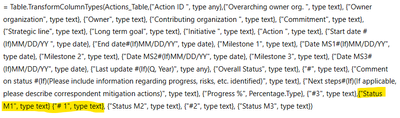
= Table.TransformColumnTypes(Actions_Table,{"Action ID ", type any},{"Overarching owner org. ", type text}, {"Owner organization", type text}, {"Owner", type text}, {"Contributing organization ", type text}, {"Commitment", type text}, {"Strategic line", type text}, {"Long term goal", type text}, {"Initiative ", type text}, {"Action ", type text}, {"Start date #(lf)MM/DD/YY ", type date}, {"End date#(lf)MM/DD/YY", type date}, {"Milestone 1", type text}, {"Date MS1#(lf)MM/DD/YY", type date}, {"Milestone 2", type text}, {"Date MS2#(lf)MM/DD/YY", type date}, {"Milestone 3", type text}, {"Date MS3#(lf)MM/DD/YY", type date}, {"Last update #(lf)(Q, Year)", type any}, {"Overall Status", type text}, {"#", type text}, {"Comment on status #(lf)(Please include information regarding progress, risks, etc. identified)", type text}, {"Next steps#(lf)(If applicable, please describe correspondent mitigation actions)", type text}, {"Progress %", Percentage.Type}, {"#3", type text},{"Status M1", type text} {"# 1", type text}, {"Status M2", type text}, {"#2", type text}, {"Status M3", type text})
Solved! Go to Solution.
Hi @Dounia ,
Upon my inspection, I have found that the possible reason for your error is the missing comma in {“Status M1”, type text} and {“# 1”, type text}.
After making the correction, please run the query again to verify that the error has been resolved.
If you have any other questions please feel free to contact me.
Best Regards,
Yang
Community Support Team
If there is any post helps, then please consider Accept it as the solution to help the other members find it more quickly.
If I misunderstand your needs or you still have problems on it, please feel free to let us know. Thanks a lot!
Hi @Dounia ,
Upon my inspection, I have found that the possible reason for your error is the missing comma in {“Status M1”, type text} and {“# 1”, type text}.
After making the correction, please run the query again to verify that the error has been resolved.
If you have any other questions please feel free to contact me.
Best Regards,
Yang
Community Support Team
If there is any post helps, then please consider Accept it as the solution to help the other members find it more quickly.
If I misunderstand your needs or you still have problems on it, please feel free to let us know. Thanks a lot!
Thanks very much!
Check out the April 2026 Power BI update to learn about new features.
If you have recently started exploring Fabric, we'd love to hear how it's going. Your feedback can help with product improvements.
A new Power BI DataViz World Championship is coming this June! Don't miss out on submitting your entry.
| User | Count |
|---|---|
| 38 | |
| 38 | |
| 31 | |
| 22 | |
| 15 |
| User | Count |
|---|---|
| 74 | |
| 61 | |
| 31 | |
| 31 | |
| 23 |