cancel
Showing results for 
Search instead for 
Did you mean: 

The Power BI Data Visualization World Championships is back! Get ahead of the game and start preparing now! Learn more

Reply
Anonymous
Not applicable

Expression.Error: We cannot convert a value of type Function to type Number.

Hello


Any idea why the below results in error?


= Table.RemoveRows(#"Changed Type", each not Text.Contains([A], "some1") and [B]<0)


Expression.Error: We cannot convert a value of type Function to type Number.
Details:
Value=[Function]
Type=[Type]


I do have specified in a previous step [A] to be text and [B] to be integer.


Thanks!

1 ACCEPTED SOLUTION
Anonymous
Not applicable

Hi  @Anonymous , 


As far as I know "each not Text.Contains([A], "some1") and [B]<0" part works as a function.

As  HotChilli mentioned Table.RemoveRows will use number in second part. 

Table.RemoveRows(table as table, offset as number, optional count as nullable number) as table

Table.SelectRows will use function in second part. So I suggest you to use Table.SelectRows in your code, it will work.

Table.SelectRows(table as table, condition as function) as table

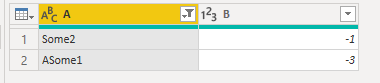
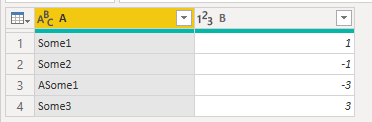
My Sample: 
RicoZhou_1-1650012856279.png

Result is as below.

RicoZhou_0-1650012850121.png

M Code:

let
    Source = Table.FromRows(Json.Document(Binary.Decompress(Binary.FromText("i45WCs7PTTVU0lEyVIrVgfCMgDxdCNcRJqtrDJc2BnKBvFgA", BinaryEncoding.Base64), Compression.Deflate)), let _t = ((type nullable text) meta [Serialized.Text = true]) in type table [A = _t, B = _t]),
    #"Changed Type" = Table.TransformColumnTypes(Source,{{"A", type text}, {"B", Int64.Type}}),
    #"Remove rows" = Table.SelectRows(#"Changed Type", each not Text.Contains([A], "some1") and [B]<0)
in
    #"Remove rows"


Best Regards,
Rico Zhou


If this post helps, then please consider Accept it as the solution to help the other members find it more quickly.


View solution in original post

3 REPLIES 3
Anonymous
Not applicable

@HotChilli  but the same applies to Table.SelectRows ?

Anonymous
Not applicable

Hi  @Anonymous , 


As far as I know "each not Text.Contains([A], "some1") and [B]<0" part works as a function.

As  HotChilli mentioned Table.RemoveRows will use number in second part. 

Table.RemoveRows(table as table, offset as number, optional count as nullable number) as table

Table.SelectRows will use function in second part. So I suggest you to use Table.SelectRows in your code, it will work.

Table.SelectRows(table as table, condition as function) as table

My Sample: 

RicoZhou_1-1650012856279.png

Result is as below.

RicoZhou_0-1650012850121.png

M Code:

let
    Source = Table.FromRows(Json.Document(Binary.Decompress(Binary.FromText("i45WCs7PTTVU0lEyVIrVgfCMgDxdCNcRJqtrDJc2BnKBvFgA", BinaryEncoding.Base64), Compression.Deflate)), let _t = ((type nullable text) meta [Serialized.Text = true]) in type table [A = _t, B = _t]),
    #"Changed Type" = Table.TransformColumnTypes(Source,{{"A", type text}, {"B", Int64.Type}}),
    #"Remove rows" = Table.SelectRows(#"Changed Type", each not Text.Contains([A], "some1") and [B]<0)
in
    #"Remove rows"


Best Regards,
Rico Zhou


If this post helps, then please consider Accept it as the solution to help the other members find it more quickly.


HotChilli
Super User
Super User

Table.RemoveRows   takes a table and a number as parameters.  The code here passes a function as the 2nd parameter.

Helpful resources

Announcements
Power BI DataViz World Championships

Power BI Dataviz World Championships

The Power BI Data Visualization World Championships is back! Get ahead of the game and start preparing now!

December 2025 Power BI Update Carousel

Power BI Monthly Update - December 2025

Check out the December 2025 Power BI Holiday Recap!

FabCon Atlanta 2026 carousel

FabCon Atlanta 2026

Join us at FabCon Atlanta, March 16-20, for the ultimate Fabric, Power BI, AI and SQL community-led event. Save $200 with code FABCOMM.