cancel
Showing results for 
Search instead for 
Did you mean: 

The Power BI Data Visualization World Championships is back! Get ahead of the game and start preparing now! Learn more

Reply
MarkTeviotdale
Frequent Visitor

Exporting data from visual rather than raw data

Hi All


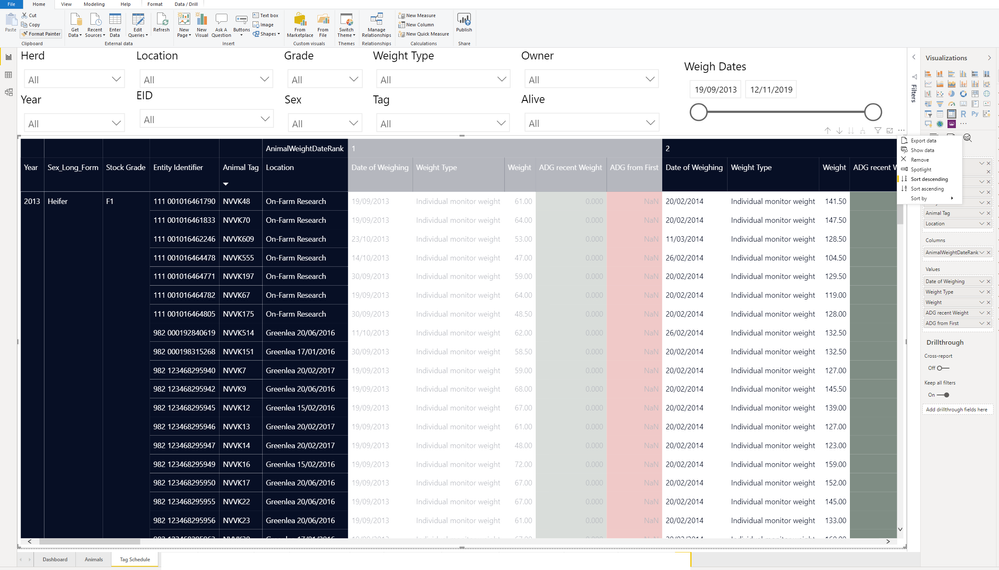
We use a lot of matrix visualisation's to display data for our client. The client is now requesting to export that visual so using the data that is displayed and filtered. We can export the data that is going in, but we cannot export in a nice table, formatted the same as the matrix graphic below. Is there a way to do this ? or do you need to switch to a different visual to accomplish this.


Untitled.png


Thanks

Mark


1 ACCEPTED SOLUTION

Hi @V-lianl-msft 


Sorry, I put in a support request through Azure support for this. They have also confirmed this is by design so workarounds need to be used to achieve this requirement.


Thanks

Mark

View solution in original post

5 REPLIES 5
MarkTeviotdale
Frequent Visitor

Thanks @Stemar_Aubert  and @V-lianl-msft  for your replies to my query. I will take a look at the documentation you have provided.


Cheers

Mark

 
Is this problem sloved?
If not, please let me know.
 
Best Regards,
Liang
If this post helps, then please consider Accept it as the solution to help the other members find it more quickly.

Hi @V-lianl-msft 


Sorry, I put in a support request through Azure support for this. They have also confirmed this is by design so workarounds need to be used to achieve this requirement.


Thanks

Mark

Stemar_Aubert
Resolver I
Resolver I

The export data function yields .CSV files. You can create a template in Excel Power Query that will take care of the import/format.

Not ideal, but as said before, Power BI isn't exporting formatted data.

V-lianl-msft
Community Support
Community Support

Hi @MarkTeviotdale ,


Unfortunately this can not be achieved in power bi desktop. But you can try to publish your report to web-> pin the matrix to a tile-> print the tile. For more details, please refer to this documentation.


Best Regards,

Liang

If this post helps, then please consider Accept it as the solution to help the other members find it more quickly

Helpful resources

Announcements
Power BI DataViz World Championships

Power BI Dataviz World Championships

The Power BI Data Visualization World Championships is back! Get ahead of the game and start preparing now!

December 2025 Power BI Update Carousel

Power BI Monthly Update - December 2025

Check out the December 2025 Power BI Holiday Recap!

FabCon Atlanta 2026 carousel

FabCon Atlanta 2026

Join us at FabCon Atlanta, March 16-20, for the ultimate Fabric, Power BI, AI and SQL community-led event. Save $200 with code FABCOMM.