cancel
Showing results for 
Search instead for 
Did you mean: 

Get Fabric certified for FREE! Don't miss your chance! Learn more

Reply
Anonymous
Not applicable

Export to Excel Function

Hello,


I have published a report on the server side and I am trying to click on my matrix visuals to see the "Export To Excel" function. However, the visual is not showing that option to me at all. (I can however see it on the desktop version).


The export to excel function is enabled for the report as well under reports->Setiings->Export to excel.


Can someone please help me with this? I do not understand why I am not able to see the export option. Thanks!

4 REPLIES 4
v-danhe-msft
Microsoft Employee
Microsoft Employee

Hi @Anonymous,

Could you please tell me if your problem has been solved? If it is, could you please mark the helpful replies as Answered to close this topic?


Regards,

Daniel He

Community Support Team _ Daniel He
If this post helps, then please consider Accept it as the solution to help the other members find it more quickly.
v-danhe-msft
Microsoft Employee
Microsoft Employee

Hi @Anonymous,

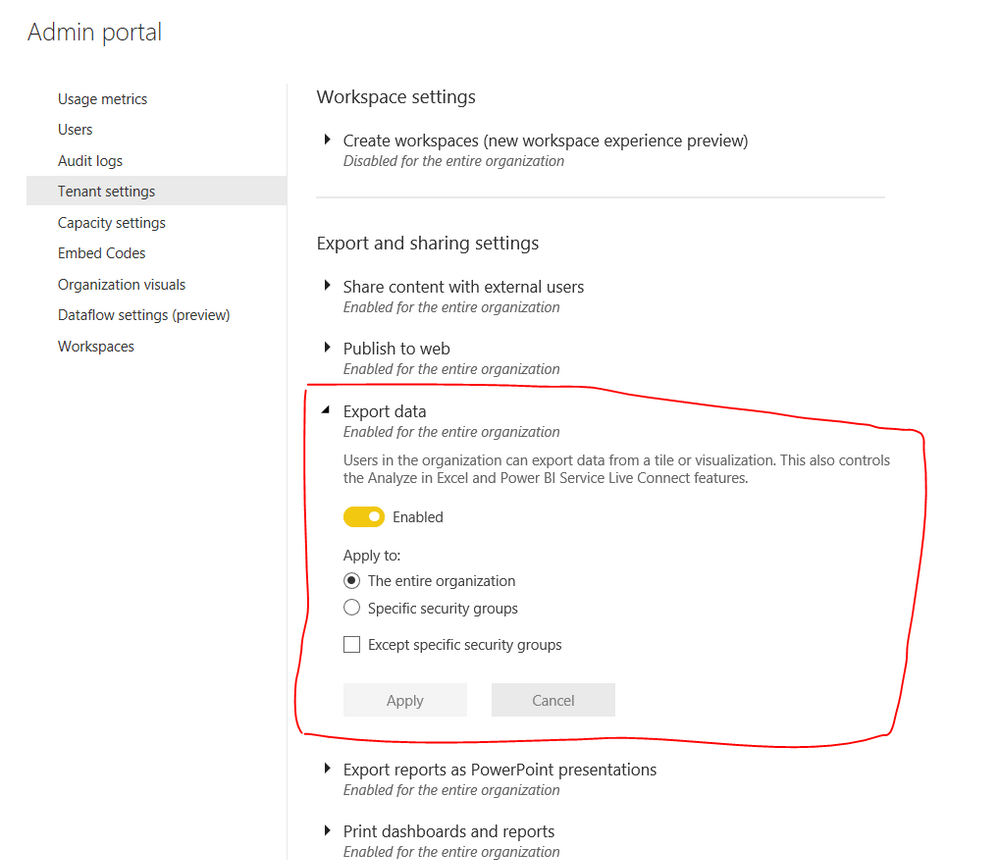
Coud you have checked if your organization have enabled the "Export data" function in Admin portal?

1.PNG

Regards,

Daniel He

Community Support Team _ Daniel He
If this post helps, then please consider Accept it as the solution to help the other members find it more quickly.
Anonymous
Not applicable

@v-danhe-msft Hey yes, thats all fine. In fact when i created a table visual in the same report to test, it does give me the option. But the matrix visuals were not showing the option.

Hi @Anonymous,

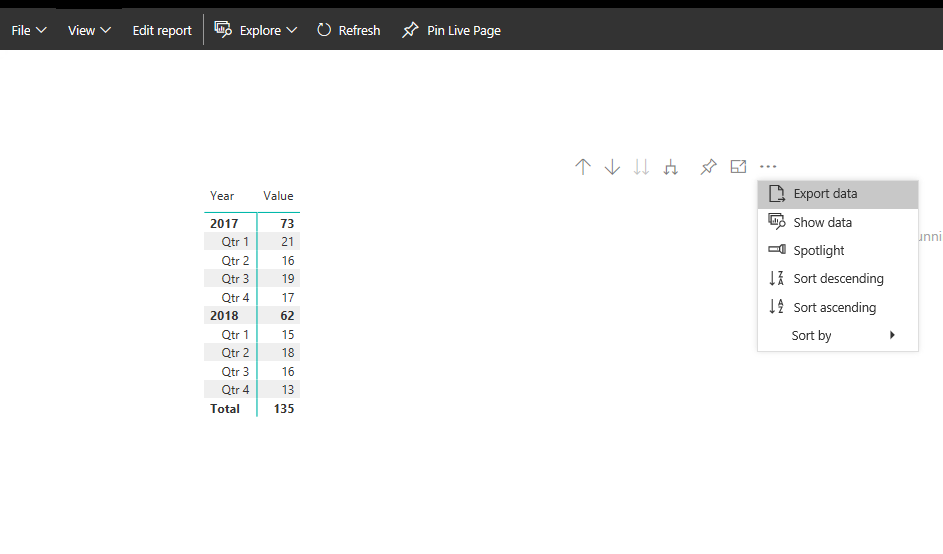
Based on my test, it could work on my side:

1.PNG

Could you please check below link if there is any limitation have applied to your report:

https://docs.microsoft.com/en-us/power-bi/visuals/power-bi-visualization-export-data#limitations-and-considerations


Regards,

Daniel He

Community Support Team _ Daniel He
If this post helps, then please consider Accept it as the solution to help the other members find it more quickly.

Helpful resources

Announcements
Join our Fabric User Panel

Join our Fabric User Panel

Share feedback directly with Fabric product managers, participate in targeted research studies and influence the Fabric roadmap.

February Power BI Update Carousel

Power BI Monthly Update - February 2026

Check out the February 2026 Power BI update to learn about new features.

FabCon Atlanta 2026 carousel

FabCon Atlanta 2026

Join us at FabCon Atlanta, March 16-20, for the ultimate Fabric, Power BI, AI and SQL community-led event. Save $200 with code FABCOMM.