Join us at FabCon Atlanta from March 16 - 20, 2026, for the ultimate Fabric, Power BI, AI and SQL community-led event. Save $200 with code FABCOMM.
Register now!The Power BI Data Visualization World Championships is back! Get ahead of the game and start preparing now! Learn more
Hi all,
I want to export my report in xls/xlsx format!
How can I do?
Kind regards.
Solved! Go to Solution.
Currently the only format supported for exporting data for a visual is .csv, which you can then open in Excel and convert to .xlsx.
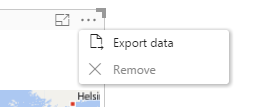
When you click on a visual, you see the operations supported in the top right. Click on "Export data" and export to .csv.
Thanks,
Sam Lester (MSFT)
Hi,
I don't find the link for Accept as Solution.
Is ok your answer Sam.
Thank
Currently the only format supported for exporting data for a visual is .csv, which you can then open in Excel and convert to .xlsx.
When you click on a visual, you see the operations supported in the top right. Click on "Export data" and export to .csv.
Thanks,
Sam Lester (MSFT)
Hi,
I don't find the link for Accept as Solution.
Is ok your answer Sam.
Thank
Check out the November 2025 Power BI update to learn about new features.
Advance your Data & AI career with 50 days of live learning, contests, hands-on challenges, study groups & certifications and more!