This time we’re going bigger than ever. Fabric, Power BI, SQL, AI and more. We're covering it all. You won't want to miss it.
Learn moreDid you hear? There's a new SQL AI Developer certification (DP-800). Start preparing now and be one of the first to get certified. Register now
Hi,
i created 2 dimensional matrix table in powerbi , when i trying to export that to excel , it is exported the raw data. Is it possible to get the excel file in the same format as showing in power bi desktop/services( matrix form). Kindly give some solutions.
Solved! Go to Solution.
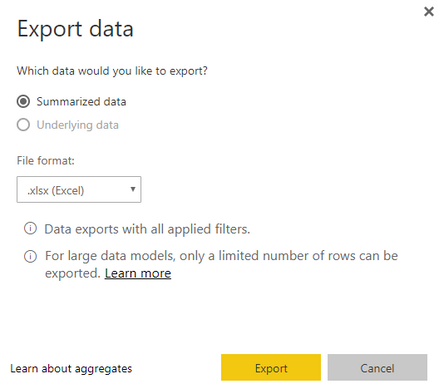
You can first publish your report to power bi service and then click the ellipse on the right-top hand of the matrix/table visual, then select "Summarized data".
Community Support Team _ Jimmy Tao
If this post helps, then please consider Accept it as the solution to help the other members find it more quickly.
You can first publish your report to power bi service and then click the ellipse on the right-top hand of the matrix/table visual, then select "Summarized data".
Community Support Team _ Jimmy Tao
If this post helps, then please consider Accept it as the solution to help the other members find it more quickly.
after export in excel use pivot table.
If repeating, use macro or Power Query
Check out the April 2026 Power BI update to learn about new features.
Sign up to receive a private message when registration opens and key events begin.
If you have recently started exploring Fabric, we'd love to hear how it's going. Your feedback can help with product improvements.
| User | Count |
|---|---|
| 34 | |
| 31 | |
| 25 | |
| 20 | |
| 16 |
| User | Count |
|---|---|
| 61 | |
| 49 | |
| 28 | |
| 23 | |
| 23 |