cancel
Showing results for 
Search instead for 
Did you mean: 

Get Fabric Certified for FREE during Fabric Data Days. Don't miss your chance! Request now

Reply
Anonymous
Not applicable

Explain increase feature in Line chart

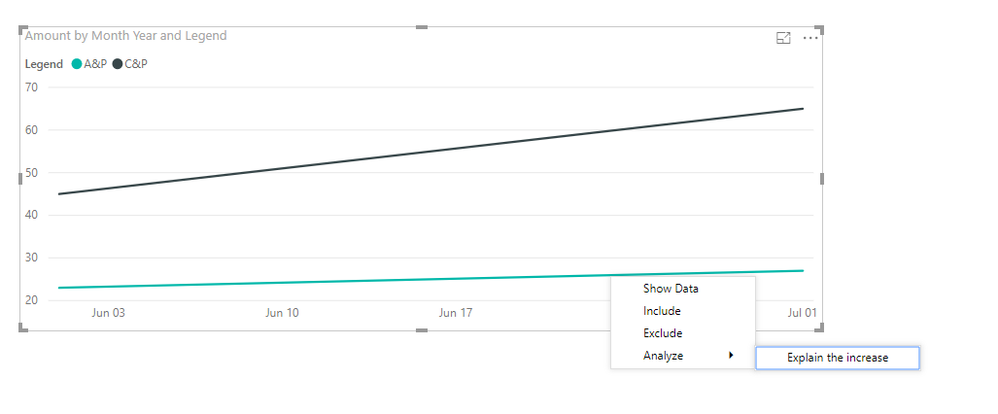
Hey, I have the following Line chart visual


Explain increase doubt.PNGRight clickin gon any point on the line gets the Analyze -> Explain the increase feature.


1) When i publish this to the server as it is, it shows this feature in the server as well.

2) However, if i publish the same with RLS enabled in the desktop under Modelling - > Manage Roles and then publish to the server, the visual does not show this Analyze feature in the visual even if i am an ADMIN on the workspace.


Is there anything that can be done about this?


Thanks!


4 REPLIES 4
v-juanli-msft
Community Support
Community Support

Hi @Anonymous

I make a test as your steps, it finally has the same result as yours.

I would go to confirm if it is by design or a bug.


Best Regards

maggie

Anonymous
Not applicable

@v-juanli-msft Thank You!

Hi @Anonymous

I'm afraid currently it is impossible to use Anlyze->explain increase feature when setting RLS.

Please see the limitations below

https://docs.microsoft.com/en-us/power-bi/desktop-insights

he following list is the collection of currently unsupported scenarios for explain the increase/decrease:

  • Include/exclude filters
  • Measure filters
  • Non-additive measures and aggregates
  • Non-numeric measures
  • Use of "Show value as"
  • Filtered measures - filtered measures are visual level calculations with a specific filter applied (for example, Total Sales for France), and are used on some of hte visuals created by the insights feature

When setting RLS for a dataset, it does something like adding a filter for the dataset for different user.


Best Regards

maggie

Anonymous
Not applicable

@v-juanli-msft Thank you!

Helpful resources

Announcements
November Power BI Update Carousel

Power BI Monthly Update - November 2025

Check out the November 2025 Power BI update to learn about new features.

Fabric Data Days Carousel

Fabric Data Days

Advance your Data & AI career with 50 days of live learning, contests, hands-on challenges, study groups & certifications and more!

FabCon Atlanta 2026 carousel

FabCon Atlanta 2026

Join us at FabCon Atlanta, March 16-20, for the ultimate Fabric, Power BI, AI and SQL community-led event. Save $200 with code FABCOMM.

Top Solution Authors
Top Kudoed Authors