Don't miss your chance to take exam DP-600 or DP-700 on us!
Request nowLearn from the best! Meet the four finalists headed to the FINALS of the Power BI Dataviz World Championships! Register now
Hi, I have a little problem expanding table after a merge
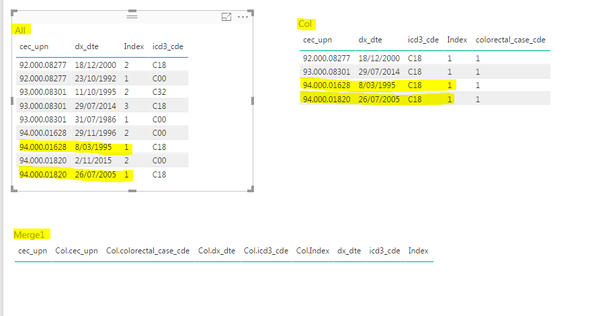
So here have three visualizations
As you can see two record records match on the highlighted columns, but no rows in the Merge1 table.
This is how I got to this result.
= Table.NestedJoin(All,{"cec_upn", "dx_dte", "Index"},Col,{"cec_upn", "dx_dte", "Index"},"Col",JoinKind.Inner)
All good sofar.
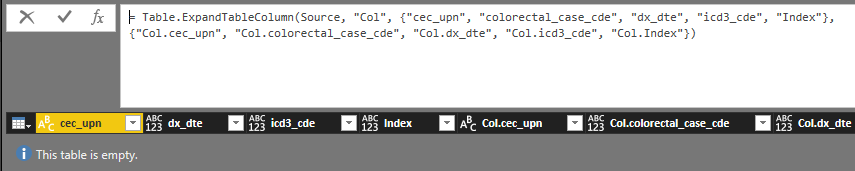
I then did
= Table.ExpandTableColumn(Source, "Col", {"cec_upn", "colorectal_case_cde", "dx_dte", "icd3_cde", "Index"}, {"Col.cec_upn", "Col.colorectal_case_cde", "Col.dx_dte", "Col.icd3_cde", "Col.Index"})
v
Everything was done thru the UI.
Can you explain why I get an empty table.
Thanks Fred
Solved! Go to Solution.
Hi Fnoorda,
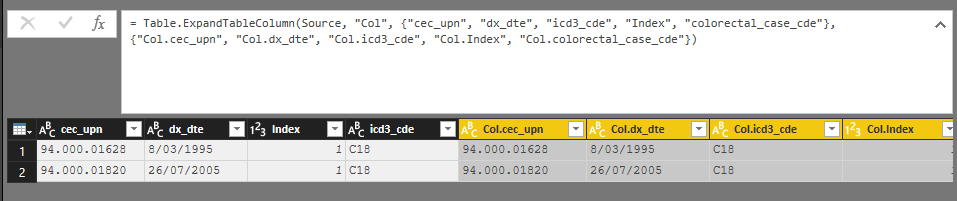
I have test your issue, and it works after I merged two tables:
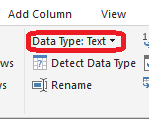
One possible condition in your case is that the data type of columns in table All doesn’t match the data type of columns in table Col. Please check if data types of columns are same in two tables.
Please refer to my PBIX file: https://www.dropbox.com/s/clyn58d40vpphtn/For%20Fnoorda.pbix?dl=0
Best Regards,
Jimmy Tao
Hi Fnoorda,
I have test your issue, and it works after I merged two tables:
One possible condition in your case is that the data type of columns in table All doesn’t match the data type of columns in table Col. Please check if data types of columns are same in two tables.
Please refer to my PBIX file: https://www.dropbox.com/s/clyn58d40vpphtn/For%20Fnoorda.pbix?dl=0
Best Regards,
Jimmy Tao
Thanks Jimmy that does solve the problem. Thanks for your help. Powerbi does seem to change the data type sometimes from whatever it is to this "any type" I asume that equtes to variant.
Thanks again.
Share feedback directly with Fabric product managers, participate in targeted research studies and influence the Fabric roadmap.
Check out the February 2026 Power BI update to learn about new features.
| User | Count |
|---|---|
| 53 | |
| 45 | |
| 38 | |
| 16 | |
| 15 |
| User | Count |
|---|---|
| 83 | |
| 70 | |
| 38 | |
| 28 | |
| 26 |