

cancel
Showing results for 
Search instead for 
Did you mean: 

Did you hear? There's a new SQL AI Developer certification (DP-800). Start preparing now and be one of the first to get certified. Register now

Reply
StuartSmith
Power Participant
Power Participant

Expandable\Shrink Table Row

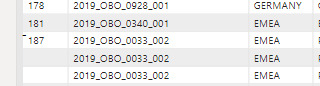
Another day, another question. I have a table that for the first colunm contains project id's, of which might be 1 row or multiple row.  I would to group all the rows with the same code together and have something similar to the below, where if a code has multiple row , you can expand\compress the rows.  I have tried the matrix tool, but it either doesnt do what I want it to do or cant.


Any other ways to achieve the below or similar?


1.png


2.png

6 REPLIES 6
edhans
Community Champion
Community Champion

@StuartSmith if the matrix visual is the solution that works for you from @VijayP that is great. If not, can you provide us with some data to work with?

How to get good help fast. Help us help you.
How to Get Your Question Answered Quickly
How to provide sample data in the Power BI Forum


Did I answer your question? Mark my post as a solution!
Did my answers help arrive at a solution? Give it a kudos by clicking the Thumbs Up!

DAX is for Analysis. Power Query is for Data Modeling


Proud to be a Super User!

MCSA: BI Reporting
VijayP
Super User
Super User

@StuartSmith 

Use Matrix to get this effect!


Did I answer your question? Mark my post as a solution! Appreciate your Kudos!!
MY Blog || My YouTube Channel || Connect with me on Linkedin || My Latest Data Story - Ageing Analysis

Proud to be a Super User!


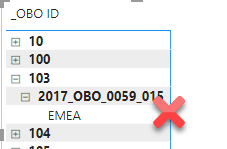
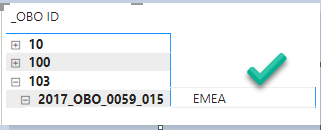
But I can only get the matrix to drill down ever item, but I only want it to drill down once.


2020-09-18_16-32-55.png2020-09-18_16-36-55.png


Hope that makes sense.

@StuartSmith 

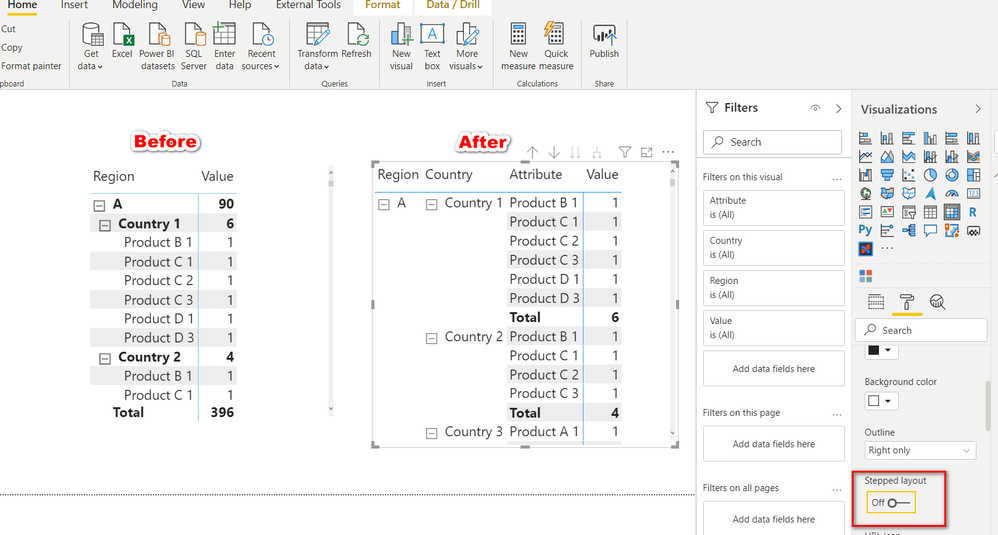
To get the effect where you shown a Gree Tick . After creating Matrix goto matrix properties and goto Row headers and Switch off the Stepped layout so that you will get your requird view

As shown in pic before and after

2020-09-18_211607.png


Did I answer your question? Mark my post as a solution! Appreciate your Kudos!!
MY Blog || My YouTube Channel || Connect with me on Linkedin || My Latest Data Story - Ageing Analysis

Proud to be a Super User!


@StuartSmith 

Once you set up Matrix  you can set up bookmark to get the effect permanent and dynamic as well. 

Apart from Matrix I donot see any other such option to expand or collapse data

@edhans  What is your suggestion!


Did I answer your question? Mark my post as a solution! Appreciate your Kudos!!
MY Blog || My YouTube Channel || Connect with me on Linkedin || My Latest Data Story - Ageing Analysis

Proud to be a Super User!


edhans
Community Champion
Community Champion

@StuartSmith ,

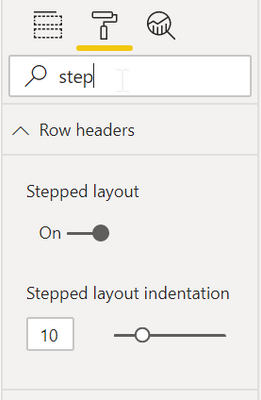
By default, in a Matrix Stepped Layout is on. That may not be waht you want. You can turn it off in the formatting pane for the visual.

edhans_0-1600444137115.png

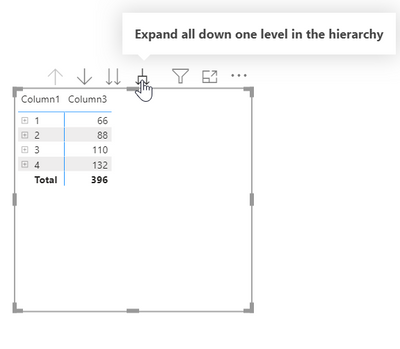
You can also drill down in all fields one level in one click all the way with the single-to-double-down-arrow button.

edhans_1-1600444317053.png

In the visual header section of the formatting pane for the visual, make sure Expand to Next Level is on. You can turn the others off. You will not see this in the desktop though, but on the service, the other drill down buttons will be removed.

edhans_2-1600444360412.png

Or, the bookmark suggestion by @VijayP will also work. Additionally, if you drill down in your desktop and publish, that is what the users will see, so they will not need to drill down.


Did I answer your question? Mark my post as a solution!
Did my answers help arrive at a solution? Give it a kudos by clicking the Thumbs Up!

DAX is for Analysis. Power Query is for Data Modeling


Proud to be a Super User!

MCSA: BI Reporting

Helpful resources

Announcements
April Power BI Update Carousel

Power BI Monthly Update - April 2026

Check out the April 2026 Power BI update to learn about new features.

New to Fabric survey Carousel

New to Fabric Survey

If you have recently started exploring Fabric, we'd love to hear how it's going. Your feedback can help with product improvements.

Power BI DataViz World Championships carousel

Power BI DataViz World Championships - June 2026

A new Power BI DataViz World Championship is coming this June! Don't miss out on submitting your entry.

FabCon and SQLCon Highlights Carousel

FabCon & SQLCon Highlights

Experience the highlights from FabCon & SQLCon, available live and on-demand starting April 14th.