
cancel
Showing results for 
Search instead for 
Did you mean: 

Get Fabric Certified for FREE during Fabric Data Days. Don't miss your chance! Request now

Reply
smerchant
Helper I
Helper I

Expand Column - REST API JSON Records

I have bring data to PowerBI through an REST API Endpoint.  I have two questions:


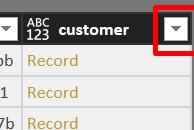
1) How do I expand the customer column so I get the value only (there are two column the customer records link/values) (Picture 1)

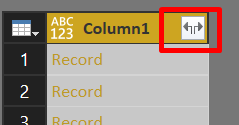
2) Why do I see 'expand' icon (two arrow) in some columns which allow me to pick the column and not in other column e.g. customer (Picture 2)


customerrecords.png


expandcolumn.png


1 ACCEPTED SOLUTION
Anonymous
Not applicable

@smerchant,

The column with two arrow contains all the fields recorded in your JSON file, and some fields(e.g. customer ) contain nested arrays, these fields only have one arrow after you import data from JSON to Power BI Desktop.

To expand the customer column, please follow hugoberry's suggestions in this similar thread.


Regards,
Lydia Zhang

View solution in original post

2 REPLIES 2
Anonymous
Not applicable

@smerchant,

The column with two arrow contains all the fields recorded in your JSON file, and some fields(e.g. customer ) contain nested arrays, these fields only have one arrow after you import data from JSON to Power BI Desktop.

To expand the customer column, please follow hugoberry's suggestions in this similar thread.


Regards,
Lydia Zhang

Hello, 


Taking this further, I have 20 JSON files with 20 columns each to import. Rather than click, click, click, what is the programmatic method for importing these?


powerBILineChart15.pngpowerBILineChart16.png


Specifically

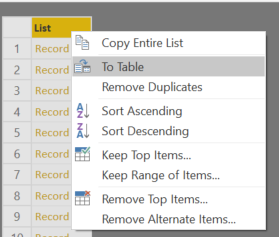
  • How do I convert JSON to table
  • Expand all columns
  • Drop some columns
  • Rename some columns

This is all manual at the moment.


Thank you!

Helpful resources

Announcements
November Power BI Update Carousel

Power BI Monthly Update - November 2025

Check out the November 2025 Power BI update to learn about new features.

Fabric Data Days Carousel

Fabric Data Days

Advance your Data & AI career with 50 days of live learning, contests, hands-on challenges, study groups & certifications and more!

FabCon Atlanta 2026 carousel

FabCon Atlanta 2026

Join us at FabCon Atlanta, March 16-20, for the ultimate Fabric, Power BI, AI and SQL community-led event. Save $200 with code FABCOMM.

Top Solution Authors
Top Kudoed Authors