Don't miss your chance to take the Fabric Data Engineer (DP-600) exam for FREE! Find out how by attending the DP-600 session on April 23rd (pacific time), live or on-demand.
Learn moreJoin the FabCon + SQLCon recap series. Up next: Power BI, Real-Time Intelligence, IQ and AI, and Data Factory take center stage. All sessions are available on-demand after the live show. Register now
Hi,
One of the things that I'm trying to find a Query from Power BI Desktop to run in SSMS:
- I have a SQL Server database that has two tables, a customer table and an invoice table
- I'd like to bring these into PBI together to build some dashboards, reports, etc.
- The primary keys in both are a Company ID and a Customer ID
-If its Crystal Report or SSRS, we can pull the Query (with tables and joins) and can be executable in SSMS. However, In power BI I have to go to each Query and select Source to get the info. But not a executable query
Hi @sandeepk66,
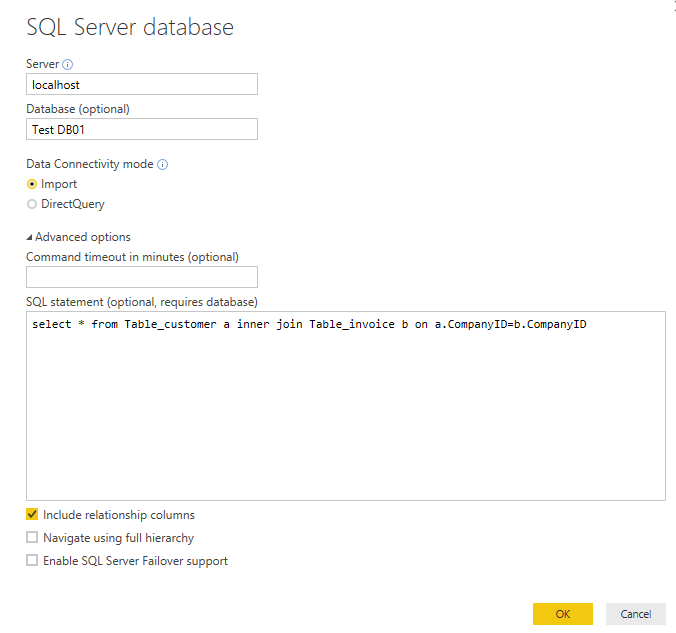
SQL query is also execuable in Power BI desktop. You can input the SQL Query when creating Data Source connection as is shown in below image. Then, a Joined table will be loaded into Power BI rather than multiple separate tables.
Best regards,
Yuliana Gu
Check out the April 2026 Power BI update to learn about new features.
If you have recently started exploring Fabric, we'd love to hear how it's going. Your feedback can help with product improvements.
A new Power BI DataViz World Championship is coming this June! Don't miss out on submitting your entry.
| User | Count |
|---|---|
| 48 | |
| 46 | |
| 41 | |
| 20 | |
| 17 |
| User | Count |
|---|---|
| 70 | |
| 69 | |
| 32 | |
| 27 | |
| 26 |