FabCon is coming to Atlanta
Join us at FabCon Atlanta from March 16 - 20, 2026, for the ultimate Fabric, Power BI, AI and SQL community-led event. Save $200 with code FABCOMM.
Register now!- Power BI forums
- Get Help with Power BI
- Desktop
- Service
- Report Server
- Power Query
- Mobile Apps
- Developer
- DAX Commands and Tips
- Custom Visuals Development Discussion
- Health and Life Sciences
- Power BI Spanish forums
- Translated Spanish Desktop
- Training and Consulting
- Instructor Led Training
- Dashboard in a Day for Women, by Women
- Galleries
- Data Stories Gallery
- Themes Gallery
- Contests Gallery
- QuickViz Gallery
- Quick Measures Gallery
- Visual Calculations Gallery
- Notebook Gallery
- Translytical Task Flow Gallery
- TMDL Gallery
- R Script Showcase
- Webinars and Video Gallery
- Ideas
- Custom Visuals Ideas (read-only)
- Issues
- Issues
- Events
- Upcoming Events
The Power BI Data Visualization World Championships is back! Get ahead of the game and start preparing now! Learn more
- Power BI forums
- Forums
- Get Help with Power BI
- Desktop
- Average Leave from Work Days
- Subscribe to RSS Feed
- Mark Topic as New
- Mark Topic as Read
- Float this Topic for Current User
- Bookmark
- Subscribe
- Printer Friendly Page


- Mark as New
- Bookmark
- Subscribe
- Mute
- Subscribe to RSS Feed
- Permalink
- Report Inappropriate Content
Excluding an average of Work Days over Actual Work Days
My scenario is I have multiple employees (1500) working across multiple projects (6000+ pa) nationally (different public holiday dates) and various types of leave, e.g. 4wks annual, careers leave, volunteer leave, sick leave, etc etc.....Ans of course none of my data sources actually align or provide me with the necessary data.
So, to keep things simple, I am looking for your expert advice on a DAX solution/ formular to average out all potential leave = 42 days per calendar year @ 3.5 days per month as non work days
I have a 'Date Table' that has a measure based on work days Being based on Mon to Fri & another Colin calculating work days * 7.35 (hrs worked per day)
What I now need to include is leave work days, e.g. 23days = 19.5days & hours are 169 to
Any and all advice greatly appreciated
Solved! Go to Solution.


- Mark as New
- Bookmark
- Subscribe
- Mute
- Subscribe to RSS Feed
- Permalink
- Report Inappropriate Content
Hi,
You may download my solution file from here.
Hope this helps.
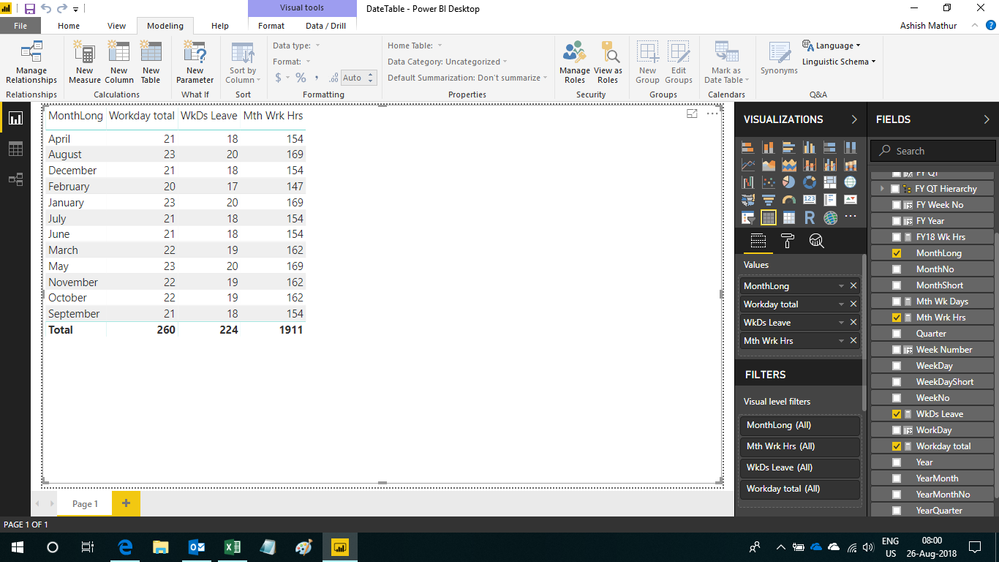
Regards,
Ashish Mathur
http://www.ashishmathur.com
https://www.linkedin.com/in/excelenthusiasts/
- Mark as New
- Bookmark
- Subscribe
- Mute
- Subscribe to RSS Feed
- Permalink
- Report Inappropriate Content
Hello Gurus
I have a Date Table that has work days and work hours of 7.35, what I am wanting to do is exclude public holidays and all leave based on an average of days, not actual dates (due to having a large national work force and not having leave data available).
Averaging out unavailable days = 42 per year at 3.5 days per month, reducing both work days & hours - how can I achieve this?
All advice appreciated

- Mark as New
- Bookmark
- Subscribe
- Mute
- Subscribe to RSS Feed
- Permalink
- Report Inappropriate Content
Hi @robhel,
Please share us some sample data with expected result to help us clarify your table structures and requirement of coding formula.
How to Get Your Question Answered Quickly
Regards,
Xiaoxin Sheng
- Mark as New
- Bookmark
- Subscribe
- Mute
- Subscribe to RSS Feed
- Permalink
- Report Inappropriate Content
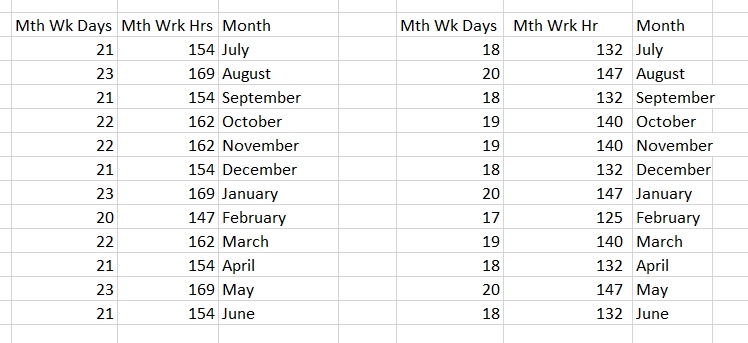
Thank you for responding - I've currently got the table on the left with work days based off Sat & Sun 0 Mon to Fri 1, which gives me the work days * 7.35 = Mth Wrk Hrs
Where I would really like assistance is to build the table on the right, where I have averaged out leave to 3 days per month
- Mark as New
- Bookmark
- Subscribe
- Mute
- Subscribe to RSS Feed
- Permalink
- Report Inappropriate Content
Hi,
In the new Table, just subtract 3 from the first column and then multiply the new value with 7.35.
Regards,
Ashish Mathur
http://www.ashishmathur.com
https://www.linkedin.com/in/excelenthusiasts/
- Mark as New
- Bookmark
- Subscribe
- Mute
- Subscribe to RSS Feed
- Permalink
- Report Inappropriate Content
Thanks Ashish for your response and I thought great that is just so simple & I've just been over thinking it......But alas, it hasn't given me exactally what I'm after........
WkDs Leave = CALCULATE(Sum('Date Table'[WorkDay]) - 3)
It provides the correct number of month days when filters applied, however the total is only subtracting 3 not 36 = 257, not expected 224 (3 * 12)
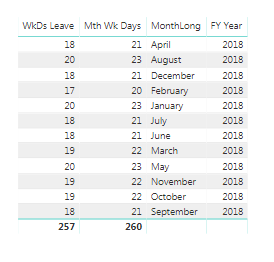
My Date Table has been compiled using borrowed code from all the great gurus out there:
WorkDay = SWITCH( TRUE(),
[WeekDayShort] = "Sat", 0, [WeekDayShort] = "Sun", 0, 1)
Mth Wk Days = CALCULATE(SUM('Date Table'[WorkDay]))
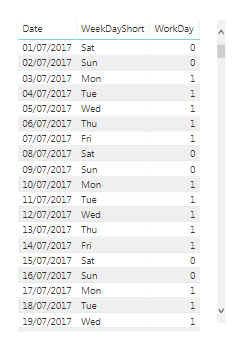
I don't want to have to build a seperate "Leave Table" just after away to mark 3 days per mth as nonwork days......All suggestions welcomed
- Mark as New
- Bookmark
- Subscribe
- Mute
- Subscribe to RSS Feed
- Permalink
- Report Inappropriate Content
Hi,
Share the link from where i can download your PBI file. Tell me the exact table where you want the answer to be 224.
Regards,
Ashish Mathur
http://www.ashishmathur.com
https://www.linkedin.com/in/excelenthusiasts/
- Mark as New
- Bookmark
- Subscribe
- Mute
- Subscribe to RSS Feed
- Permalink
- Report Inappropriate Content
Thanks Ashish - I would like the days and hours to be within the DateTable - hopefully you can assist me with this once you have stopped laughing at my attempt of building the table 
https://www.dropbox.com/s/25uyshtj3ot3ckm/DateTable.pbix?dl=0
- Mark as New
- Bookmark
- Subscribe
- Mute
- Subscribe to RSS Feed
- Permalink
- Report Inappropriate Content
Hi,
You may download my solution file from here.
Hope this helps.
Regards,
Ashish Mathur
http://www.ashishmathur.com
https://www.linkedin.com/in/excelenthusiasts/
- Mark as New
- Bookmark
- Subscribe
- Mute
- Subscribe to RSS Feed
- Permalink
- Report Inappropriate Content
Awesome!!! Thank you so much
- Mark as New
- Bookmark
- Subscribe
- Mute
- Subscribe to RSS Feed
- Permalink
- Report Inappropriate Content
You are welcome.
Regards,
Ashish Mathur
http://www.ashishmathur.com
https://www.linkedin.com/in/excelenthusiasts/
Helpful resources

Power BI Dataviz World Championships
The Power BI Data Visualization World Championships is back! Get ahead of the game and start preparing now!

Power BI Monthly Update - December 2025
Check out the December 2025 Power BI Holiday Recap!

FabCon Atlanta 2026
Join us at FabCon Atlanta, March 16-20, for the ultimate Fabric, Power BI, AI and SQL community-led event. Save $200 with code FABCOMM.

| User | Count |
|---|---|
| 39 | |
| 38 | |
| 36 | |
| 28 | |
| 28 |


| User | Count |
|---|---|
| 124 | |
| 88 | |
| 74 | |
| 66 | |
| 65 |


