FabCon is coming to Atlanta
Join us at FabCon Atlanta from March 16 - 20, 2026, for the ultimate Fabric, Power BI, AI and SQL community-led event. Save $200 with code FABCOMM.
Register now!- Power BI forums
- Get Help with Power BI
- Desktop
- Service
- Report Server
- Power Query
- Mobile Apps
- Developer
- DAX Commands and Tips
- Custom Visuals Development Discussion
- Health and Life Sciences
- Power BI Spanish forums
- Translated Spanish Desktop
- Training and Consulting
- Instructor Led Training
- Dashboard in a Day for Women, by Women
- Galleries
- Data Stories Gallery
- Themes Gallery
- Contests Gallery
- QuickViz Gallery
- Quick Measures Gallery
- Visual Calculations Gallery
- Notebook Gallery
- Translytical Task Flow Gallery
- TMDL Gallery
- R Script Showcase
- Webinars and Video Gallery
- Ideas
- Custom Visuals Ideas (read-only)
- Issues
- Issues
- Events
- Upcoming Events
The Power BI Data Visualization World Championships is back! Get ahead of the game and start preparing now! Learn more
- Power BI forums
- Forums
- Get Help with Power BI
- Desktop
- Re: Exclude weekends and holidays from calculated ...
- Subscribe to RSS Feed
- Mark Topic as New
- Mark Topic as Read
- Float this Topic for Current User
- Bookmark
- Subscribe
- Printer Friendly Page

- Mark as New
- Bookmark
- Subscribe
- Mute
- Subscribe to RSS Feed
- Permalink
- Report Inappropriate Content
Exclude weekends and holidays from calculated column result
I've read other posts that are slightly different than my needs.
SvcDone-Join = [ServiceDone]-[JoinDate]
The result is number of days it took to Deploy a PC.
This number should exclude weekends and U.S. holidays if the SPAN of the 2 dates includes weekends or holidays. Not just for this year, but for each future year, as well.
I've seen this:
Dates =
ADDCOLUMNS (
    CALENDAR ( DATE ( 2019, 1, 1 ), DATE ( 2019, 12, 31 ) ),
    "Day Name", FORMAT ( [Date], "ddd" ),
    "Weekday", IF ( WEEKDAY ( [Date], 2 ) >= 6, 0, 1 )
)
But that's only 2019 instead of all years. Is there a way to use that formula for any year? Or is there another calculation?
TIA
Solved! Go to Solution.


- Mark as New
- Bookmark
- Subscribe
- Mute
- Subscribe to RSS Feed
- Permalink
- Report Inappropriate Content
Hello @stackedcreative
"But that's only 2019 instead of all years. Is there a way to use that formula for any year?"
You can change the parameters in the date function to include any year(s).
Dates =
ADDCOLUMNS (
    CALENDAR ( DATE ( 2019, 1, 1 ), DATE ( 2019, 12, 31 ) ),
    "Day Name", FORMAT ( [Date], "ddd" ),
    "Weekday", IF ( WEEKDAY ( [Date], 2 ) >= 6, 0, 1 )
)
TO
Dates =
ADDCOLUMNS (
    CALENDAR ( DATE ( 2019, 1, 1 ), DATE ( 2022, 12, 31 ) ),
    "Day Name", FORMAT ( [Date], "ddd" ),
    "Weekday", IF ( WEEKDAY ( [Date], 2 ) >= 6, 0, 1 )
)
This will create calendar year upto 2022.
Regards
Kumail Raza
Did this help? Kudos are appreciated
Consider Accept it as the solution to help the other members find it more quickly


- Mark as New
- Bookmark
- Subscribe
- Mute
- Subscribe to RSS Feed
- Permalink
- Report Inappropriate Content
Hi @stackedcreative ,
Try the following steps:
Step1,use the following dax ,to create data table:
Dates = CALENDAR("2019/1/1","2021/12/31")Step2, import holiday in 2016 and 2017,refer:
Creating A Calendar Table For Holidays In Power BI
https://blog.enterprisedna.co/creating-a-calendar-table-for-holidays-in-power-bi/
And import web link :
https://www.calendarpedia.com/holidays/federal-holidays-2019.html
https://www.calendarpedia.com/holidays/federal-holidays-2020.html
https://www.calendarpedia.com/holidays/federal-holidays-2021.html
And you will see the below:

Step 3, base on dates,and holiday table ,to create a new table ,use the following dax(when weekend and holiday ,the column return false)
date1 =
GENERATE (
    CALENDARAUTO (),
    VAR yyyy =
        YEAR ( [Date] )
    VAR mmmm =
        MONTH ( [Date] )
    RETURN
        ROW ("Date1",FORMAT ( [Date], "YYYY-MM-DD" ),
            "Year", yyyy,
            "Month", FORMAT ( [Date], "mmmm" ),
            "Month2", mmmm,
            "Week1", FORMAT ( [Date], "dddd" ),
            "Week2", WEEKDAY ( [Date] ),
            "weekday", NOT WEEKDAY ( [Date] ) IN { 1, 7 } && not [Date] in VALUES('2019'[Date])&& not [Date] in VALUES('2020'[Date])&& not [Date] in VALUES('2021'[Date])
        )
)
You will see the below:
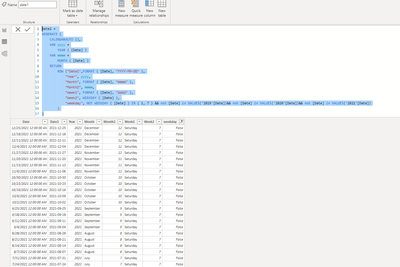
The below due to I without your pbix file,may be you need to do some adjust:
difforder =
VAR day1 =
    CALCULATE (
        COUNTROWS ( 'date1' ),
        DATESBETWEEN ( date1[Date], TableName[JoinDate], TableName[ServiceDone] ),
        date1[weekday] <> TRUE,
        ALL ( TableName)
    )
VAR day2 =
    IF ( day1 = BLANK (), 0, day1 )
VAR day3 =
    DATEDIFF ( TableName[JoinDate], TableName[ServiceDone], Day) - day2
RETURN
    day3
Wish it is helpful for you!
Best Regards
Lucien

- Mark as New
- Bookmark
- Subscribe
- Mute
- Subscribe to RSS Feed
- Permalink
- Report Inappropriate Content
Hello All, may I widen the possibilities? How about if there are 4 contact centers in the following countries:
1. Singapore
2. Rome
3. Los Angeles and
4. Beijing
The questions come up as to which country? which holidays and which time-zone to start the week/end?
Is this even possible? Thank you for your input. Cheers.
- Mark as New
- Bookmark
- Subscribe
- Mute
- Subscribe to RSS Feed
- Permalink
- Report Inappropriate Content
Hi @stackedcreative ,
Try the following steps:
Step1,use the following dax ,to create data table:
Dates = CALENDAR("2019/1/1","2021/12/31")Step2, import holiday in 2016 and 2017,refer:
Creating A Calendar Table For Holidays In Power BI
https://blog.enterprisedna.co/creating-a-calendar-table-for-holidays-in-power-bi/
And import web link :
https://www.calendarpedia.com/holidays/federal-holidays-2019.html
https://www.calendarpedia.com/holidays/federal-holidays-2020.html
https://www.calendarpedia.com/holidays/federal-holidays-2021.html
And you will see the below:
Step 3, base on dates,and holiday table ,to create a new table ,use the following dax(when weekend and holiday ,the column return false)
date1 =
GENERATE (
    CALENDARAUTO (),
    VAR yyyy =
        YEAR ( [Date] )
    VAR mmmm =
        MONTH ( [Date] )
    RETURN
        ROW ("Date1",FORMAT ( [Date], "YYYY-MM-DD" ),
            "Year", yyyy,
            "Month", FORMAT ( [Date], "mmmm" ),
            "Month2", mmmm,
            "Week1", FORMAT ( [Date], "dddd" ),
            "Week2", WEEKDAY ( [Date] ),
            "weekday", NOT WEEKDAY ( [Date] ) IN { 1, 7 } && not [Date] in VALUES('2019'[Date])&& not [Date] in VALUES('2020'[Date])&& not [Date] in VALUES('2021'[Date])
        )
)
You will see the below:
The below due to I without your pbix file,may be you need to do some adjust:
difforder =
VAR day1 =
    CALCULATE (
        COUNTROWS ( 'date1' ),
        DATESBETWEEN ( date1[Date], TableName[JoinDate], TableName[ServiceDone] ),
        date1[weekday] <> TRUE,
        ALL ( TableName)
    )
VAR day2 =
    IF ( day1 = BLANK (), 0, day1 )
VAR day3 =
    DATEDIFF ( TableName[JoinDate], TableName[ServiceDone], Day) - day2
RETURN
    day3
Wish it is helpful for you!
Best Regards
Lucien
- Mark as New
- Bookmark
- Subscribe
- Mute
- Subscribe to RSS Feed
- Permalink
- Report Inappropriate Content
Hello @stackedcreative
"But that's only 2019 instead of all years. Is there a way to use that formula for any year?"
You can change the parameters in the date function to include any year(s).
Dates =
ADDCOLUMNS (
    CALENDAR ( DATE ( 2019, 1, 1 ), DATE ( 2019, 12, 31 ) ),
    "Day Name", FORMAT ( [Date], "ddd" ),
    "Weekday", IF ( WEEKDAY ( [Date], 2 ) >= 6, 0, 1 )
)
TO
Dates =
ADDCOLUMNS (
    CALENDAR ( DATE ( 2019, 1, 1 ), DATE ( 2022, 12, 31 ) ),
    "Day Name", FORMAT ( [Date], "ddd" ),
    "Weekday", IF ( WEEKDAY ( [Date], 2 ) >= 6, 0, 1 )
)
This will create calendar year upto 2022.
Regards
Kumail Raza
Did this help? Kudos are appreciated
Consider Accept it as the solution to help the other members find it more quickly


- Mark as New
- Bookmark
- Subscribe
- Mute
- Subscribe to RSS Feed
- Permalink
- Report Inappropriate Content
@stackedcreative . Work day as measure and column
measure
Work Day = COUNTROWS(FILTER(ADDCOLUMNS(CALENDAR(Min(Table[ServiceDone]),Max(Table[End Date])),"WorkDay", if(WEEKDAY([Date],2) <6,1,0)),[JoinDate] =1))
Column
Work Day = COUNTROWS(FILTER(ADDCOLUMNS(CALENDAR(Table[ServiceDone],Table[End Date]),"WorkDay", if(WEEKDAY([JoinDate],2) <6,1,0)),[WorkDay] =1))
else you need to create a calendar with holiday and use that for date diff
https://radacad.com/create-a-date-dimension-in-power-bi-in-4-steps-step-3-public-holidays
Refer how calculate -How to calculate Business Days/ Workdays, with or without date table: https://youtu.be/Qv4wT8_P-AA
Helpful resources

Power BI Dataviz World Championships
The Power BI Data Visualization World Championships is back! Get ahead of the game and start preparing now!

Power BI Monthly Update - December 2025
Check out the December 2025 Power BI Holiday Recap!

FabCon Atlanta 2026
Join us at FabCon Atlanta, March 16-20, for the ultimate Fabric, Power BI, AI and SQL community-led event. Save $200 with code FABCOMM.

| User | Count |
|---|---|
| 41 | |
| 38 | |
| 36 | |
| 30 | |
| 28 |


| User | Count |
|---|---|
| 128 | |
| 88 | |
| 79 | |
| 67 | |
| 62 |

