cancel
Showing results for 
Search instead for 
Did you mean: 

Get Fabric Certified for FREE during Fabric Data Days. Don't miss your chance! Request now

Reply
KatkaS
Post Patron
Post Patron

Exclude week-ends

Hello,

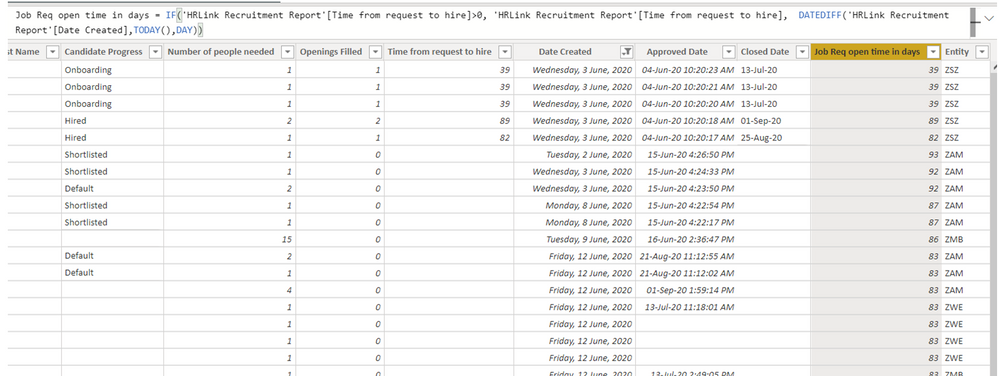
I have a calculated column as per below measure ( Job Req open time in days - it calculates how many days a requisiton is open).

I would need to exclude week-ends out of this.


Could you please help how?

Thank you!


exclude week-ends.png

1 ACCEPTED SOLUTION
Anonymous
Not applicable

Hi @KatkaS ,

First, please create a Date dimension table. Then update the formula of calculated column "Job Req open time in days" as below to exclude weekends:


Job Req open time in days =
IF (
    'HRLink Recruitment Report'[Time from request to hire] > 0,
    'HRLink Recruitment Report'[Time from request to hire],
    CALCULATE (
        COUNTROWS ( 'Date' ),
        FILTER ( 'Date', WEEKDAY ( 'Date'[Date], 2 ) < 6 ),
        DATESBETWEEN (
            'Date'[Date],
            'HRLink Recruitment Report'[Date Created],
            TODAY ()
        )
    )
)


Best Regards

Rena

View solution in original post

5 REPLIES 5
Anonymous
Not applicable

Hi @KatkaS ,

Whether your problem has been resolved? If yes, could you please mark the helpful post as Answered? It will help other members in the community find the solution easily if they face the similar problem with you. Thank you.

Best Regards

Rena

Thank you so much to all of you!!!!

Anonymous
Not applicable

Hi @KatkaS ,

First, please create a Date dimension table. Then update the formula of calculated column "Job Req open time in days" as below to exclude weekends:


Job Req open time in days =
IF (
    'HRLink Recruitment Report'[Time from request to hire] > 0,
    'HRLink Recruitment Report'[Time from request to hire],
    CALCULATE (
        COUNTROWS ( 'Date' ),
        FILTER ( 'Date', WEEKDAY ( 'Date'[Date], 2 ) < 6 ),
        DATESBETWEEN (
            'Date'[Date],
            'HRLink Recruitment Report'[Date Created],
            TODAY ()
        )
    )
)


Best Regards

Rena

Greg_Deckler
Community Champion
Community Champion

@KatkaS - Net Work Days - https://community.powerbi.com/t5/Quick-Measures-Gallery/Net-Work-Days/m-p/367362#M109


Follow on LinkedIn
@ me in replies or I'll lose your thread!!!
Instead of a Kudo, please vote for this idea
Become an expert!: Enterprise DNA
External Tools: MSHGQM
YouTube Channel!: Microsoft Hates Greg
Latest book!:
DAX For Humans

DAX is easy, CALCULATE makes DAX hard...
amitchandak
Super User
Super User

@KatkaS , for the work day calculation. You might need help from Date table.


Refer to my file on the second page. There is an example of date diff and workday diff

https://www.dropbox.com/s/y47ah38sr157l7t/Order_delivery_date_diff.pbix?dl=0


Share with Power BI Enthusiasts: Full Power BI Video (20 Hours) YouTube
Microsoft Fabric Series 60+ Videos YouTube
Microsoft Fabric Hindi End to End YouTube

Helpful resources

Announcements
November Power BI Update Carousel

Power BI Monthly Update - November 2025

Check out the November 2025 Power BI update to learn about new features.

Fabric Data Days Carousel

Fabric Data Days

Advance your Data & AI career with 50 days of live learning, contests, hands-on challenges, study groups & certifications and more!

FabCon Atlanta 2026 carousel

FabCon Atlanta 2026

Join us at FabCon Atlanta, March 16-20, for the ultimate Fabric, Power BI, AI and SQL community-led event. Save $200 with code FABCOMM.

Top Solution Authors
Top Kudoed Authors