cancel
Showing results for 
Search instead for 
Did you mean: 

Learn from the best! Meet the four finalists headed to the FINALS of the Power BI Dataviz World Championships! Register now

Reply
ksimpkinson
Regular Visitor

Exclude specified filter

I have a dataset that is a combination of headcount and transactions (i.e. terminations, promotions, etc). One of the ways the terminations are categorized is by a detailed action reason.

I want to be able to filter turnover rate (# of terminations / average headcount) by the detailed action reason. In order to do this I need to ignore the all filters on the headcount calculation, except for the detailed action reason filter.

Using this formula:

Turnover Rate =

DIVIDE( [Total Terminations],

CALCULATE( [Average Employee Headcount], ALLSELECTED() )

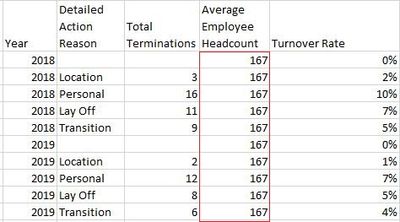
I was able to ignore all filters on the headcount calculation to get an average headcount that would look something like this:
Untitled picture1.jpg

It is the same for all years, action reasons, etc.

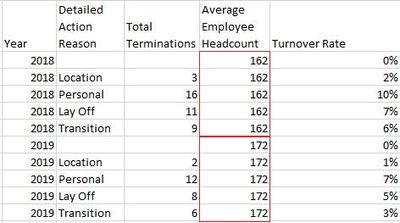
But I only want to ignore the detailed action reason filters and keep every other filter. For example, if I were to filter on year and detailed action reason I would want it to look something like this:
Untitled picture.jpg

What can I use to exclude just the one filter (in this case Detailed Action Reason), while keeping the rest?

Here is the calculation for the Average Employee Headcount measure for reference:

Average Employee Headcount =

DIVIDE(

CALCULATE(

COUNT(data[Employee ID]),

data[Action Type] = "Headcount"),

CALCULATE(

DISTINCTCOUNT(data[Effective Date]),

data[Action Type] = "Headcount")

)

2 ACCEPTED SOLUTIONS
amitchandak
Super User
Super User

@ksimpkinson , As per what I got it


Turnover Rate =
DIVIDE( [Total Terminations],
CALCULATE( [Average Employee Headcount], ALL(Table[Detailed Action reason]) )

or
Turnover Rate =
DIVIDE( [Total Terminations],
CALCULATE( [Average Employee Headcount], removefilters(Table[Detailed Action reason]) )


Sometimes this does not work out at that time you need to a separate table for Detailed Action reason and you use all on that


Turnover Rate =
DIVIDE( [Total Terminations],
CALCULATE( [Average Employee Headcount], removefilters('Detailed Action reason') )

Share with Power BI Enthusiasts: Full Power BI Video (20 Hours) YouTube
Microsoft Fabric Series 60+ Videos YouTube
Microsoft Fabric Hindi End to End YouTube

View solution in original post

Greg_Deckler
Community Champion
Community Champion

@ksimpkinson - You can use ALLEXCEPT or REMOVEFILTERS or KEEPFILTERS to edit context of the calculation. 


Follow on LinkedIn
@ me in replies or I'll lose your thread!!!
Instead of a Kudo, please vote for this idea
Become an expert!: Enterprise DNA
External Tools: MSHGQM
YouTube Channel!: Microsoft Hates Greg
Latest book!:
DAX For Humans

DAX is easy, CALCULATE makes DAX hard...

View solution in original post

2 REPLIES 2
Greg_Deckler
Community Champion
Community Champion

@ksimpkinson - You can use ALLEXCEPT or REMOVEFILTERS or KEEPFILTERS to edit context of the calculation. 


Follow on LinkedIn
@ me in replies or I'll lose your thread!!!
Instead of a Kudo, please vote for this idea
Become an expert!: Enterprise DNA
External Tools: MSHGQM
YouTube Channel!: Microsoft Hates Greg
Latest book!:
DAX For Humans

DAX is easy, CALCULATE makes DAX hard...
amitchandak
Super User
Super User

@ksimpkinson , As per what I got it


Turnover Rate =
DIVIDE( [Total Terminations],
CALCULATE( [Average Employee Headcount], ALL(Table[Detailed Action reason]) )

or
Turnover Rate =
DIVIDE( [Total Terminations],
CALCULATE( [Average Employee Headcount], removefilters(Table[Detailed Action reason]) )


Sometimes this does not work out at that time you need to a separate table for Detailed Action reason and you use all on that


Turnover Rate =
DIVIDE( [Total Terminations],
CALCULATE( [Average Employee Headcount], removefilters('Detailed Action reason') )

Share with Power BI Enthusiasts: Full Power BI Video (20 Hours) YouTube
Microsoft Fabric Series 60+ Videos YouTube
Microsoft Fabric Hindi End to End YouTube

Helpful resources

Announcements
Join our Fabric User Panel

Join our Fabric User Panel

Share feedback directly with Fabric product managers, participate in targeted research studies and influence the Fabric roadmap.

February Power BI Update Carousel

Power BI Monthly Update - February 2026

Check out the February 2026 Power BI update to learn about new features.

FabCon Atlanta 2026 carousel

FabCon Atlanta 2026

Join us at FabCon Atlanta, March 16-20, for the ultimate Fabric, Power BI, AI and SQL community-led event. Save $200 with code FABCOMM.