Learn from the best! Meet the four finalists headed to the FINALS of the Power BI Dataviz World Championships! Register now
I have a dataset that is a combination of headcount and transactions (i.e. terminations, promotions, etc). One of the ways the terminations are categorized is by a detailed action reason.
I want to be able to filter turnover rate (# of terminations / average headcount) by the detailed action reason. In order to do this I need to ignore the all filters on the headcount calculation, except for the detailed action reason filter.
Using this formula:
Turnover Rate =
DIVIDE( [Total Terminations],
CALCULATE( [Average Employee Headcount], ALLSELECTED() )
I was able to ignore all filters on the headcount calculation to get an average headcount that would look something like this:
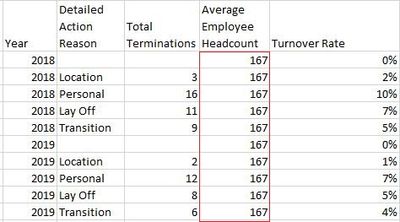
It is the same for all years, action reasons, etc.
But I only want to ignore the detailed action reason filters and keep every other filter. For example, if I were to filter on year and detailed action reason I would want it to look something like this:
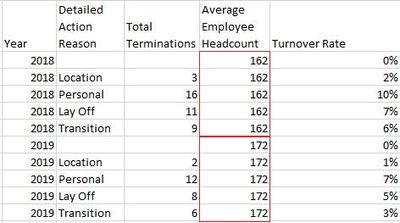
What can I use to exclude just the one filter (in this case Detailed Action Reason), while keeping the rest?
Here is the calculation for the Average Employee Headcount measure for reference:
Average Employee Headcount =
DIVIDE(
CALCULATE(
COUNT(data[Employee ID]),
data[Action Type] = "Headcount"),
CALCULATE(
DISTINCTCOUNT(data[Effective Date]),
data[Action Type] = "Headcount")
)
Solved! Go to Solution.
@ksimpkinson , As per what I got it
Turnover Rate =
DIVIDE( [Total Terminations],
CALCULATE( [Average Employee Headcount], ALL(Table[Detailed Action reason]) )
or
Turnover Rate =
DIVIDE( [Total Terminations],
CALCULATE( [Average Employee Headcount], removefilters(Table[Detailed Action reason]) )
Sometimes this does not work out at that time you need to a separate table for Detailed Action reason and you use all on that
Turnover Rate =
DIVIDE( [Total Terminations],
CALCULATE( [Average Employee Headcount], removefilters('Detailed Action reason') )
@ksimpkinson - You can use ALLEXCEPT or REMOVEFILTERS or KEEPFILTERS to edit context of the calculation.
@ksimpkinson , As per what I got it
Turnover Rate =
DIVIDE( [Total Terminations],
CALCULATE( [Average Employee Headcount], ALL(Table[Detailed Action reason]) )
or
Turnover Rate =
DIVIDE( [Total Terminations],
CALCULATE( [Average Employee Headcount], removefilters(Table[Detailed Action reason]) )
Sometimes this does not work out at that time you need to a separate table for Detailed Action reason and you use all on that
Turnover Rate =
DIVIDE( [Total Terminations],
CALCULATE( [Average Employee Headcount], removefilters('Detailed Action reason') )
| User | Count |
|---|---|
| 57 | |
| 44 | |
| 32 | |
| 16 | |
| 14 |
| User | Count |
|---|---|
| 84 | |
| 70 | |
| 38 | |
| 27 | |
| 25 |