Join us at FabCon Atlanta from March 16 - 20, 2026, for the ultimate Fabric, Power BI, AI and SQL community-led event. Save $200 with code FABCOMM.
Register now!The Power BI Data Visualization World Championships is back! Get ahead of the game and start preparing now! Learn more
Hi,
I have a report with 4 slicers. I'd like to create a measure where it sums regardless of the slicer selection. I'd like to completely exclude any slicer selection from the results. How can i do that? Appreciate any help!
Slicer 1; Period
Slicer 2: Channel
Slicer 3: Category
Slicer 4: Segment
Solved! Go to Solution.
I found the solution all() function did the trick for me and excluded all slicers.
Calculate(SUM('POS'[Values]),'POS'[Measures] IN {"Dollars"},ALL())
I found the solution all() function did the trick for me and excluded all slicers.
Calculate(SUM('POS'[Values]),'POS'[Measures] IN {"Dollars"},ALL())
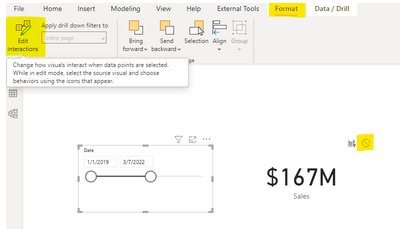
Click on your slicer and find the format tab in the ribbon, select edit interactions and hit the circle with the line through for the measure you don't want to change with the slicer
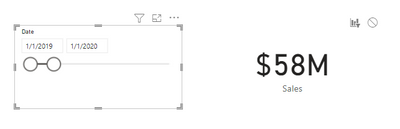
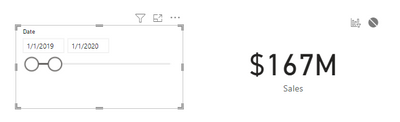
The slicer will no longer affect the value (changed dates here)
Before:
After:
@Syk Thank you for your response. There are some calculations i'd like it to interact with the slicer selections in the same table. I don't want to exclude all interactions. Is there a way to do this?
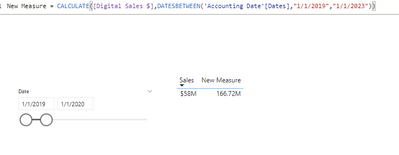
You'd need to use a filter function that overides the context of the report page.. Calculate is an example of this - in this screenshot the table still takes interaction from the date slicer but the 'New Measure' doesn't care because it uses calculate to overide it.
The Power BI Data Visualization World Championships is back! Get ahead of the game and start preparing now!
| User | Count |
|---|---|
| 41 | |
| 38 | |
| 36 | |
| 30 | |
| 28 |
| User | Count |
|---|---|
| 128 | |
| 88 | |
| 79 | |
| 67 | |
| 62 |