Get Fabric or SQL Certified for Free.
Get certified for free when you join Fabric Data Days 2026 and dive into Fabric, Power BI, SQL, AI, and other essential data skills.
Join now- Power BI forums
- Get Help with Power BI
- Desktop
- Service
- Report Server
- Power Query
- Mobile Apps
- Developer
- DAX Commands and Tips
- Custom Visuals Development Discussion
- Health and Life Sciences
- Power BI Spanish forums
- Translated Spanish Desktop
- Training and Consulting
- Instructor Led Training
- Dashboard in a Day for Women, by Women
- Galleries
- Data Stories Gallery
- Themes Gallery
- Contests Gallery
- QuickViz Gallery
- Quick Measures Gallery
- Visual Calculations Gallery
- Notebook Gallery
- Translytical Task Flow Gallery
- TMDL Gallery
- R Script Showcase
- Webinars and Video Gallery
- Ideas
- Custom Visuals Ideas (read-only)
- Issues
- Issues
- Events
- Upcoming Events
Data Days is here! Join us now for 60+ days of learning, challenges, and connection. Learn more
- Power BI forums
- Forums
- Get Help with Power BI
- Desktop
- Exclude multiple values from calculated column
- Subscribe to RSS Feed
- Mark Topic as New
- Mark Topic as Read
- Float this Topic for Current User
- Bookmark
- Subscribe
- Printer Friendly Page


- Mark as New
- Bookmark
- Subscribe
- Mute
- Subscribe to RSS Feed
- Permalink
- Report Inappropriate Content
Exclude multiple values from calculated column
Hi,
Given code and output below, id like to exclude multiple values based on date and name.
IF I have more than one row of same Date&Name id like to output calculation (330) only in one row.
So basically output below in last column would change to 330, 0, 0, 508, 0, 0.
Is there a way to do that? >> I know measure would solve that, but i need to include these values by day in graph so there is a need to do that by calculated col.
Thanks in advance!
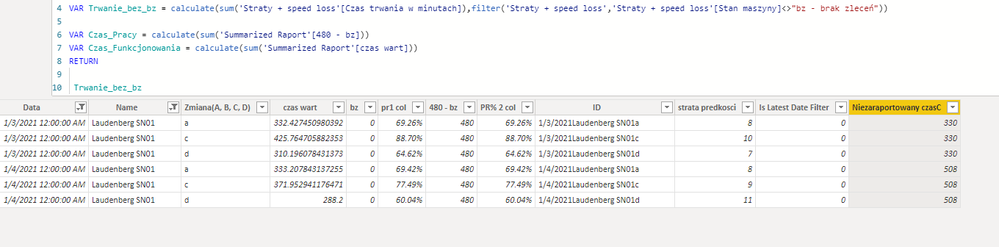
Solved! Go to Solution.


- Mark as New
- Bookmark
- Subscribe
- Mute
- Subscribe to RSS Feed
- Permalink
- Report Inappropriate Content
Hi @hejszyszky ,
Since I do not have your specific data, I have created a template data based on what you have provided so far:
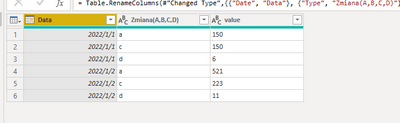
Then use the below dax to create a new column:
final =
VAR index11 =
    RANKX (
        FILTER ( 'Summarized Raport', 'Summarized Raport'[Data] = EARLIER ( 'Summarized Raport'[Data] ) ),
        'Summarized Raport'[Zmiana(A,B,C,D)],
        ,
        ASC
    )
RETURN
    IF (
        index11 = 1,
        SUMX (
            FILTER ( 'Summarized Raport', 'Summarized Raport'[Data] = EARLIER ( 'Summarized Raport'[Data] ) ),
            'Summarized Raport'[value]
        ),
        0
    )
Final output:
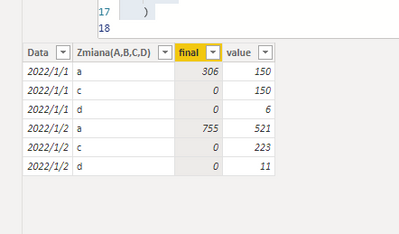
You can adapt my code to your specific environment and needs.
Did I answer your question? Mark my post as a solution!
Best Regards
Lucien
- Mark as New
- Bookmark
- Subscribe
- Mute
- Subscribe to RSS Feed
- Permalink
- Report Inappropriate Content
Hi @hejszyszky ,
Since I do not have your specific data, I have created a template data based on what you have provided so far:
Then use the below dax to create a new column:
final =
VAR index11 =
    RANKX (
        FILTER ( 'Summarized Raport', 'Summarized Raport'[Data] = EARLIER ( 'Summarized Raport'[Data] ) ),
        'Summarized Raport'[Zmiana(A,B,C,D)],
        ,
        ASC
    )
RETURN
    IF (
        index11 = 1,
        SUMX (
            FILTER ( 'Summarized Raport', 'Summarized Raport'[Data] = EARLIER ( 'Summarized Raport'[Data] ) ),
            'Summarized Raport'[value]
        ),
        0
    )
Final output:
You can adapt my code to your specific environment and needs.
Did I answer your question? Mark my post as a solution!
Best Regards
Lucien


- Mark as New
- Bookmark
- Subscribe
- Mute
- Subscribe to RSS Feed
- Permalink
- Report Inappropriate Content
Hi, @hejszyszky
I believe I get your point, here's the picture and code:
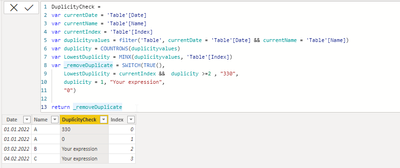
DuplicityCheck =
var currentDate = 'Table'[Date]
var currentName = 'Table'[Name]
var currentIndex = 'Table'[Index]
var duplicityvalues = filter('Table', currentDate = 'Table'[Date] && currentName = 'Table'[Name])
var duplicity = COUNTROWS(duplicityvalues)
var LowestDuplicity = MINX(duplicityvalues, 'Table'[Index])
var _removeDuplicate = SWITCH(TRUE(),
    LowestDuplicity = currentIndex &&  duplicity >=2 , "330",
    duplicity = 1, "Your expression",
    "0")

return _removeDuplicate
Please note that "your expression" represents an expression that you would normally use if everything is correct.
- Mark as New
- Bookmark
- Subscribe
- Mute
- Subscribe to RSS Feed
- Permalink
- Report Inappropriate Content
Hi, @vojtechsima
Thanks for your fast reply!
I am facing some issues, i believe its with Index column. In your scenario,Index column, is it just a row number?
- Mark as New
- Bookmark
- Subscribe
- Mute
- Subscribe to RSS Feed
- Permalink
- Report Inappropriate Content
Hi, @hejszyszky
It's just a simple Index column generated by Power Query:
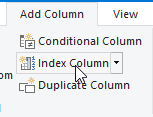
However, it really helps with your issue.
- Mark as New
- Bookmark
- Subscribe
- Mute
- Subscribe to RSS Feed
- Permalink
- Report Inappropriate Content
Well thats unlucky, cuz my table is an dax expression 😐

- Mark as New
- Bookmark
- Subscribe
- Mute
- Subscribe to RSS Feed
- Permalink
- Report Inappropriate Content
@hejszyszky ,The information you have provided is not making the problem clear to me. Can you please explain with an example.
Can you share sample data and sample output in table format? Or a sample pbix after removing sensitive data.
Appreciate your Kudos.
- Mark as New
- Bookmark
- Subscribe
- Mute
- Subscribe to RSS Feed
- Permalink
- Report Inappropriate Content
Hey @amitchandak ,
Thanks for quick response.
Output of measure above is ;
| Date | Name | Niezaraportowany czasC |
| 1/3/2021 | LSN01 | 330 |
| 1/3/2021 | LSN01 | 330 |
| 1/3/2021 | LSN01 | 330 |
| 1/4/2021 | LSN01 | 508 |
| 1/4/2021 | LSN01 | 508 |
| 1/4/2021 | LSN01 | 508 |
My desired output would be:
| Date | Name | Niezaraportowany czasC |
| 1/3/2021 | LSN01 | 330 |
| 1/3/2021 | LSN01 | 0 |
| 1/3/2021 | LSN01 | 0 |
| 1/4/2021 | LSN01 | 508 |
| 1/4/2021 | LSN01 | 0 |
| 1/4/2021 | LSN01 | 0 |
Zeroes in desired output are because there is a repetition in one date and name
In conclusion, if in any same date and same name there is more than one row, include only one value.
Am i clear here 🙂 ?

Helpful resources

Fabric Data Days 2026
Don't miss out on Data Days, June 15 through August 7. Learn Fabric, Power BI, SQL, AI and more.

Power BI Monthly Update - May 2026
Check out the May 2026 Power BI update to learn about new features.

Power BI DataViz World Championships - June 2026
A new Power BI DataViz World Championship is coming this June! Don't miss out on submitting your entry.

| User | Count |
|---|---|
| 23 | |
| 23 | |
| 20 | |
| 18 | |
| 14 |


| User | Count |
|---|---|
| 58 | |
| 51 | |
| 41 | |
| 30 | |
| 24 |


